PI Travel, Trip Planning for the Next Gen

A trip planning App that connects Gen Z and Millennial users through co-planning and content sharing

Overview

PI TRAVEL is a B2C app launched in 2024 that helps users plan trips in a social context. Inspired by how young travelers are drawn to content on social platforms, it simplifies the entire process of discovering, planning, and sharing trips with others. I joined the team as a Product Designer during the 0→1 phase and led the end-to-end design of four core features, followed by multiple post-launch iterations. The product is now available on both iOS and Android.

TIMEline

Jul. 2022 - Mar. 2024

My Role

Product Manager, involving in 0-to-1 feature design and data-driven iteration

Team

3 Designer (incl. me), 1 Product Manager, 6 Engineers, 1 Data Analyst, 2 Operations, 2 Strategy Lead, 1 QA

my focus

Product Design and management, User experience, User growth, Product Strategy, Feature iteration, Design system, System Thinking

Trip Creation

Trip Creation

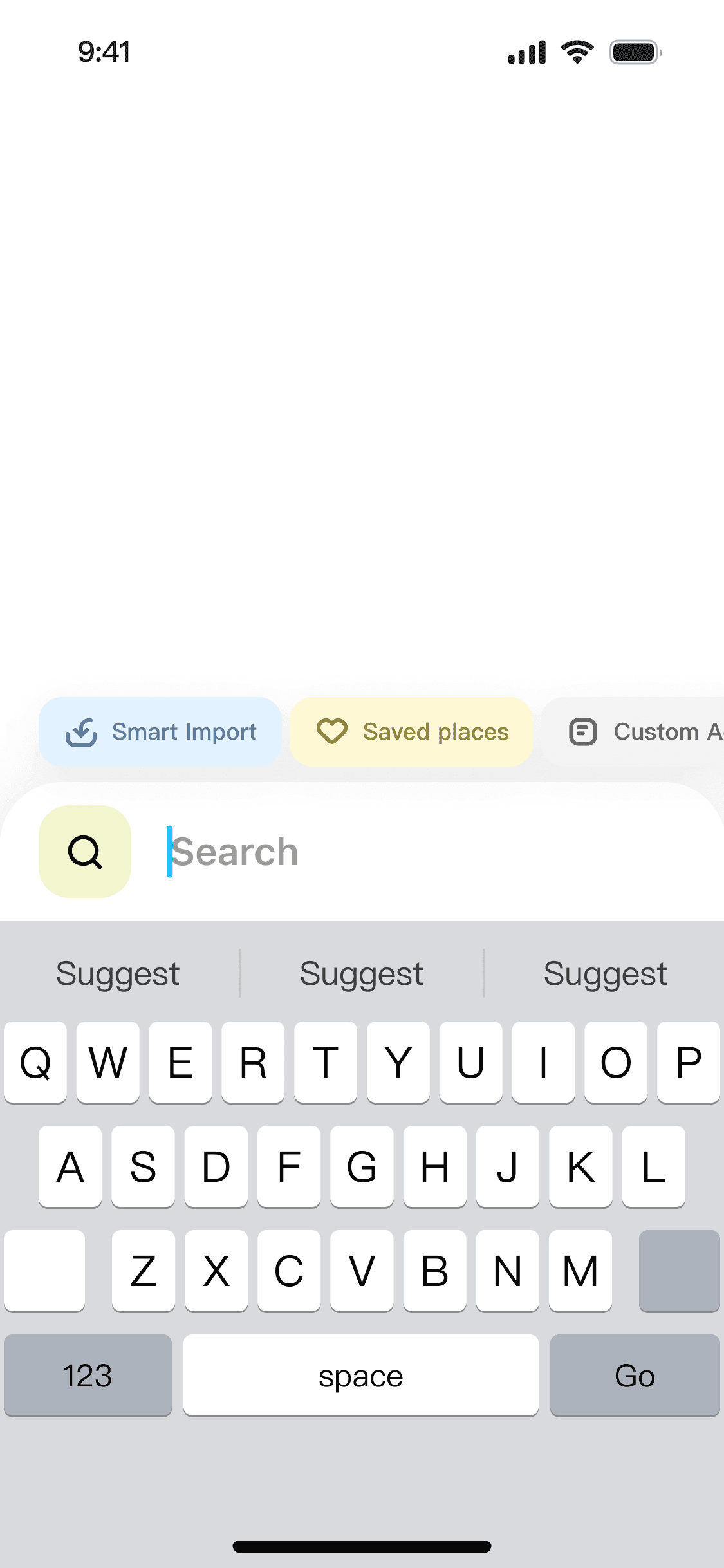
Create Trips Instantly with a Click

Turn any trip-related social link or list of places into a ready-to-edit trip plan in one tap, seamlessly.

Route planning

Route planning

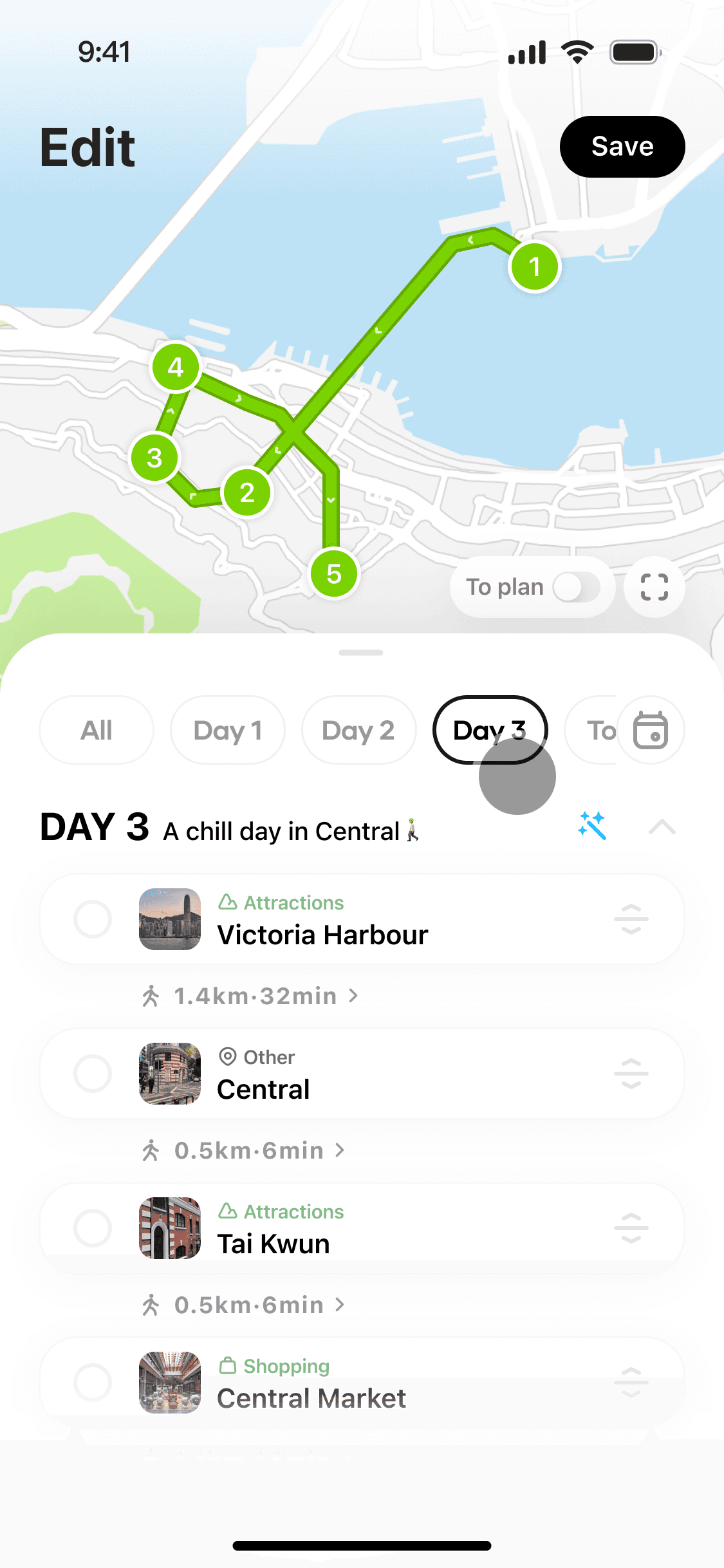
Plan Routes Smartly

Get the most efficient routes by AI optimization tailored to needs, saving time and effort for real adventure.

Trip overview

Trip overview

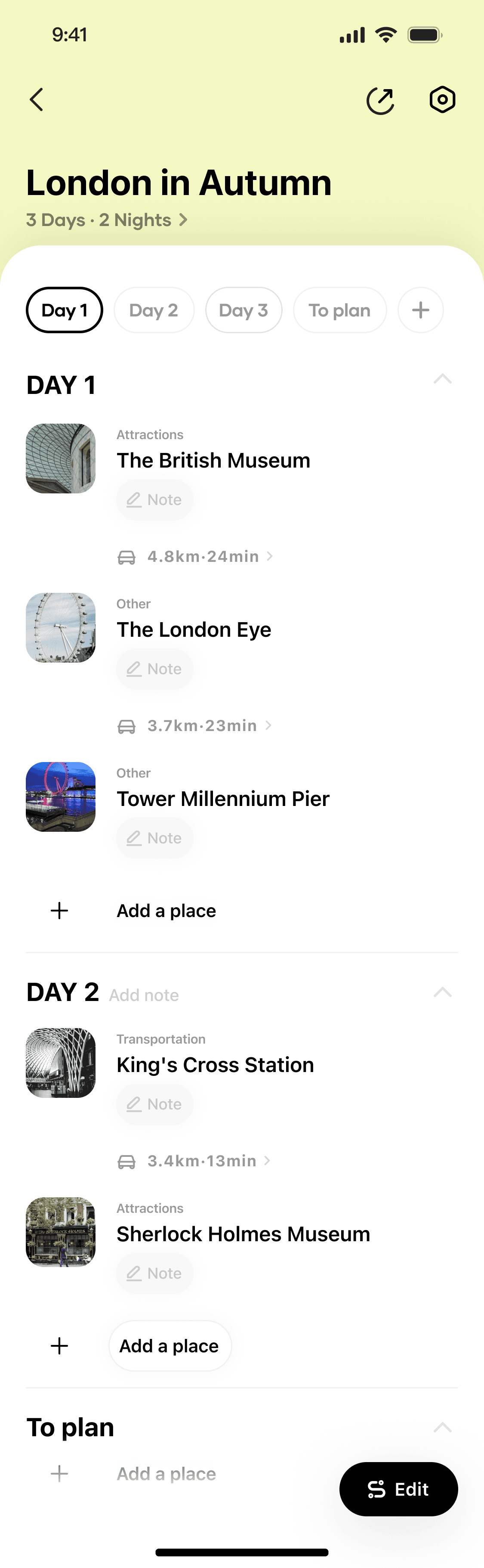
Preview trips with real-time Map, all in one place

Preview trips with real-time Map,
all in one place

Look up entire trip plan and places at a glance with real-time maps that bring the plans to real life navigation.

Trip Creation

Create Trips Instantly with a Click

Turn any trip-related social link or list of places into a ready-to-edit trip plan in one tap, seamlessly.

Route planning

Plan Routes Smartly

Get the most efficient routes by AI optimization tailored to needs, saving time and effort for real adventure.

Trip overview

Preview trips with real-time Map, all in one place

Look up entire trip plan and places at a glance with real-time maps that bring the plans to real life navigation.

PI TRAVEL turns a spark into a real plan with seamless co-editing trip planning experience and intuitive navigation, simplified every step of your next adventure along the way.

PI TRAVEL turns a spark into a real plan with seamless co-editing trip planning experience and intuitive navigation, simplified every step of your next adventure along the way.

PI TRAVEL turns a spark into a real plan with seamless co-editing trip planning experience and intuitive navigation, simplified every step of your next adventure along the way.

Overview

impact

imapct

What I Aimed For, What I Did, What I Achieved

Goal / 01.

Drive Business Growth

Goal / 02.

Enhance Key User Experience

Goal / 03.

Scale Product Delivery Across Teams

Goal / 01.

Drive Business Growth

Goal / 02.

Enhance Key User Experience

Goal / 03.

Scale Product Delivery Across Teams

Goal / 01.

Drive Business Growth

Goal / 02.

Enhance Key User Experience

Goal / 03.

Scale Product Delivery Across Teams

Goal / 01.

Drive Business Growth

Goal / 02.

Enhance Key User Experience

Goal / 03.

Scale Product Delivery Across Teams

Goal / 01.

Drive Business Growth

Goal / 02.

Enhance Key User Experience

Goal / 03.

Scale Product Delivery Across Teams

Goal / 01.

Drive Business Growth

Goal / 02.

Enhance Key User Experience

Goal / 03.

Scale Product Delivery Across Teams

Goal / 01.

Drive Business Growth

Goal / 02.

Enhance Key User Experience

Goal / 03.

Scale Product Delivery Across Teams

problem

Users often lose interest when trying to turn a spontaneous idea into action.

When the planning process is fragmented from where the idea originates, it becomes difficult to take the next step.

The product aim to bridge this gap by transforming fleeting inspiration into a shareable, actionable plan through a smooth planning experience.

Share

no cues or tools to plan or connect further after sharing.

Share

no cues or tools to plan or connect further after sharing

Share

no cues or tools to plan or connect further after sharing.

Save + Search

switching between apps to manually piece together a trip

Save + Search

switching between apps to manually piece together a trip

Save + Search

switching between apps to manually piece together a trip

Browse

getting inspired by endless content but can’t turn it into a real plan.

Browse

getting inspired by endless content but can’t turn it into a real plan

Browse

getting inspired by endless content but can’t turn it into a real plan.

Share

no cues or tools to plan or connect further after sharing.

Save + Search

switching between apps to manually piece together a trip

Browse

getting inspired by endless content but can’t turn it into a real plan.

Share

no cues or tools to plan or connect further after sharing.

Save + Search

switching between apps to manually piece together a trip

Browse

getting inspired by endless content but can’t turn it into a real plan.

problem

TARGET USER

TARGET USER

Designing a better trip-planning experience for users who search, save, and co-plan.

Based on market research on competitive products and social platforms, the product targeted Gen Z and young millennials who often turn social content into action. They need tools that support collaborative editing, optimized route planning, real-time navigation, and shared experiences within their social circles.

TARGET USER

TARGET USER

Designing a better trip-planning experience for users who search, save, and co-plan.

Based on market research on competitive products and social platforms, the product targeted Gen Z and young millennials who often turn social content into action. They need tools that support collaborative editing, optimized route planning, real-time navigation, and shared experiences within their social circles.

solution

SOLution

SOLution

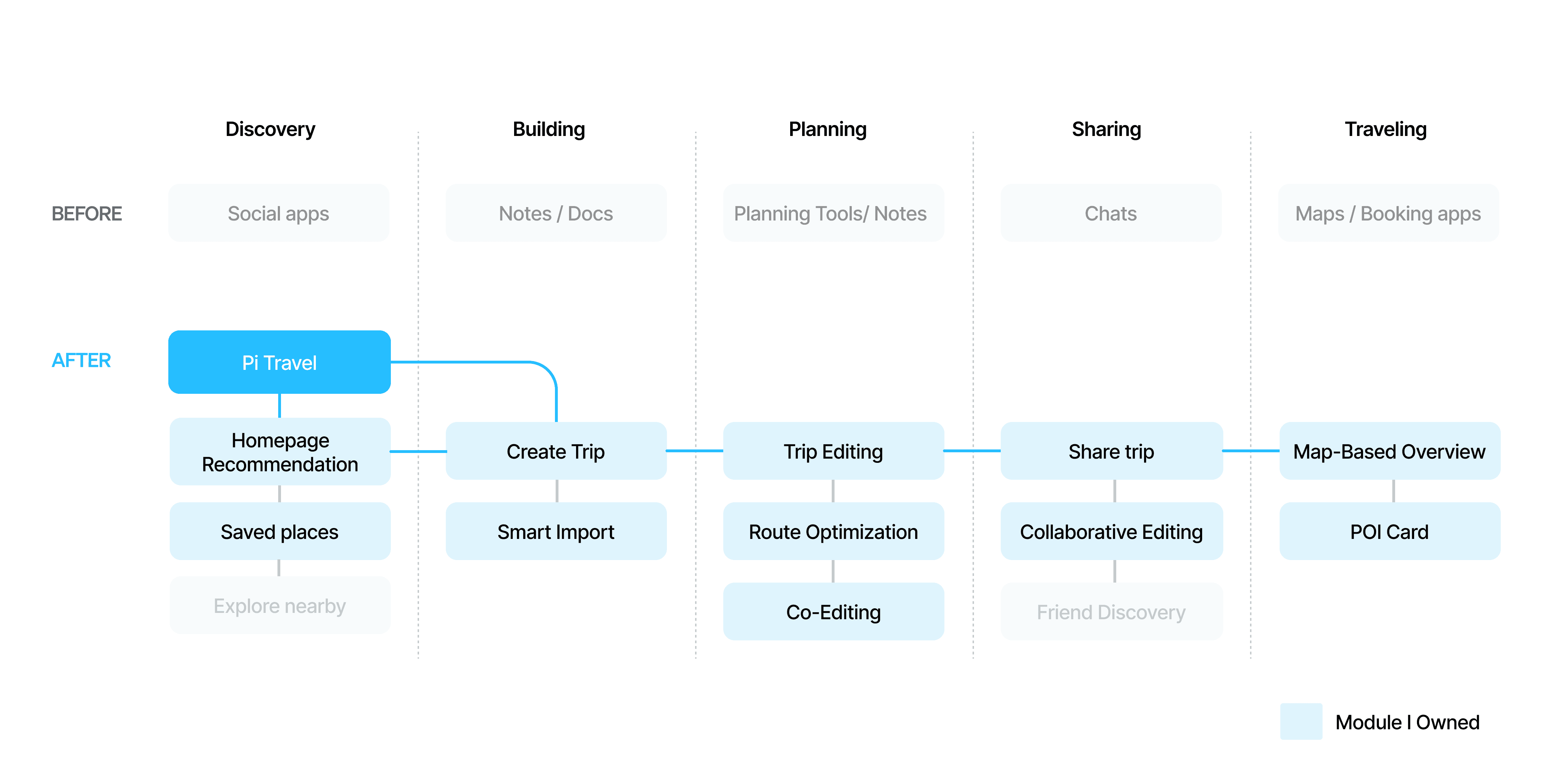
A fast, intuitive travel app that connects discovery, planning, sharing, and traveling into one seamless experience.

Previously, trip planning was scattered across social apps and maps. Pi Travel connects these steps into one flow, integrating trip creation, route editing, and map navigation to make planning faster, more social, and scalable.

solution

SOLution

A fast, intuitive travel app that connects discovery, planning, sharing, and traveling into one seamless experience.

Previously, trip planning was scattered across social apps and maps. Pi Travel connects these steps into one flow, integrating trip creation, route editing, and map navigation to make planning faster, more social, and scalable.

solution

SOLution

A fast, intuitive travel app that connects discovery, planning, sharing, and traveling into one seamless experience.

Previously, trip planning was scattered across social apps and maps. Pi Travel connects these steps into one flow, integrating trip creation, route editing, and map navigation to make planning faster, more social, and scalable.

Process
& Design

Process
& Design

01 Smart Import

Trip Creation

Users often struggled to piece together trips across multiple tools. To reduce friction, I designed three entry points for creating trips. This flexibility met different user needs, reduced input effort, and increased engagement during onboarding.

01 Smart Import

1.0 Key Interactions Design

From Discovery to Building: Crafting a Smooth Core Experience

Based on market research on competitive products and social platforms, the product targeted Gen Z and young millennials who often turn social content into action. They need tools that support collaborative editing, optimized route planning, real-time navigation, and shared experiences within their social circles.

Trip Creation

Users often struggled to piece together trips across multiple tools. To reduce friction, I designed three entry points for creating trips. This flexibility met different user needs, reduced input effort, and increased engagement during onboarding.

Trip Creation

Users often struggled to piece together trips across multiple tools. To reduce friction, I designed three entry points for creating trips. This flexibility met different user needs, reduced input effort, and increased engagement during onboarding.

01 Smart Import

01 Smart Import

01 Smart Import

1.0 Key Interactions Design

From Discovery to Building: Crafting a Smooth Core Experience

Based on market research on competitive products and social platforms, the product targeted Gen Z and young millennials who often turn social content into action. They need tools that support collaborative editing, optimized route planning, real-time navigation, and shared experiences within their social circles.

Trip Creation

Users often struggled to piece together trips across multiple tools. To reduce friction, I designed three entry points for creating trips. This flexibility met different user needs, reduced input effort, and increased engagement during onboarding.

02 Add a Place

Trip overview

Trip Editing

01 Trip Editing
(Delete, Drag & Drop, Move)

Editing is the most frequent action in trip planning. Users do not needs to jump between map and note to change accordingly. with an intuitive drag-and-drop function with single/multi-select to quickly change things in day tab keep the context clear between days and places

Early testers reported a 30% faster editing flow and fewer errors when reordering or removing places.

Trip Editing

I designed a map-based, drag-and-drop itinerary builder that brings all essential editing actions into one place with a live map. Users can reorder, delete or add stops without switching contexts. On top of that, an AI-powered route optimizer provides one-click optimization to reduce effort on route planning. Making editing experience intuitive and less effort.

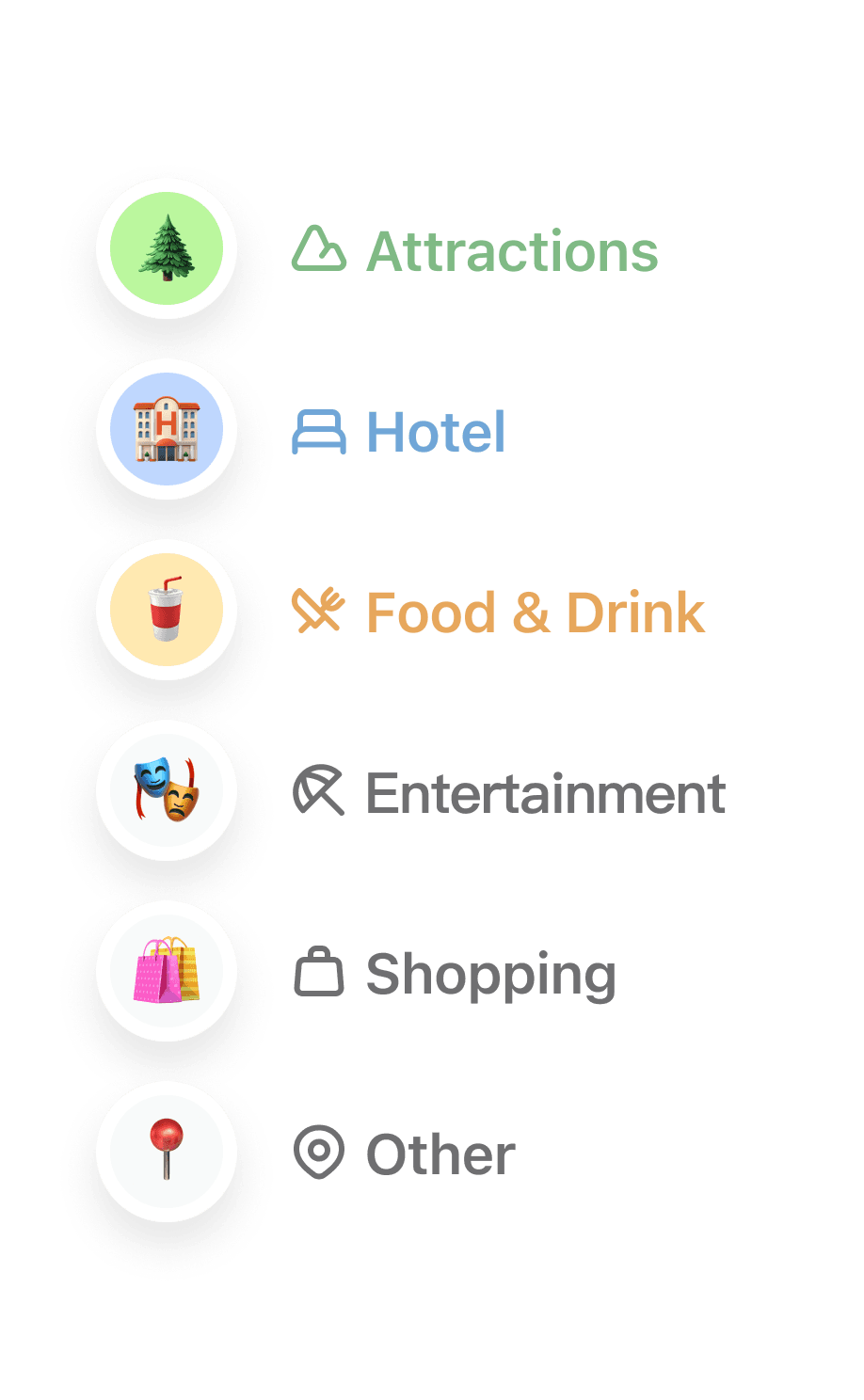
Icon Redesign

Introduced emoji-based icons with distinct colors,

clearly categorised POI into 6 major types.


Grouping Logic

Applied a “Country → City → Place” cluster hierarchy to structure POIs consistently and add clarity for readability.


Explore Toggle

Added a toggle to show/hide nearby POIs, helping users discover popular spots on demand.

+35% increase in map view usage after UI improvements, showing clearer categorization encouraged more active exploration.

02 POI-Based Exploration

03 Realtime Navigation

A real-time map is integrated into the trip overview overlay. It syncs instantly with any POI or route updates, giving users a clear view of place coverage across multiple days.

01 Trip Overview & Details

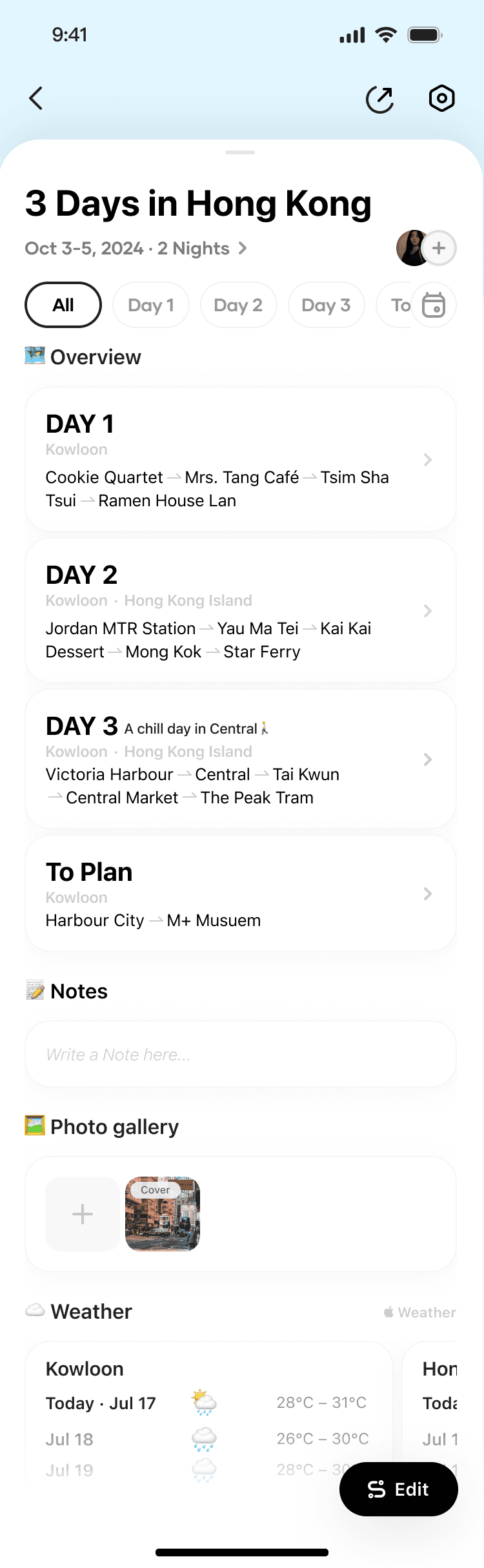
A dedicated overview page displays daily stops, notes, and weather at a glance. Users can switch dates via the tab menu and click “Edit” to enter editing mode. This clear separation between overview and editing path reduces cognitive load and makes it easier for users to check plans in real time while traveling.

A~30% reduction in planning time, and users reported the overview made it easier to share and coordinate trips in groups

Trip Creation

Users often struggled to track multi-day itineraries in editing mode. We introduced a Trip Overview mode with an ‘All’ tab summarizing the full itinerary, while each Day tab shows trip details for daily planning. This streamlined view reduces cognitive load and makes view and share trips effortless.

Before

After

Trip Editing

I designed a map-based, drag-and-drop itinerary builder that brings all essential editing actions into one place with a live map. Users can reorder, delete or add stops without switching contexts. On top of that, an AI-powered route optimizer provides one-click optimization to reduce effort on route planning. Making editing experience intuitive and less effort.

Trip overview

Trip overview

Trip overview

Trip Editing

Trip Editing

Trip Editing

01 Trip Editing
(Delete, Drag & Drop, Move)

01 Trip Editing
(Delete, Drag & Drop, Move)

01 Trip Editing
(Delete, Drag & Drop, Move)

Editing is the most frequent action in trip planning. Users do not needs to jump between map and note to change accordingly, with an intuitive drag-and-drop function with single/multi-select to quickly change things in day tab keep the context clear between days and places.

Early testers reported a 30% faster editing flow and fewer errors when reordering or removing places.

02 Add a Place

02 Add a Place

02 Add a Place

02 Add a Place

02 Add a Place

02 Add a Place

Trip Creation

Users often struggled to track multi-day itineraries in editing mode. We introduced a Trip Overview mode with an ‘All’ tab summarizing the full itinerary, while each Day tab shows trip details for daily planning. This streamlined view reduces cognitive load and makes view and share trips effortless.

Before

After

Icon Redesign

Introduced emoji-based icons with distinct colors,

clearly categorised POI into 6 major types.


Grouping Logic

Applied a “Country → City → Place” cluster hierarchy to structure POIs consistently and add clarity for readability.


Explore Toggle

Added a toggle to show/hide nearby POIs, helping users discover popular spots on demand.

+35% increase in map view usage after UI improvements, showing clearer categorization encouraged more active exploration.

02 POI-Based Exploration

03 Realtime Navigation

03 Realtime Navigation

A real-time map is integrated into the trip overview overlay. It syncs instantly with any POI or route updates, giving users a clear view of place coverage across multiple days.

Icon Redesign

Introduced emoji-based icons with distinct colors,

clearly categorised POI into 6 major types.


Grouping Logic

Applied a “Country → City → Place” cluster hierarchy to structure POIs consistently and add clarity for readability.


Explore Toggle

Added a toggle to show/hide nearby POIs, helping users discover popular spots on demand.

+35% increase in map view usage after UI improvements, showing clearer categorization encouraged more active exploration.

02 POI-Based Exploration

01 Trip overview & Details

A dedicated overview page displays daily stops, notes, and weather at a glance. Users can switch dates via the tab menu and click “Edit” to enter editing mode. This clear separation between overview and editing path reduces cognitive load and makes it easier for users to check plans in real time while traveling.

A~30% reduction in planning time, and users reported the overview made it easier to share and coordinate trips in groups

01 Trip overview & Details

A dedicated overview page displays daily stops, notes, and weather at a glance. Users can switch dates via the tab menu and click “Edit” to enter editing mode. This clear separation between overview and editing path reduces cognitive load and makes it easier for users to check plans in real time while traveling.

A~30% reduction in planning time, and users reported the overview made it easier to share and coordinate trips in groups

01 Trip Overview &Details

A dedicated overview page displays daily stops, notes, and weather at a glance. Users can switch dates via the tab menu and click “Edit” to enter editing mode. This clear separation between overview and editing path reduces cognitive load and makes it easier for users to check plans in real time while traveling.

Icon Redesign

Introduced emoji-based icons with distinct colors,

clearly categorised POI into 6 major types.


Grouping Logic

Applied a “Country → City → Place” cluster hierarchy to structure POIs consistently and add clarity for readability.


Explore Toggle

Added a toggle to show/hide nearby POIs, helping users discover popular spots on demand.

02 POI-Based Exploration

03 Realtime Navigation

A real-time map is integrated into the trip overview overlay. It syncs instantly with any POI or route updates, giving users a clear view of place coverage across multiple days.

01 Trip Overview & Details

A dedicated overview page displays daily stops, notes, and weather at a glance. Users can switch dates via the tab menu and click “Edit” to enter editing mode. This clear separation between overview and editing path reduces cognitive load and makes it easier for users to check plans in real time while traveling.

A~30% reduction in planning time, and users reported the overview made it easier to share and coordinate trips in groups

2.0 New Release feature

Collaborative Trip Editing

We expanded the product from a single-user tool to a multi-user experience, enabling real-time collaborative trip planning with friends. This feature was built in response to strong demand from user feedback, as many travelers wanted a way to co-create and adjust itineraries together. It drove a 40% increase in engagement within trip planning flows and strengthened the product’s social capabilities.

User Flow

SOLution

By mapping out the user flow and conflict-handling logic with the PM and engineers, I extended the overview page with an invite button and collaborator avatars, and designed a new invite card and a “Manage” section in trip settings.
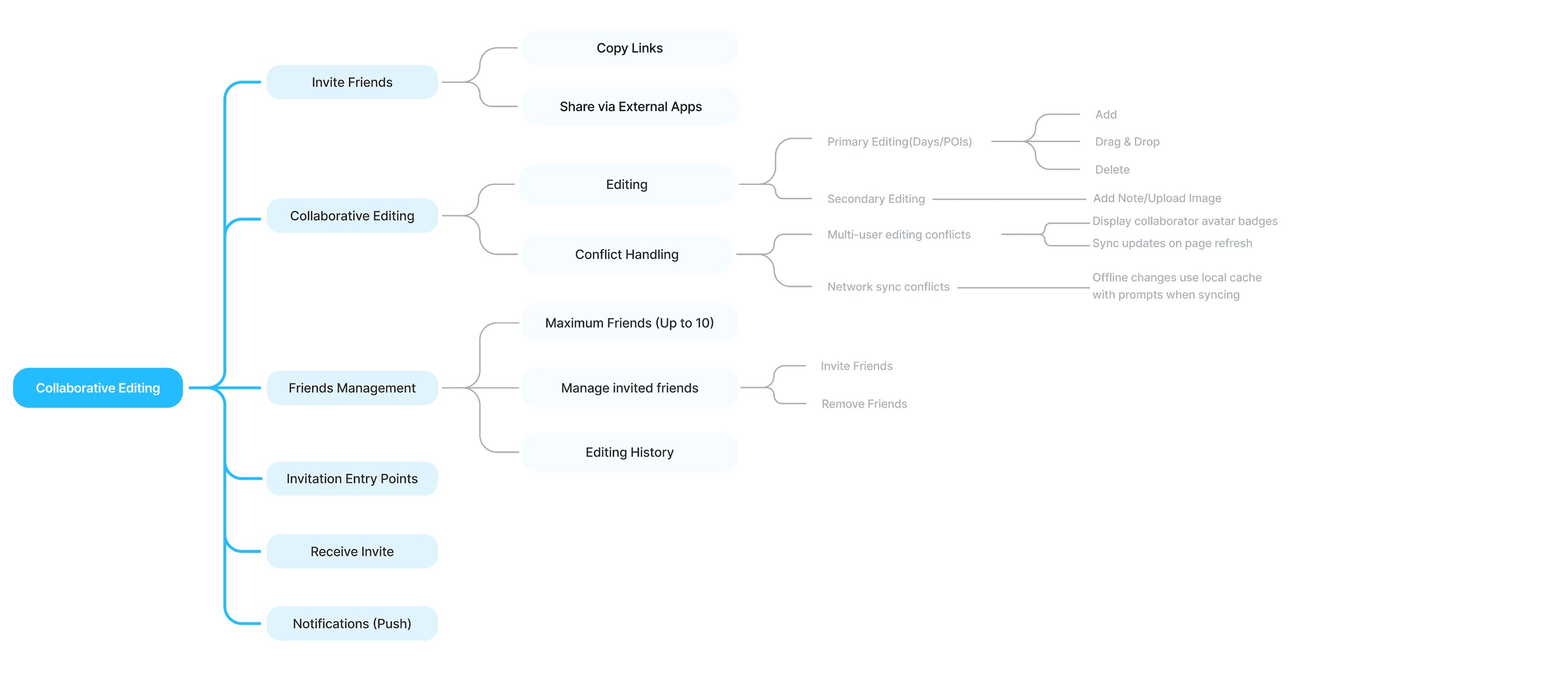
USER FLOW

KEY INTERACTION

 Invite Friends

Users can invite up to 10 friends via link or external apps.

Co-editing Mode

User can join the trip and sync in real time. Avatars make collaboration transparent by showing who is invited.

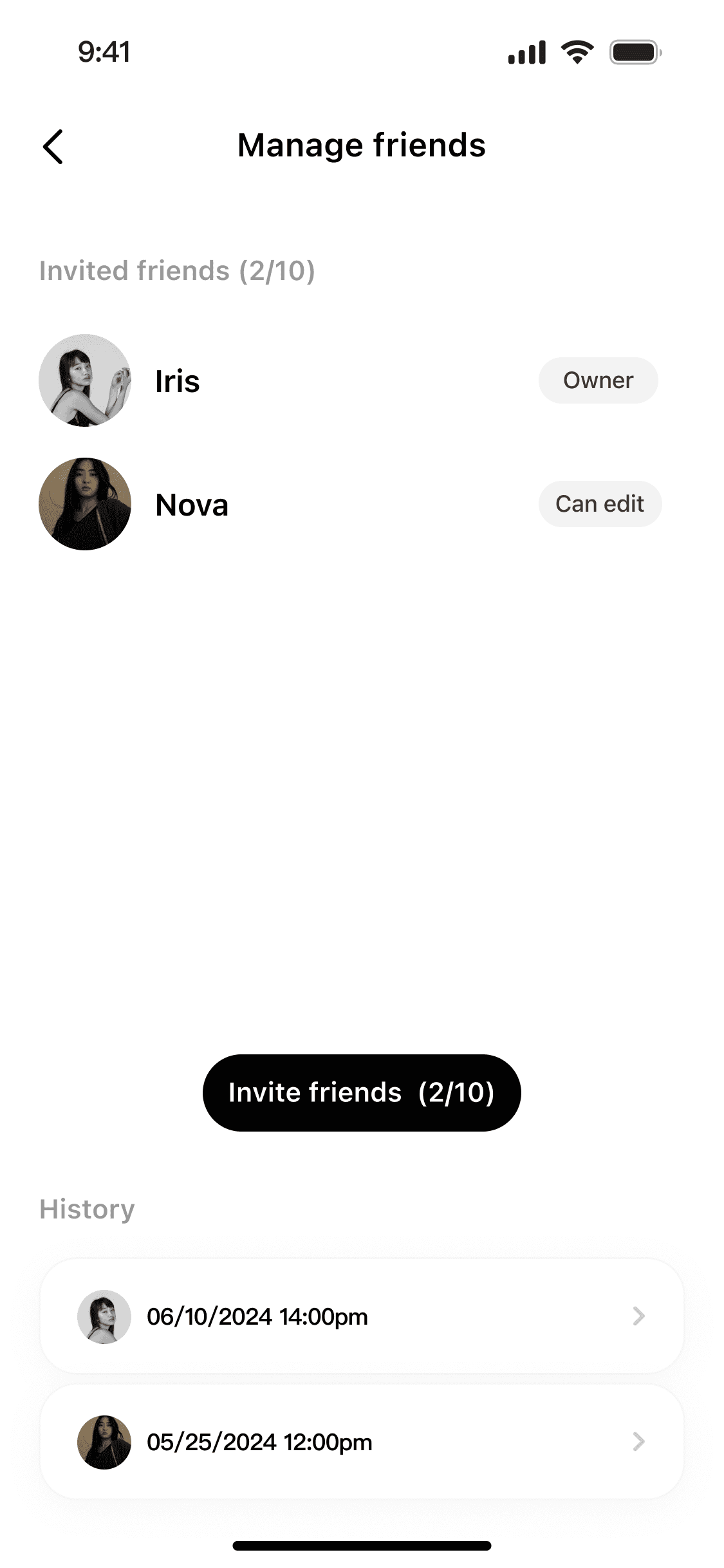
Manage Friends

Allow users to view all invited members and roles (Owner / Editor), with editing history in setting. 


 Invite Friends

 Invite Friends

 Invite Friends

Users can invite up to 10 friends via link or external apps.

co-editing mode

User can join the trip and sync in real time. Avatars make collaboration transparent by showing who is invited.

Manage friends

Allow users to view all invited members and roles (Owner / Editor), with editing history in setting. 


Co-editing Mode

Co-editing Mode

User can join the trip and sync in real time. Avatars make collaboration transparent by showing who is invited.

Manage Friends

Manage Friends

Allow users to view all invited members and roles (Owner / Editor), with editing history in setting. 


KEY INTERACTION

2.0 New Release feature

Collaborative Trip Editing

We expanded the product from a single-user tool to a multi-user experience, enabling real-time collaborative trip planning with friends. This feature was built in response to strong demand from user feedback, as many travelers wanted a way to co-create and adjust itineraries together. It drove a 40% increase in engagement within trip planning flows and strengthened the product’s social capabilities.

User Flow

By mapping out the user flow and conflict-handling logic with the PM and engineers, I extended the overview page with an invite button and collaborator avatars, and designed a new invite card and a “Manage” section in trip settings.

USER FLOW

KEY INTERACTION

 Invite Friends

Users can invite up to 10 friends via link or external apps.

Co-editing Mode

User can join the trip and sync in real time. Avatars make collaboration transparent by showing who is invited.

Manage Friends

Allow users to view all invited members and roles (Owner / Editor), with editing history in setting. 


 Invite Friends

Users can invite up to 10 friends via link or external apps.

co-editing mode

User can join the trip and sync in real time. Avatars make collaboration transparent by showing who is invited.

Manage friends

Allow users to view all invited members and roles (Owner / Editor), with editing history in setting. 


Co-editing Mode

User can join the trip and sync in real time. Avatars make collaboration transparent by showing who is invited.

Manage Friends

Allow users to view all invited members and roles (Owner / Editor), with editing history in setting. 


KEY INTERACTION

2.0 New Release feature

Collaborative Trip Editing

We expanded the product from a single-user tool to a multi-user experience, enabling real-time collaborative trip planning with friends. This feature was built in response to strong demand from user feedback, as many travelers wanted a way to co-create and adjust itineraries together. It drove a 40% increase in engagement within trip planning flows and strengthened the product’s social capabilities.

User Flow

By mapping out the user flow and conflict-handling logic with the PM and engineers, I extended the overview page with an invite button and collaborator avatars, and designed a new invite card and a “Manage” section in trip settings.

USER FLOW

KEY INTERACTION

 Invite Friends

Users can invite up to 10 friends via link or external apps.

Co-editing Mode

User can join the trip and sync in real time. Avatars make collaboration transparent by showing who is invited.

Manage Friends

Allow users to view all invited members and roles (Owner / Editor), with editing history in setting. 


 Invite Friends

Users can invite up to 10 friends via link or external apps.

co-editing mode

User can join the trip and sync in real time. Avatars make collaboration transparent by showing who is invited.

Manage friends

Allow users to view all invited members and roles (Owner / Editor), with editing history in setting. 


Co-editing Mode

User can join the trip and sync in real time. Avatars make collaboration transparent by showing who is invited.

Manage Friends

Allow users to view all invited members and roles (Owner / Editor), with editing history in setting. 


KEY INTERACTION

3.0 Iterations

Data-Driven Iteration & Bug Fixes After Initial Launch

After launch, we iterated weekly to fix UI bugs and improve retention, feature adoption and overall usability. We identified bugs and issues through telemetry data and user feedback also internbal walk through, then prioritized them into iteration plans with the team. As a designer, I contributed to roadmap planning and ensured on-time releases and delivery.

After launch, we iterated weekly to fix UI bugs and improve retention, feature adoption and overall usability. We identified bugs and issues through telemetry data and user feedback also internbal walk through, then prioritized them into iteration plans with the team. As a designer, I contributed to roadmap planning and ensured on-time releases and delivery.

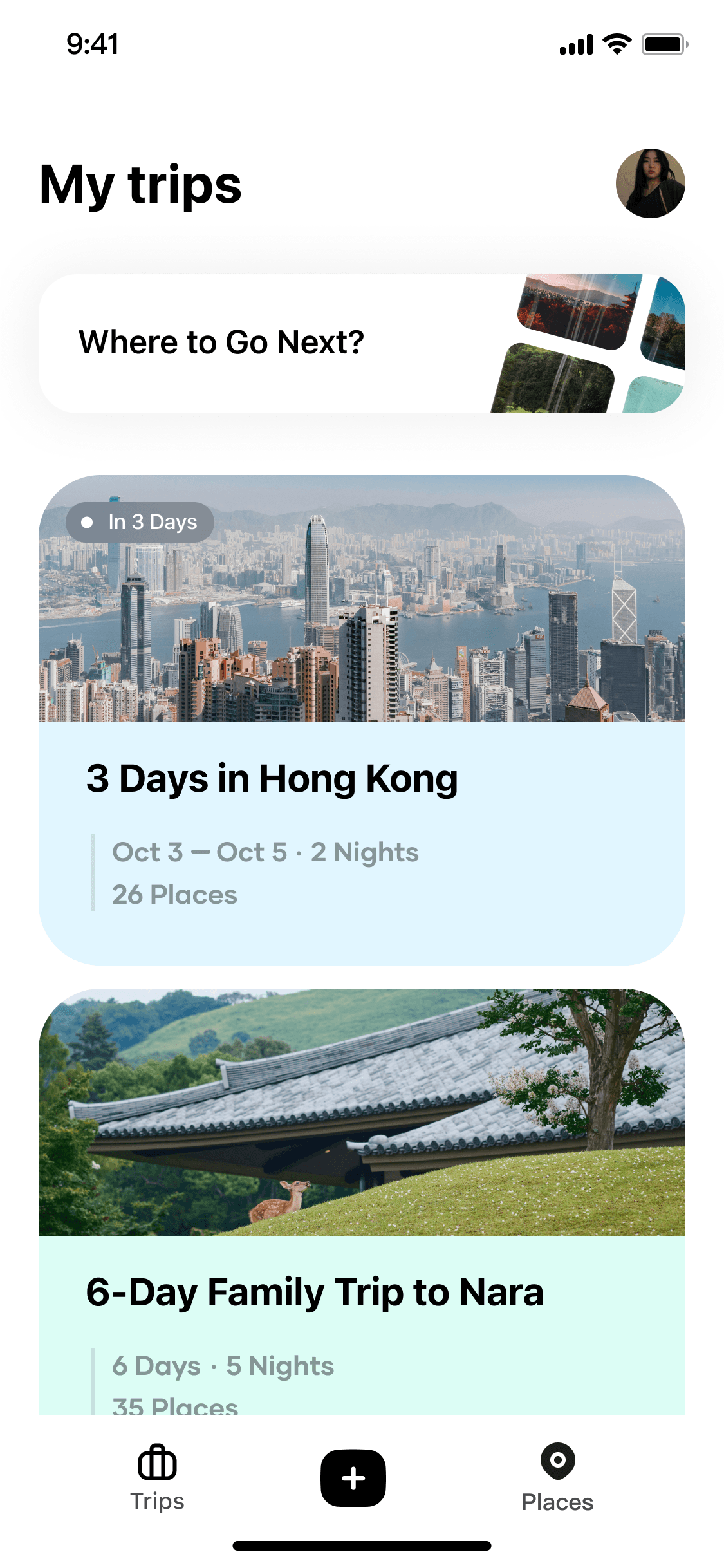
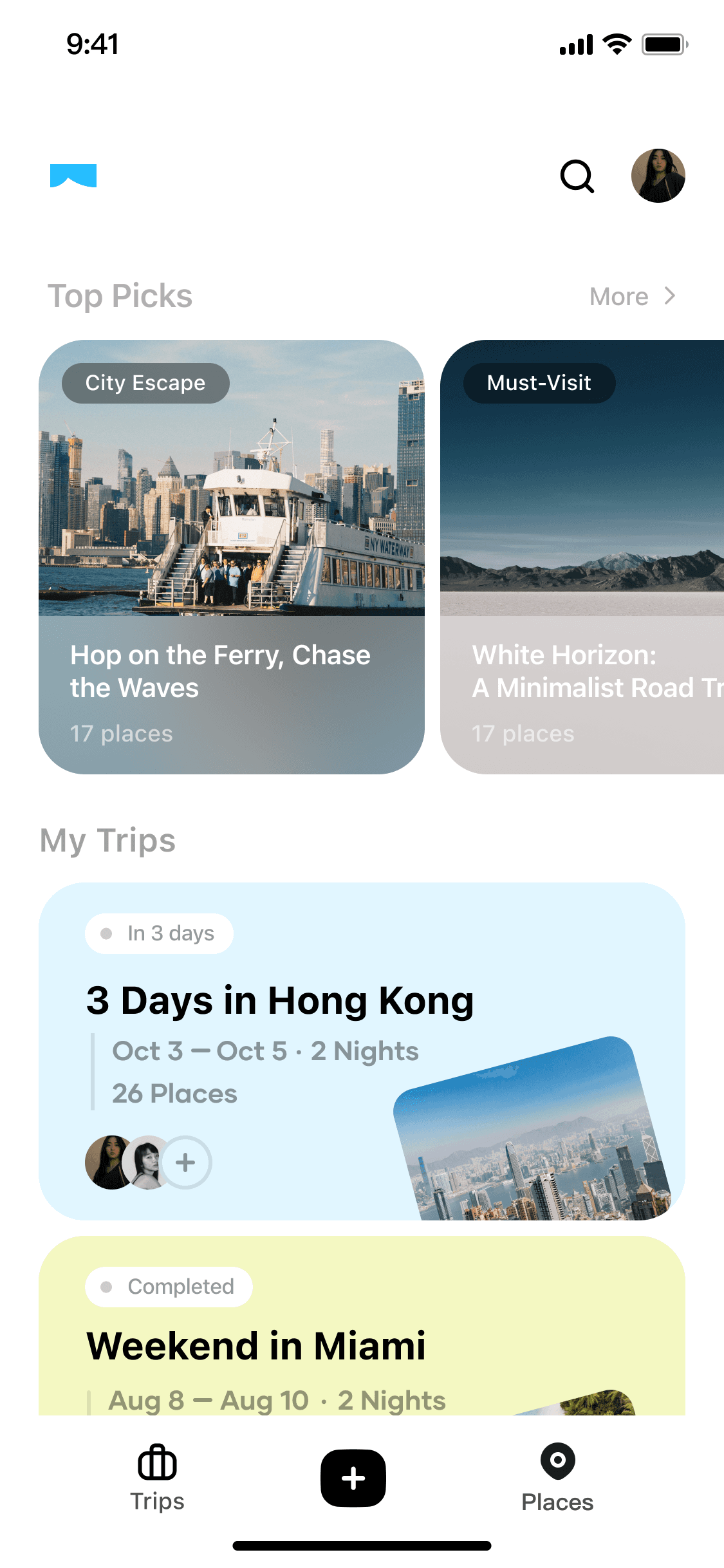
Homepage

Before

After

V 1.0 Homepage

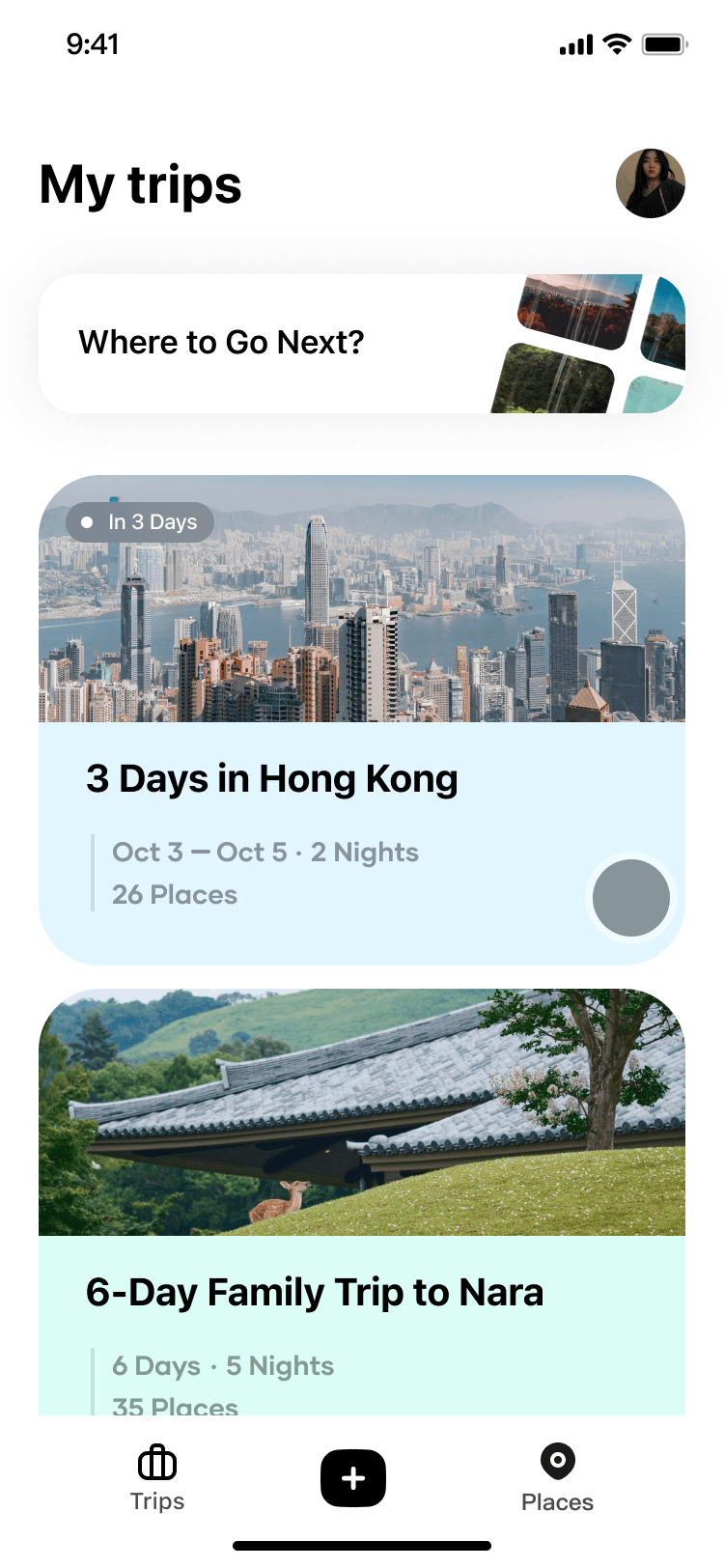
The banner section offered limited inspiration, reducing opportunities for users to discover new destinations or curated templates. This constrained the homepage to a entry point for existing trip rather than a space for exploration.

V 3.0 Homepage

The carousel highlights curated trending trips, inspiring users with fresh content and reasons to explore in-app. The most recent trip with collaborators is surfaced on the cover card, supporting re-entry into ongoing plans and social connection.

Homepage

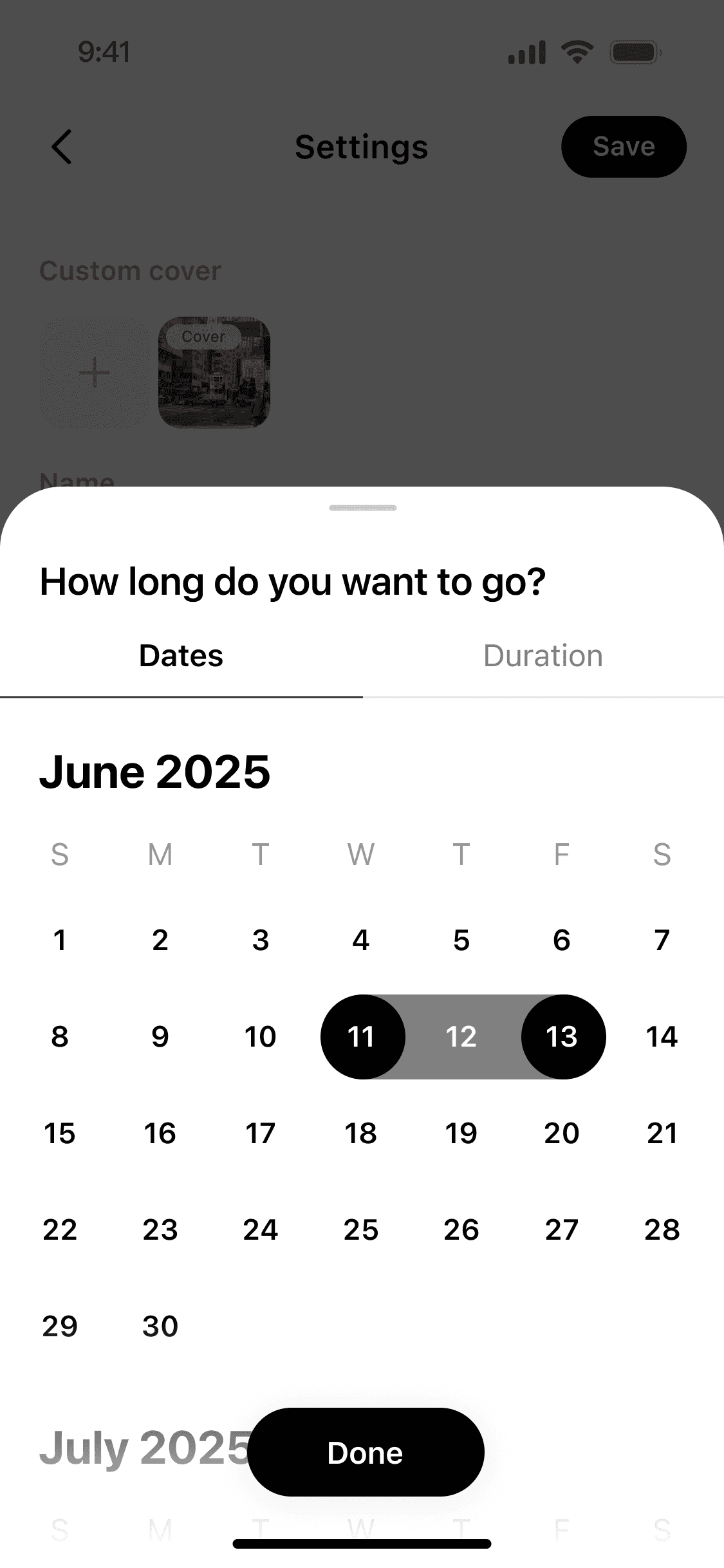
Calender

Before

After

V 1.0 Calender

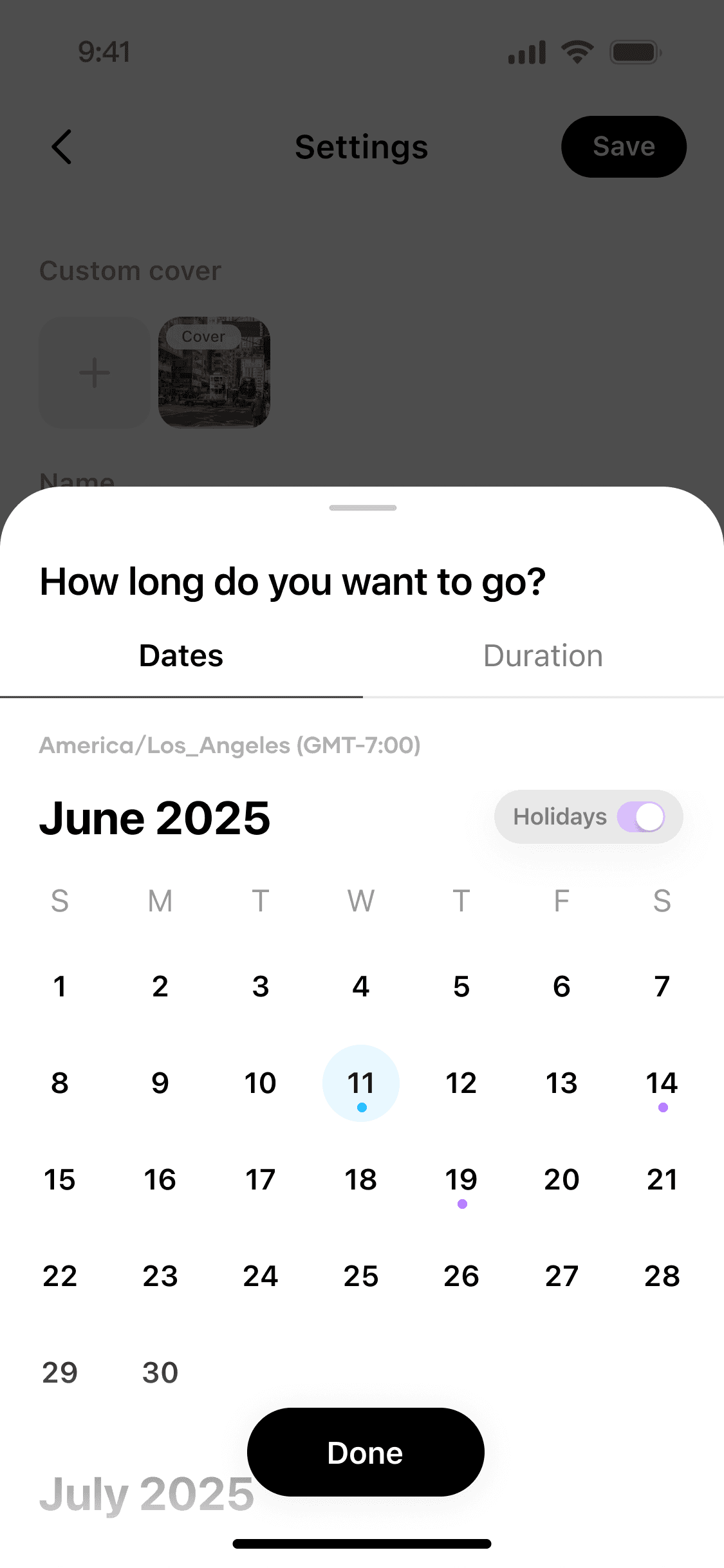
Users could only switch between duration and calendar mode to select trip dates, with limited contextual support.

V 2.4 Calender

The calendar with timezone display synced to the user’s phone, helping them plan across locations with different timezone. A toggle for public holidays was added for personalized planning, and UI color cues highlight the current day and holidays. These improvements support better foresight and reduce errors in trip scheduling.

Calender

3.0 Iterations

Data-Driven Iteration & Bug Fixes After Initial Launch

After launch, we iterated weekly to fix UI bugs and improve retention, feature adoption and overall usability. We identified bugs and issues through telemetry data and user feedback also internbal walk through, then prioritized them into iteration plans with the team. As a designer, I contributed to roadmap planning and ensured on-time releases and delivery.

After launch, we iterated weekly to fix UI bugs and improve retention, feature adoption and overall usability. We identified bugs and issues through telemetry data and user feedback also internbal walk through, then prioritized them into iteration plans with the team. As a designer, I contributed to roadmap planning and ensured on-time releases and delivery.

Homepage

Before

After

V 1.0 Homepage

The banner section offered limited inspiration, reducing opportunities for users to discover new destinations or curated templates. This constrained the homepage to a entry point for existing trip rather than a space for exploration.

V 3.0 Homepage

The carousel highlights curated trending trips, inspiring users with fresh content and reasons to explore in-app. The most recent trip with collaborators is surfaced on the cover card, supporting re-entry into ongoing plans and social connection.

Homepage

Calender

Before

After

V 1.0 Calender

Users could only switch between duration and calendar mode to select trip dates, with limited contextual support.

V 2.4 Calender

The calendar with timezone display synced to the user’s phone, helping them plan across locations with different timezone. A toggle for public holidays was added for personalized planning, and UI color cues highlight the current day and holidays. These improvements support better foresight and reduce errors in trip scheduling.

Calender

3.0 Iterations

Data-Driven Iteration & Bug Fixes After Initial Launch

After launch, we iterated weekly to fix UI bugs and improve retention, feature adoption and overall usability. We identified bugs and issues through telemetry data and user feedback also internbal walk through, then prioritized them into iteration plans with the team. As a designer, I contributed to roadmap planning and ensured on-time releases and delivery.

After launch, we iterated weekly to fix UI bugs and improve retention, feature adoption and overall usability. We identified bugs and issues through telemetry data and user feedback also internbal walk through, then prioritized them into iteration plans with the team. As a designer, I contributed to roadmap planning and ensured on-time releases and delivery.

Homepage

Before

After

V 1.0 Homepage

The banner section offered limited inspiration, reducing opportunities for users to discover new destinations or curated templates. This constrained the homepage to a entry point for existing trip rather than a space for exploration.

V 3.0 Homepage

The carousel highlights curated trending trips, inspiring users with fresh content and reasons to explore in-app. The most recent trip with collaborators is surfaced on the cover card, supporting re-entry into ongoing plans and social connection.

Homepage

Calender

Before

After

V 1.0 Calender

Users could only switch between duration and calendar mode to select trip dates, with limited contextual support.

V 2.4 Calender

The calendar with timezone display synced to the user’s phone, helping them plan across locations with different timezone. A toggle for public holidays was added for personalized planning, and UI color cues highlight the current day and holidays. These improvements support better foresight and reduce errors in trip scheduling.

Calender

UI &
Design System

UI &
Design System

UI &
Design System

Project 2.0 :
Content management system

Project 2.0 :
Content management system

Project 2.0 :
Content management system

The Impact & What I Did

I built an internal CMS with Admin Configuration Panel to optimize internal efficiency and elevate content quality. This system established a scalable, structured publishing framework, empowering the operations team with efficient content publishing for homepage recommendations, trip event, and POI data. And directly resulted in improved in-app content discovery and higher user retention.

Improved Retention with Content

Improved Retention

Built an editorial CMS that standardizes POI and trip updates, expanding city coverage and ensuring consistently fresher, higher-quality content.

Built an editorial CMS that standardizes POI and trip updates, expanding city coverage and ensuring consistently fresher, higher-quality content.

⏱️️

Speed 2x Turnaround

Enabled batch publishing and modular configuration so operations can manage highlights and templates independently with role-based approvals.

👥️

Frictionless Cross-Team Workflow

Improved Retention

Added status indicators and version tracking to the admin panel, reducing publishing errors and rework across teams.

Built an editorial CMS that standardizes POI and trip updates, expanding city coverage and ensuring consistently fresher, higher-quality content.

Speed 2x Turnaround

Enabled batch publishing and modular configuration so operations can manage highlights and templates independently with role-based approvals.

Frictionless Cross-Team Workflow

Added status indicators and version tracking to the admin panel, reducing publishing errors and rework across teams.

KEY INTERACTION

Region & Point Of Interest (POI) Bulk Manager

Region & Point Of Interest (POI)
Bulk Manager

A real-time map is integrated into the trip overview overlay. It syncs instantly with any POI or route updates, giving users a clear view of place coverage across multiple days.

Curated Events &
Featured Trips Scheduler

Set up trip content in batches: configure featured trip templates and ship with role-based approvals.

Detailed
Trip Content Pool

Centralized Trip Content Pool Management with filters, metadata, and quick preview. Integrated batch actions to streamline operations.

Curated Events &
Featured Trips Scheduler

Set up trip content in batches: configure featured trip templates and ship with role-based approvals.

Detailed
Trip Content Pool

Centralized Trip Content Pool Management with filters, metadata, and quick preview. Integrated batch actions to streamline operations.

KEY INTERACTION

KEY INTERACTION

The Impact & What I Did

I built an internal CMS with Admin Configuration Panel to optimize internal efficiency and elevate content quality. This system established a scalable, structured publishing framework, empowering the operations team with efficient content publishing for homepage recommendations, trip event, and POI data. And directly resulted in improved in-app content discovery and higher user retention.

Improved Retention with Content

Built an editorial CMS that standardizes POI and trip updates, expanding city coverage and ensuring consistently fresher, higher-quality content.

⏱️️

Speed 2x Turnaround

Enabled batch publishing and modular configuration so operations can manage highlights and templates independently with role-based approvals.

👥️

Frictionless Cross-Team Workflow

Added status indicators and version tracking to the admin panel, reducing publishing errors and rework across teams.

Speed 2x Turnaround

Enabled batch publishing and modular configuration so operations can manage highlights and templates independently with role-based approvals.

Frictionless Cross-Team Workflow

Added status indicators and version tracking to the admin panel, reducing publishing errors and rework across teams.

KEY INTERACTION

Region & Point Of Interest (POI) Bulk Manager

A real-time map is integrated into the trip overview overlay. It syncs instantly with any POI or route updates, giving users a clear view of place coverage across multiple days.

Curated Events &
Featured Trips Scheduler

Set up trip content in batches: configure featured trip templates and ship with role-based approvals.

Detailed
Trip Content Pool

Centralized Trip Content Pool Management with filters, metadata, and quick preview. Integrated batch actions to streamline operations.

Curated Events &
Featured Trips Scheduler

Set up trip content in batches: configure featured trip templates and ship with role-based approvals.

Detailed Trip Content Pool

Centralized Trip Content Pool Management with filters, metadata, and quick preview. Integrated batch actions to streamline operations.

KEY INTERACTION

KEY INTERACTION

The Impact & What I Did

I built an internal CMS with Admin Configuration Panel to optimize internal efficiency and elevate content quality. This system established a scalable, structured publishing framework, empowering the operations team with efficient content publishing for homepage recommendations, trip event, and POI data. And directly resulted in improved in-app content discovery and higher user retention.

Improved Retention with Content

Built an editorial CMS that standardizes POI and trip updates, expanding city coverage and ensuring consistently fresher, higher-quality content.

⏱️️

Speed 2x Turnaround

Enabled batch publishing and modular configuration so operations can manage highlights and templates independently with role-based approvals.

👥️

Frictionless Cross-Team Workflow

Added status indicators and version tracking to the admin panel, reducing publishing errors and rework across teams.

Speed 2x Turnaround

Enabled batch publishing and modular configuration so operations can manage highlights and templates independently with role-based approvals.

Frictionless Cross-Team Workflow

Added status indicators and version tracking to the admin panel, reducing publishing errors and rework across teams.

KEY INTERACTION

Region & Point Of Interest (POI)
Bulk Manager

A real-time map is integrated into the trip overview overlay. It syncs instantly with any POI or route updates, giving users a clear view of place coverage across multiple days.

Curated Events &
Featured Trips Scheduler

Set up trip content in batches: configure featured trip templates and ship with role-based approvals.

Detailed
Trip Content Pool

Centralized Trip Content Pool Management with filters, metadata, and quick preview. Integrated batch actions to streamline operations.

Curated Events &
Featured Trips Scheduler

Set up trip content in batches: configure featured trip templates and ship with role-based approvals.

Detailed Trip Content Pool

Centralized Trip Content Pool Management with filters, metadata, and quick preview. Integrated batch actions to streamline operations.

KEY INTERACTION

KEY INTERACTION

Takeaways &
Reflections

Takeaways &
Reflections

Takeaways &
Reflections

Tracking from day one mattered. The data precisely pinpointed user drop-off points, allowing us to rapidly iterate and optimize crucial micro-interactions that significantly improved the overall flow.

When problems came up, I brought everyone in. Talking early with engineers and PMs kept us aligned, helped us fix issues faster, and made design-eng handoff smoother.

If I were doing this again, I’d prototype collaborative editing first and ship an early MVP. Earlier user tests would have surfaced more edge cases before scaling.

Tracking from day one mattered. The data precisely pinpointed user drop-off points, allowing us to rapidly iterate and optimize crucial micro-interactions that significantly improved the overall flow.

When problems came up, I brought everyone in. Talking early with engineers and PMs kept us aligned, helped us fix issues faster, and made design-eng handoff smoother.

If I were doing this again, I’d prototype collaborative editing first and ship an early MVP. Earlier user tests would have surfaced more edge cases before scaling.

Tracking from day one mattered. The data precisely pinpointed user drop-off points, allowing us to rapidly iterate and optimize crucial micro-interactions that significantly improved the overall flow.

When problems came up, I brought everyone in. Talking early with engineers and PMs kept us aligned, helped us fix issues faster, and made design-eng handoff smoother.

If I were doing this again, I’d prototype collaborative editing first and ship an early MVP. Earlier user tests would have surfaced more edge cases before scaling.

Tia·

Tia·

© 2025 Designed & Built by Tia Liu

© 2025 Designed & Built by Tia Liu

Tia·

© 2025 Designed & Built by Tia Liu

Tia·

© 2025 Designed & Built by Tia Liu