CHALLENGE
Redefining What a Trustworthy Human–AI Collaboration Looks Like
in Enterprise Workflows.
Most AI assistants today focus on automation, but they don’t help teams make real progress together. In this project, I explored how AI could go beyond automation to become a reliable partner in decision-making, communication, and alignment across enterprise workflows.
overview
a Role-Specific AI Agent for product managers
Trusted · Context-Aware · Embedded in the Enterprise Environment
To address the growing complexity of product management, this solution tailored to PM workflows. It leverages Azure AI capabilities to connect tools, surface insights, and support decisions through transparent reasoning and human-in-the-loop validation. The design is guided by three principles.
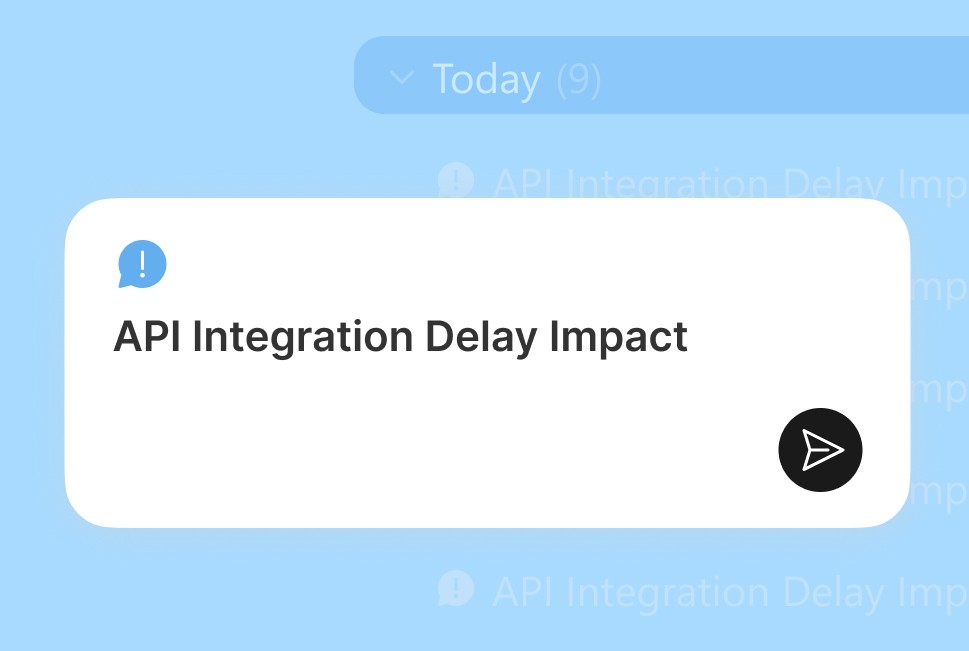
Role-Specific Agent for
PMs’ Intent
Not a generic AI assistant, but one designed around how PMs plan, align, and deliver work.
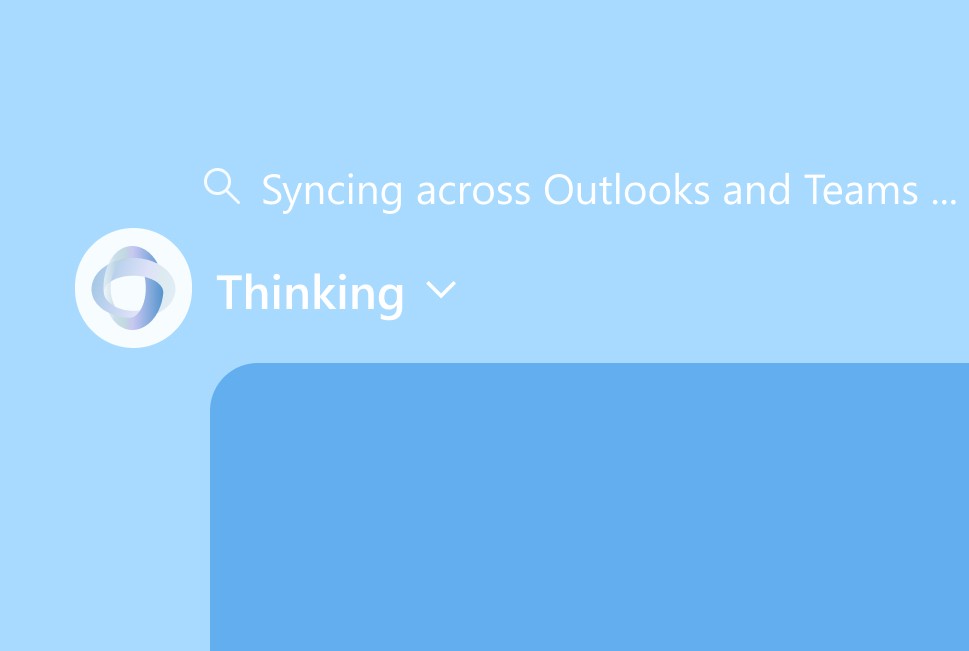
Transparent Reasoning for Trusted Collaboration
Every suggestion follows a clear logic. PMs can trace the “why” behind each action.
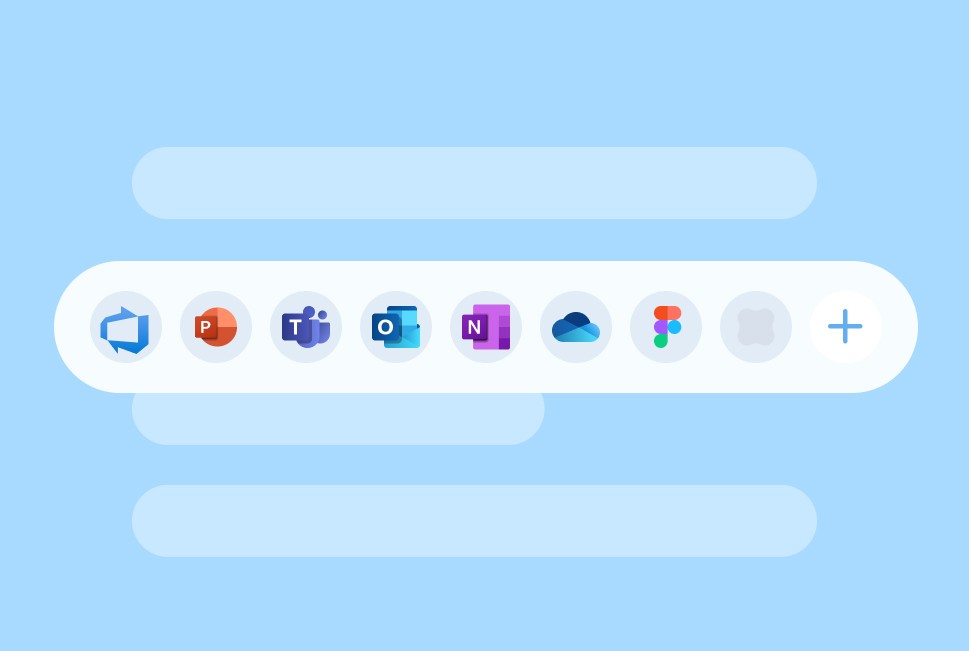
Embedded in Existing Flow and Context
Built into Microsoft 365, it works seamlessly across Teams and other tools to remove adoption barriers.
Final design
Bringing AI-powered clarity to PM workflows in Microsoft 365
Unlike tools that stop at dashboards or spec generation, I designed this companion to help product managers focus on strategy and decision-making with their teams. It predicts risks, automates recurring tasks, and aligns stakeholders through transparent reasoning—all within the familiar Microsoft 365 environment.

Proactive Alerts with Next-Step Suggestions
Proactive Alerts with Next-Step Suggestions
Turns scattered progress into clear, timely signals. Built on product principles and rule-based logic, it spots risks early and suggests actions before issues grow.
Streamlined Automation
Handles meeting prep, document drafts, and scheduling automatically.
Every action is transparent and reviewable, keeping PMs in control while reducing manual overhead.
Role-based alignment
Generates updates tailored to each role and tone, keeping everyone aligned without extra effort.
impact
Demonstrating How Trusted AI Interactions Make Work Smarter and Faster
I improved day-to-day efficiency for PMs and their teams by creating clearer workflows and building trust in AI-supported decisions.
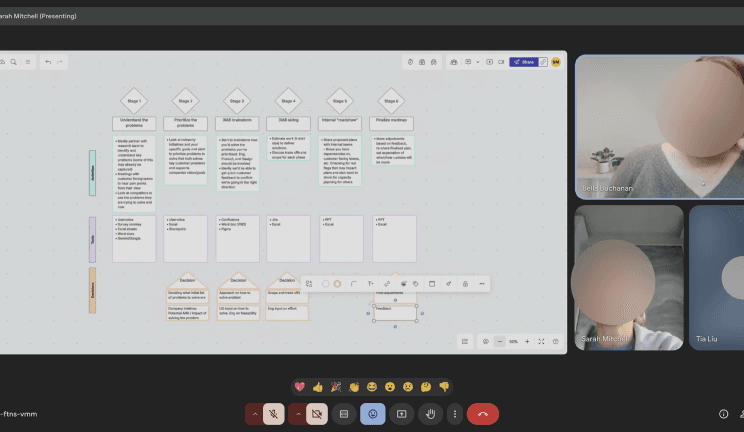
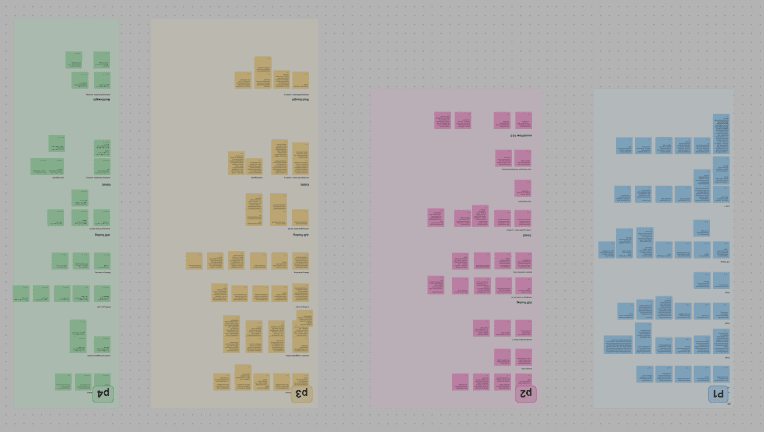
Validated With 15+ Professionals
Ran user interviews and co-design sessions with Microsoft PMs to map real workflows and challenges.
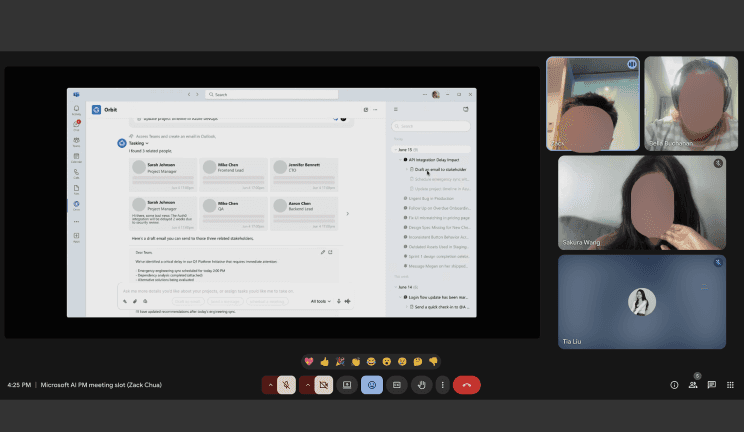
Achieved 100% Adoption Intent in Concept & Usability Testing
“I could see myself using this soon.” – P3, PM from Microsoft
Improved Task Efficiency by 25%
Tested with Microsoft PMs and observed a 25% gain in recurring task speed, accelerating internal product delivery.
Validated With 15+ Professionals
Ran user interviews and co-design sessions with Microsoft PMs to map real workflows and challenges.
Achieved 100% Adoption Intent in Concept & Usability Testing
“I could see myself using this soon.” – P3, PM from Microsoft
Improved Task Efficiency by 25%
Tested with Microsoft PMs and observed a 25% gain in recurring task speed, accelerating internal product delivery.
I also expanded the project’s reach by contributing to broader conversations on Human + AI collaboration across academic and industry groups.
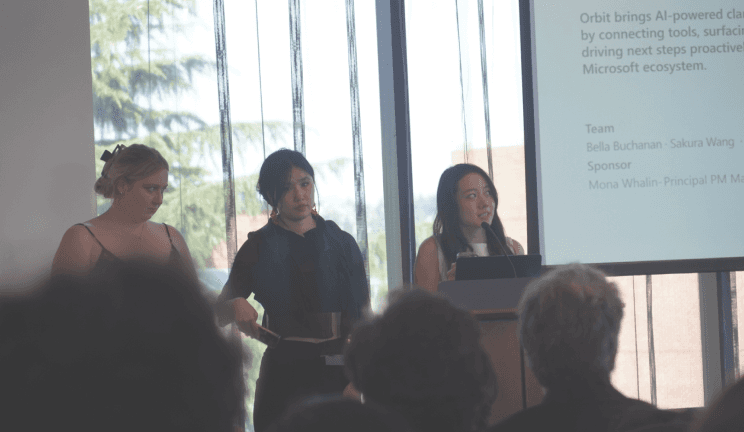
Design Show Case
@ University of Washington
Shared project outcomes and research insights with the DUB community and industry mentors.
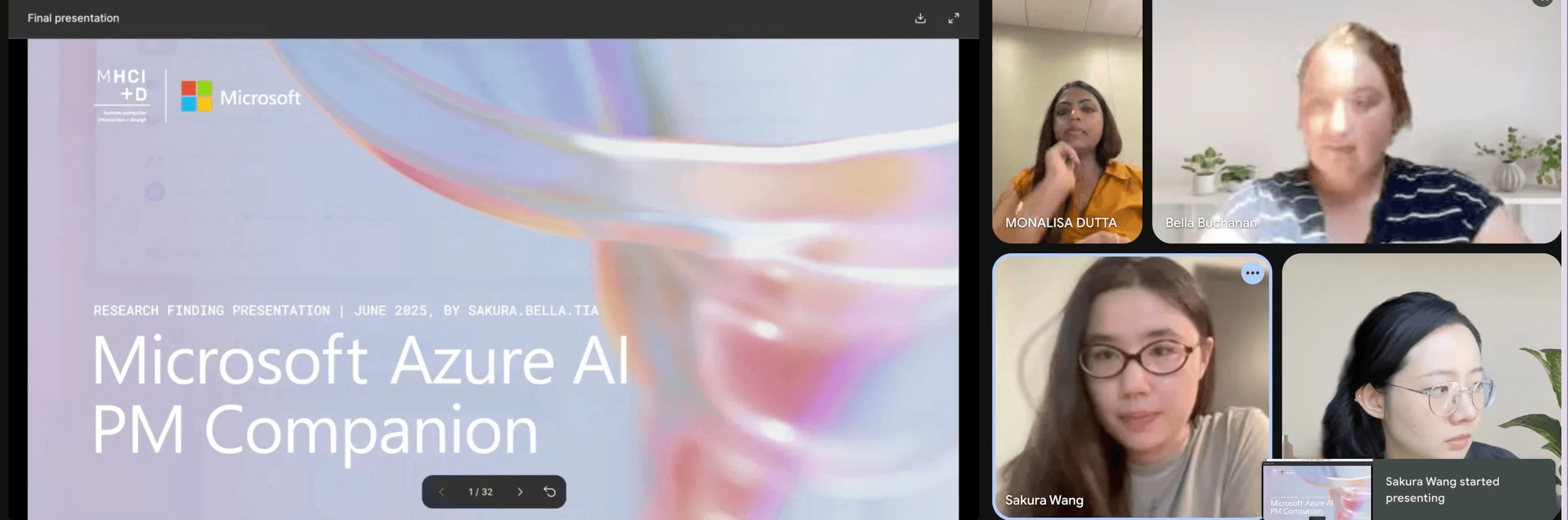
Evaluated With Internal Stakeholders From Microsoft
“It really shows your awareness of the market and how this could expand.”

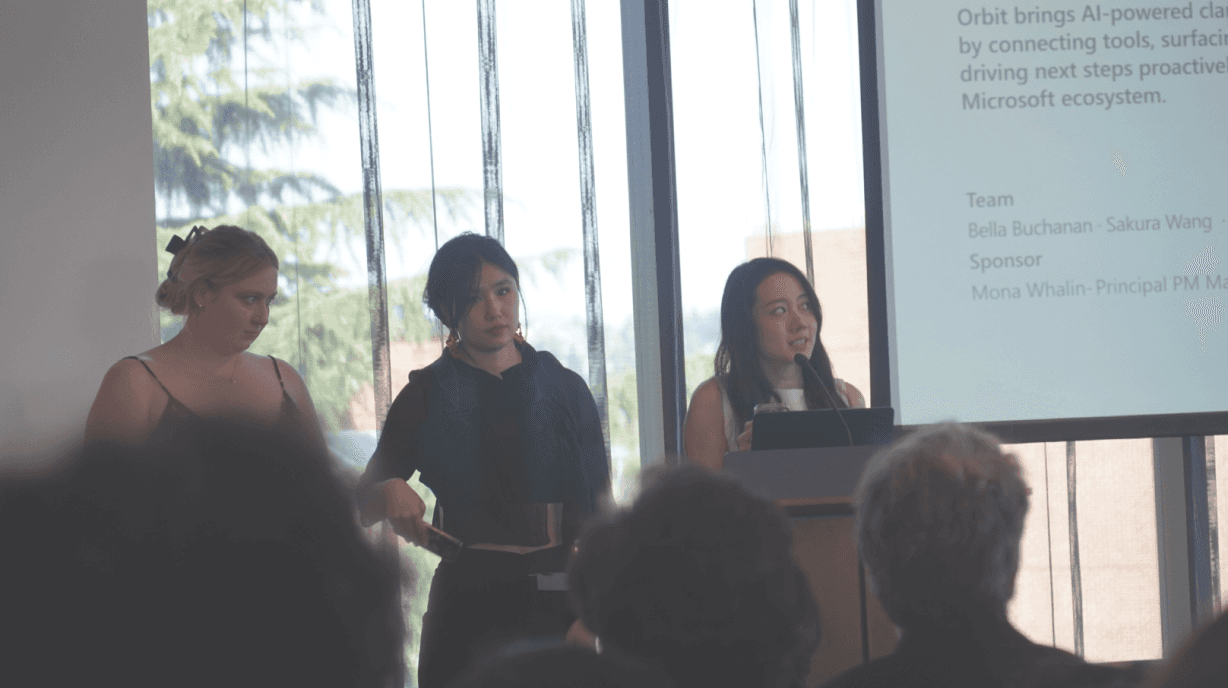
Seattle Design Festival Showcase, 2025
Presented on the main stage at the festival’s technology breakthrough track.
Research
USER RESEARCH
Understanding the Evolving Challenges in PMs’ Daily Workflow
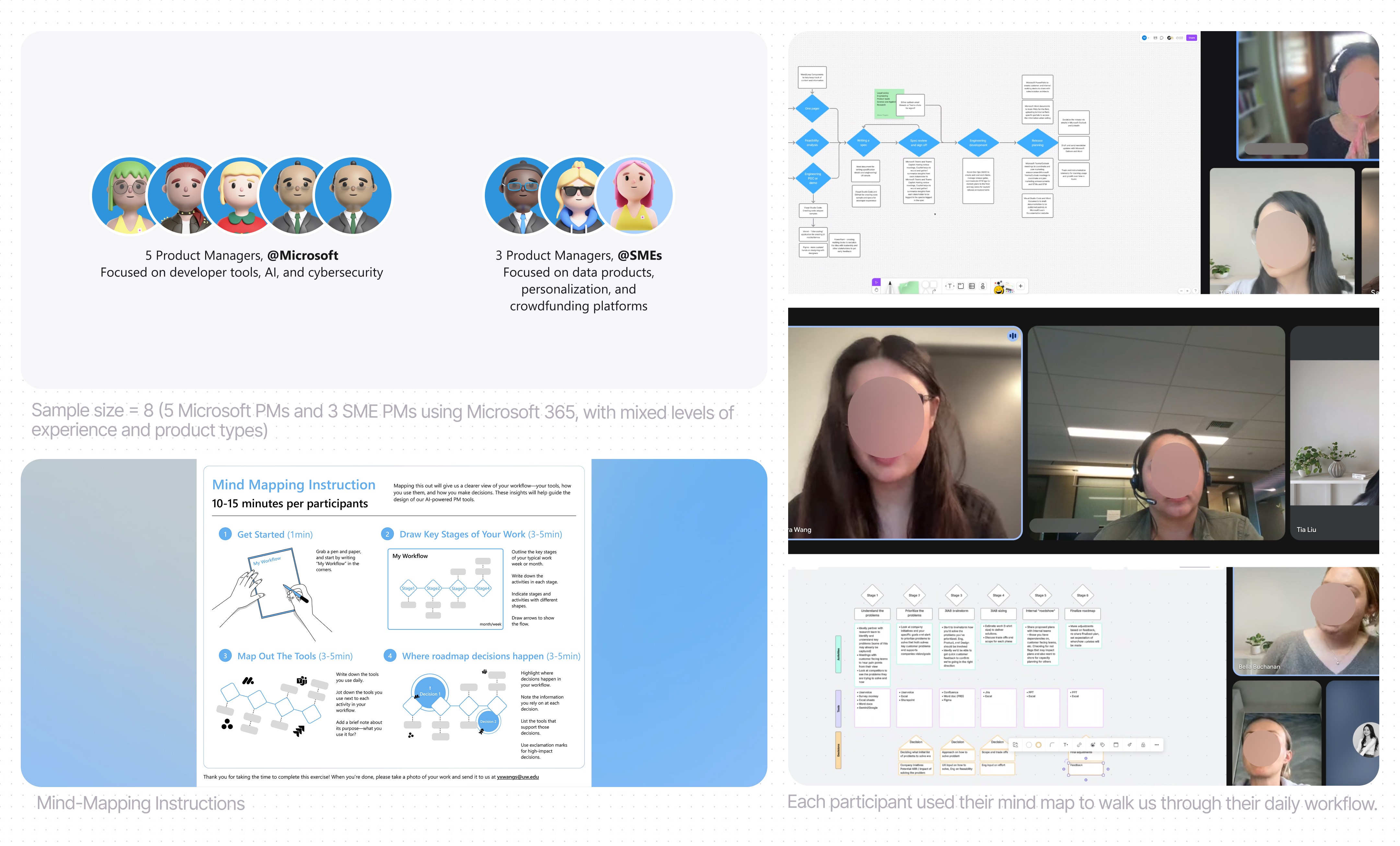
To understand how product managers navigate their daily workflows, we conducted mixed-method research combining semi-structured interviews and mind-mapping sessions. This study explored how PMs manage the complexity of roadmap planning, task prioritization, and cross-team communication, revealing the real pain points behind their day-to-day work.
Study Objective
Identify key challenges in roadmap creation and feature prioritization.
Observe how PMs interact with current tools (Jira, Confluence, Slack, etc.) and where gaps emerge.
Learn how PMs access and synthesize insights to guide decisions.
Examine how PMs tailor communication for different stakeholders.
Discover opportunities for AI-assisted collaboration and decision support.
mind-mapping session (15min) + Contextual interview (45min)
We prompted participant to map out their Product Creations Flows including tools, and areas where challenges occur.
Through this, let them to walk us through Helped PMs Introspect More Deeply On Their Workflows.
We then proceeded with an interviewing focusing on the mind-map where we:
research Insight
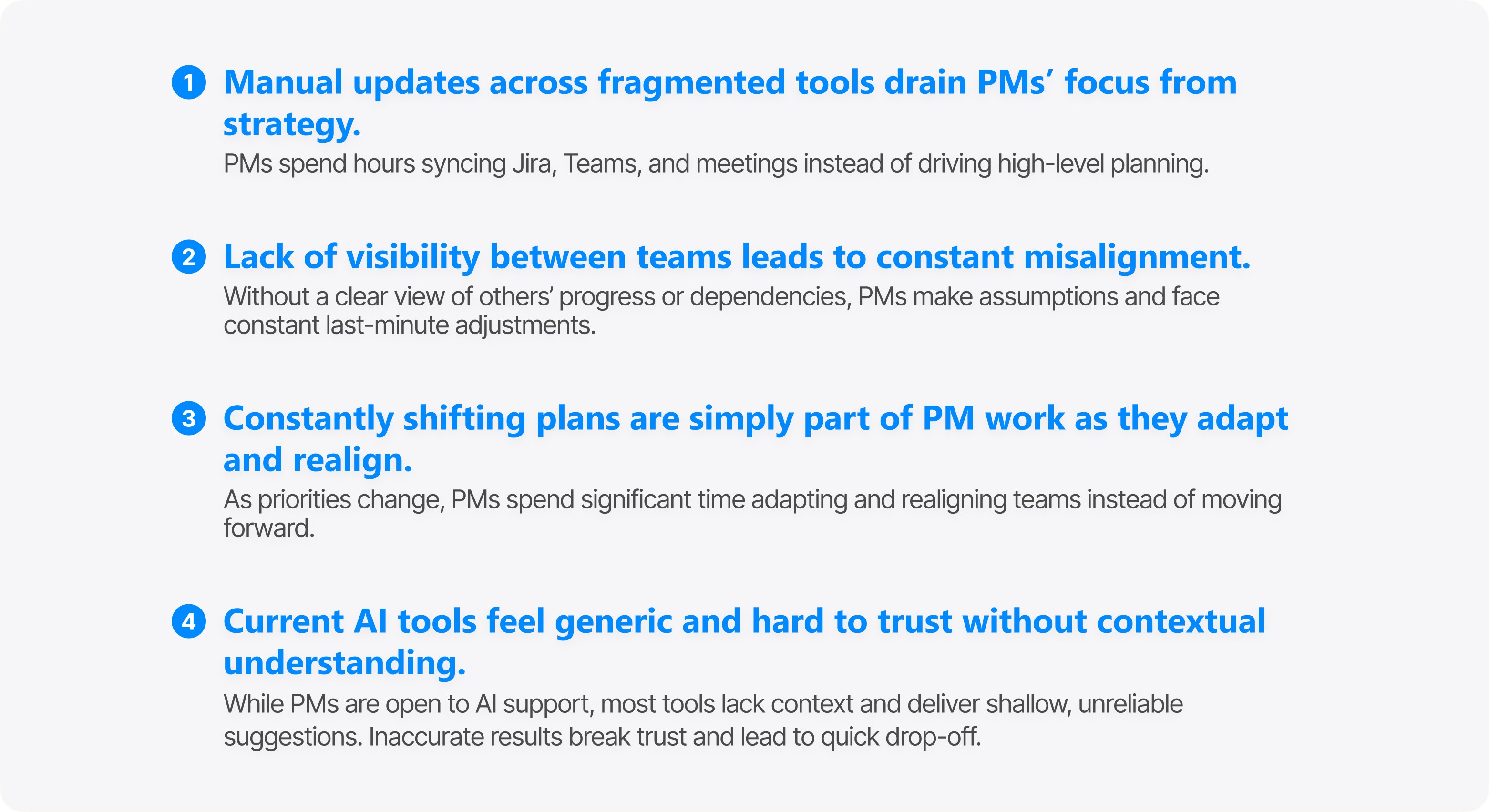
Why PMs Often Face Similar Challenges and Where the Opportunities Are
Ideation
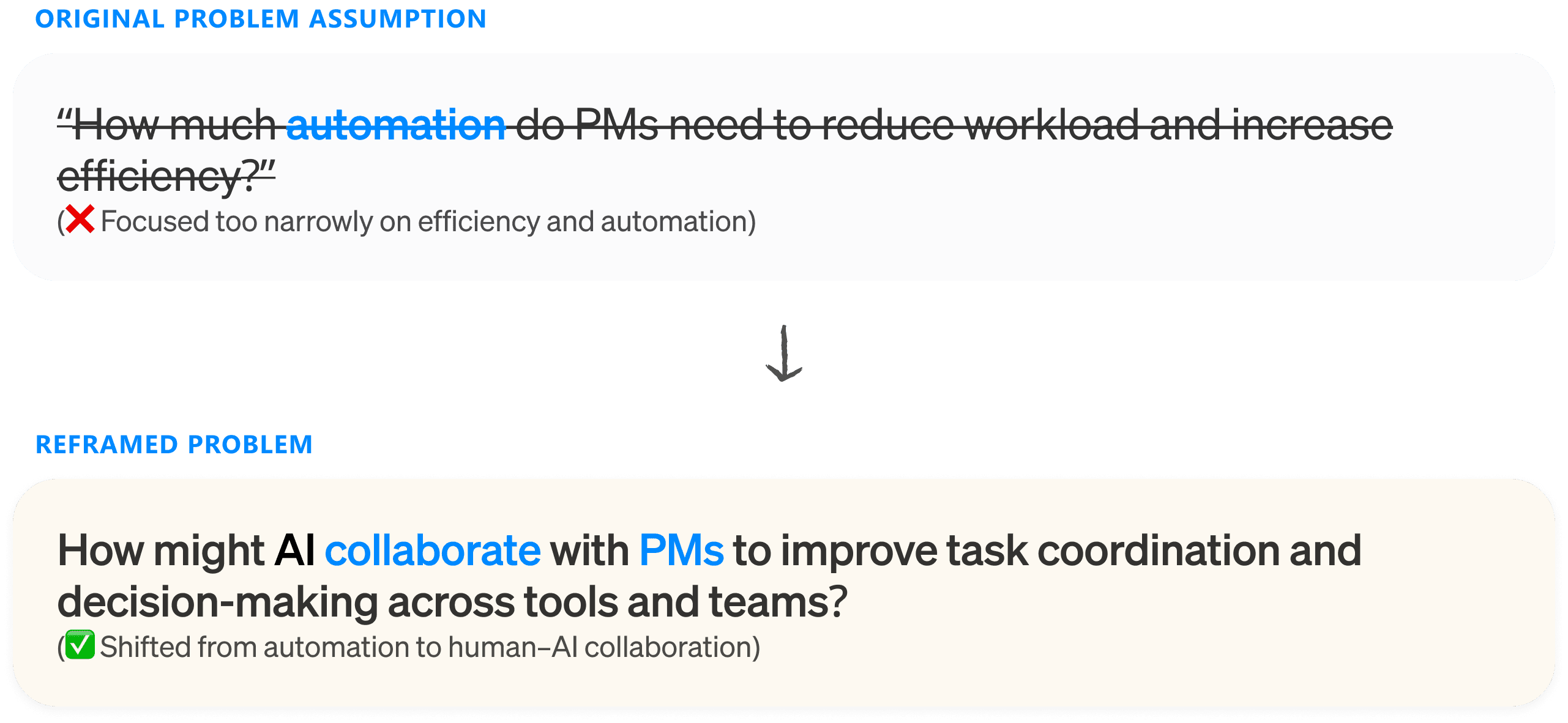
Problem reframing
Shifting Focus From Automation to Collaboration
Through research, I found that PMs’ main challenge isn’t about having too much to do — it lies in managing constant changes and keeping everyone aligned. Most tools focus on efficiency, automating tasks without understanding why PMs make decisions or how context shifts affect overall plans.
Through research, I found that PMs’ main challenge isn’t about having too much to do — it lies in managing constant changes and keeping everyone aligned. Most tools focus on efficiency, automating tasks without
understanding why PMs make decisions or how context shifts affect overall plans.
Concept exploration
From Managing Tasks to Orchestrating Collaboration
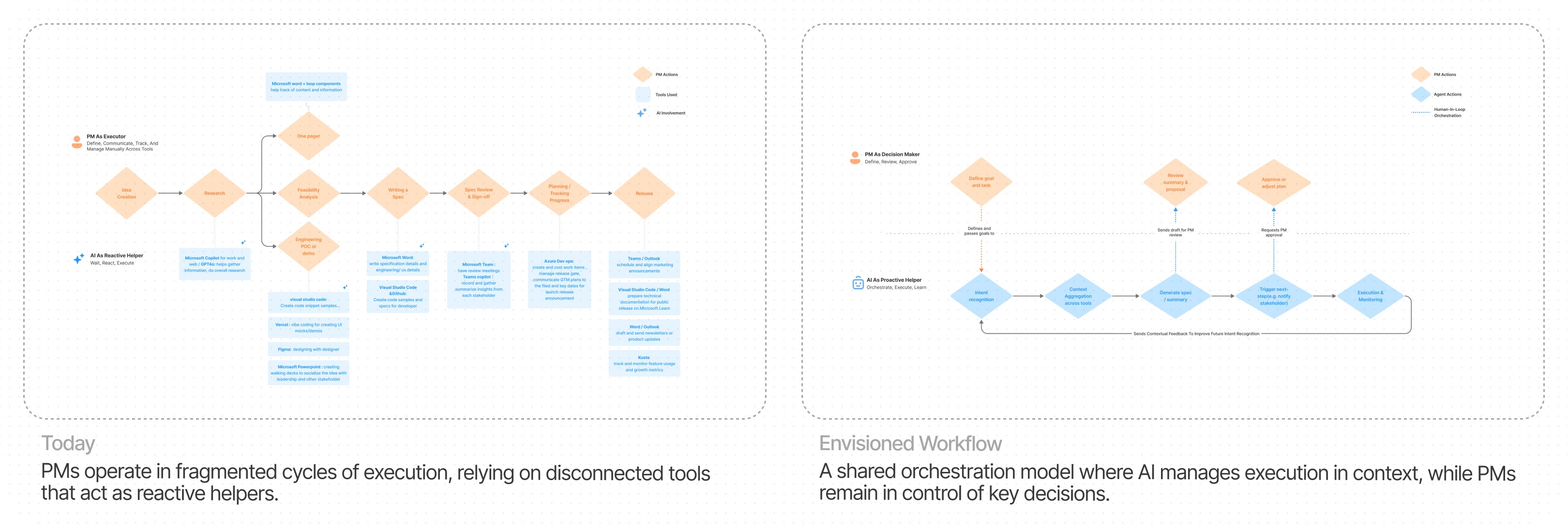
After reframing the problem, I mapped the current PM workflow to see where time and effort go.
Then, I explored how AI could step in — not to replace PMs, but to handle repetitive coordination so they can focus on strategy and human context.
The ‘Magic Wand’ Moment ✨
A Super Assistant That Understands Your Intent, Acts Before You Do
The ‘Magic Wand’ Moment ✨
A Super Assistant That Understands Your Intent,
Acts Before You Do
shifting focus From thinking Automation to focus on Collaboration
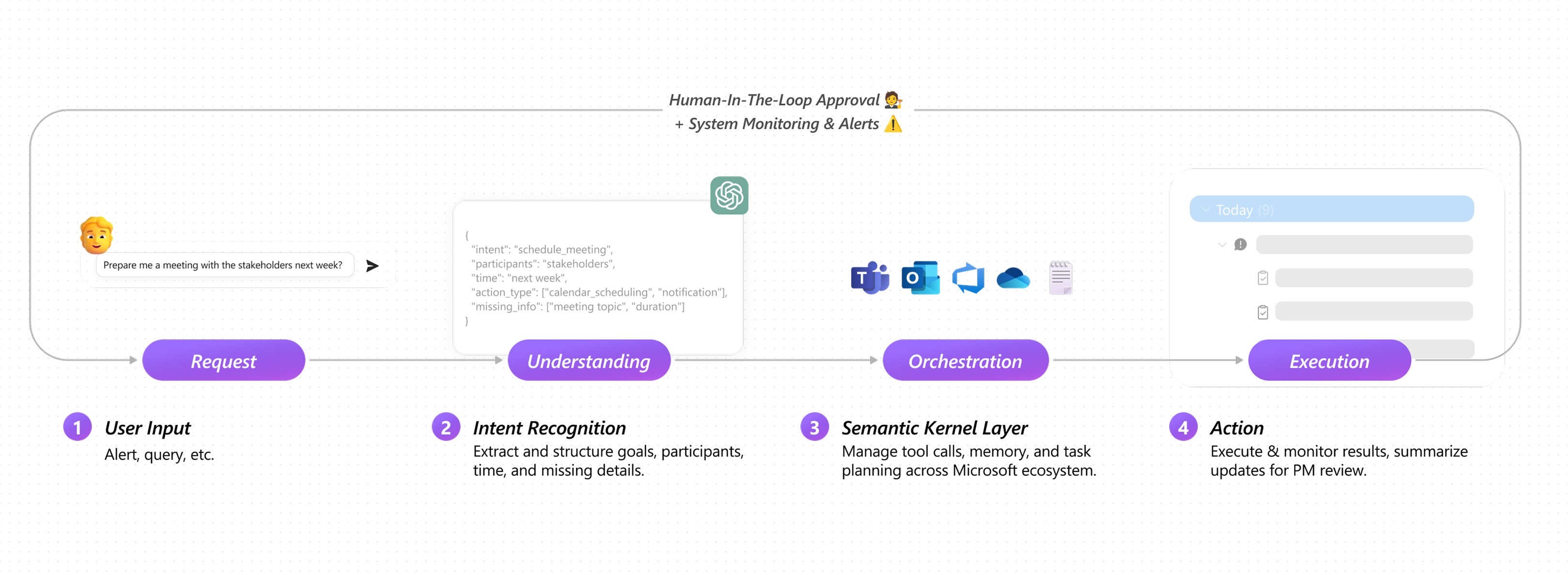
During our exploration, a PM’s remark sparked a new direction: What if AI could think, observe, and act like three coordinated assistants? That question became the foundation of an agentic model — that interprets intent, connects signals, and acts proactively, with people still in control.

To see how this could work, I mapped a lightweight system that keeps humans in the loop with minimal effort. It functions like three synchronized agents that think, observe, and act, designed to fit within Microsoft’s existing ecosystem.
IDEATION
From Reactive Chatbots to Proactive Orchestration
🙋 How Design Went Beyond Copilots and Dashboards
From Reactive Chatbots to Proactive Orchestration
🙋 How Design Went Beyond Copilots and Dashboards
shifting focus From thinking Automation to focus on Collaboration
After several iterations, we landed on the final prototype. Early versions focused on task execution, but without context or human involvement, everything felt mechanical, as if tasks appeared out of nowhere. Here’s how the design evolved through each iteration.
1 · Defining Core Requirements
The layout evolved from three key module
System Setup
Tool Integration (P0)
Orchestration Loop (Chat)
Alerts Panel: Alert → Context → Suggested Actions (P0)
Query Entry Box: Customized Action Feed (P1)
Track History
Side Navigation for Task History (P1)
The layout evolved from three key module
System Setup
Tool Integration (P0)
Orchestration Loop (Chat)
Alerts Panel: Alert → Context → Suggested Actions (P0)
Query Entry Box: Customized Action Feed (P1)
Track History
Side Navigation for Task History (P1)
The layout evolved from three key module
System Setup
Tool Integration (P0)
Orchestration Loop (Chat)
Alerts Panel: Alert → Context → Suggested Actions (P0)
Query Entry Box: Customized Action Feed (P1)
Track History
Side Navigation for Task History (P1)
The layout evolved from three key module
System Setup
Tool Integration (P0)
Orchestration Feed (Chat)
Alerts Panel: Alert → Context → Suggested Actions (P0)
Query Entry Box: Customized Action Feed (P1)
Track History
Side Navigation for Task History (P1)
Showing how the modules came together
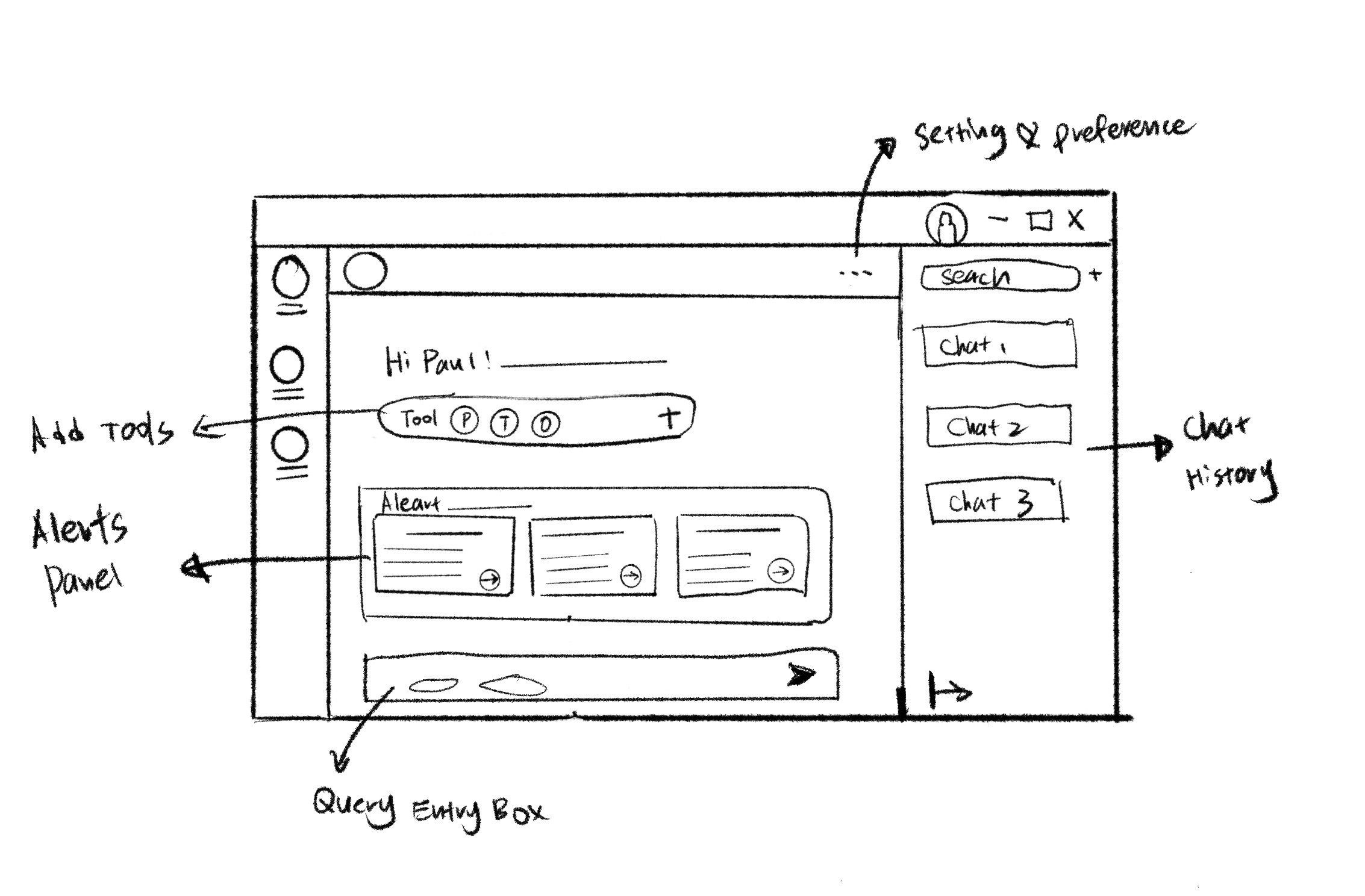
Final sketch visualizing the orchestration flow
2 · Ideating Through Sketches
2 · Ideating Through Sketches
I visualized the orchestration flow through quick sketches. Instead of a static query box, each alert opened into a growing thread of context, suggestions, and next steps, shifting the system’s role from responding to orchestrating.
I visualized the orchestration flow through quick sketches. Instead of a static query box, each alert opened into a growing thread of context, suggestions, and next steps, shifting the system’s role from responding to orchestrating.
3 · Building final Agent-Led Workflow
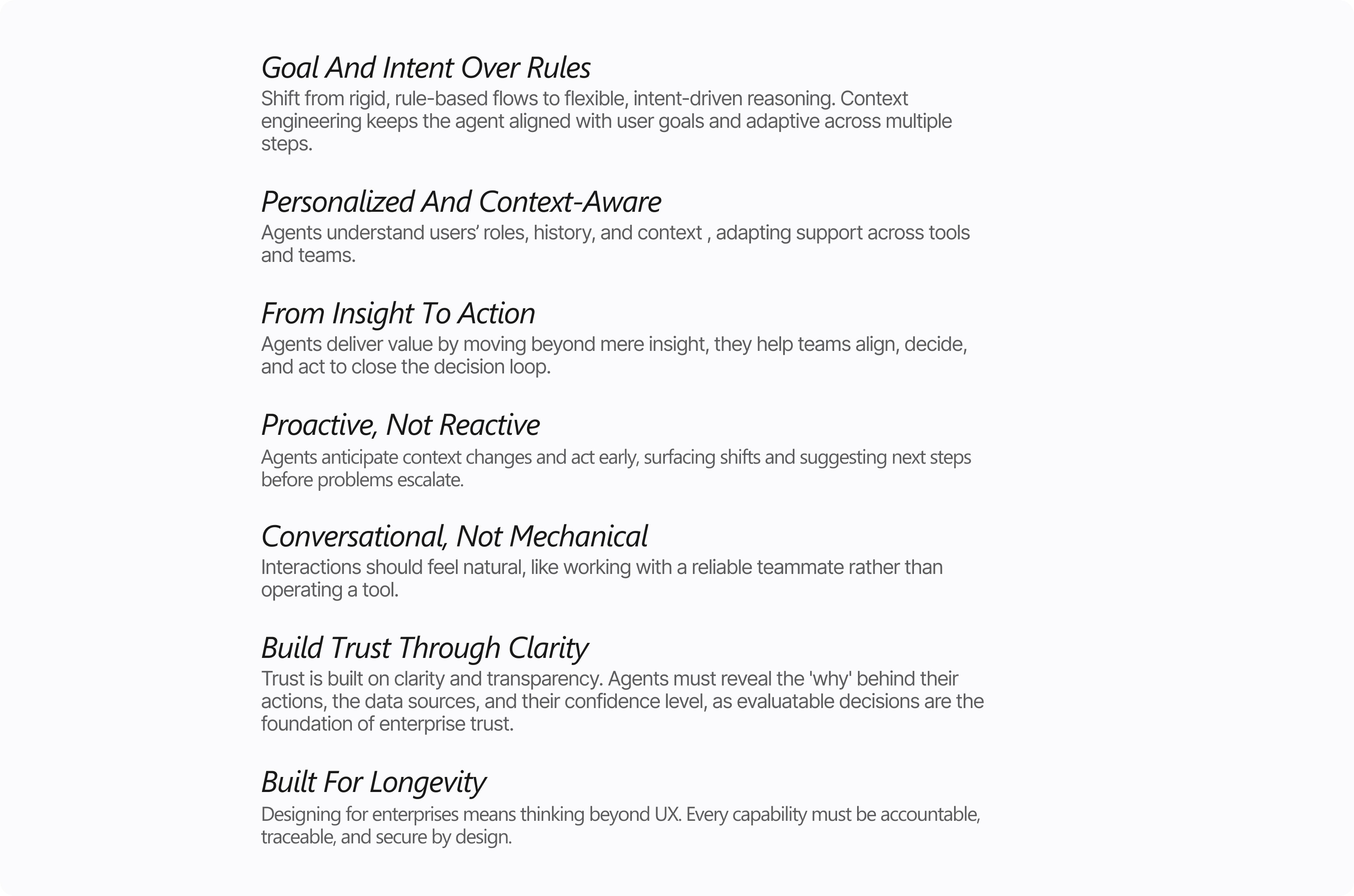
Proactive → Contextual → Collaborative → Traceable
DESIGN PRINCIPLE
Design principles and guidelines
for building trustworthy agentic experiences
shifting focus From thinking Automation to focus on Collaboration
I built these principles to guide how I design agents that truly help people work better together. The goal is to make agent feel like a reliable collaborators - a systems that are sustainable, understandable, and centered on people at every step. These ideas shaped each design decision in the final MVP, defining how the agent thinks, communicates, and grows with its users inside real enterprise environments.
Prototyping
& iteration
module 1 · request
Homepage · Proactive Alerts & Connected Tools
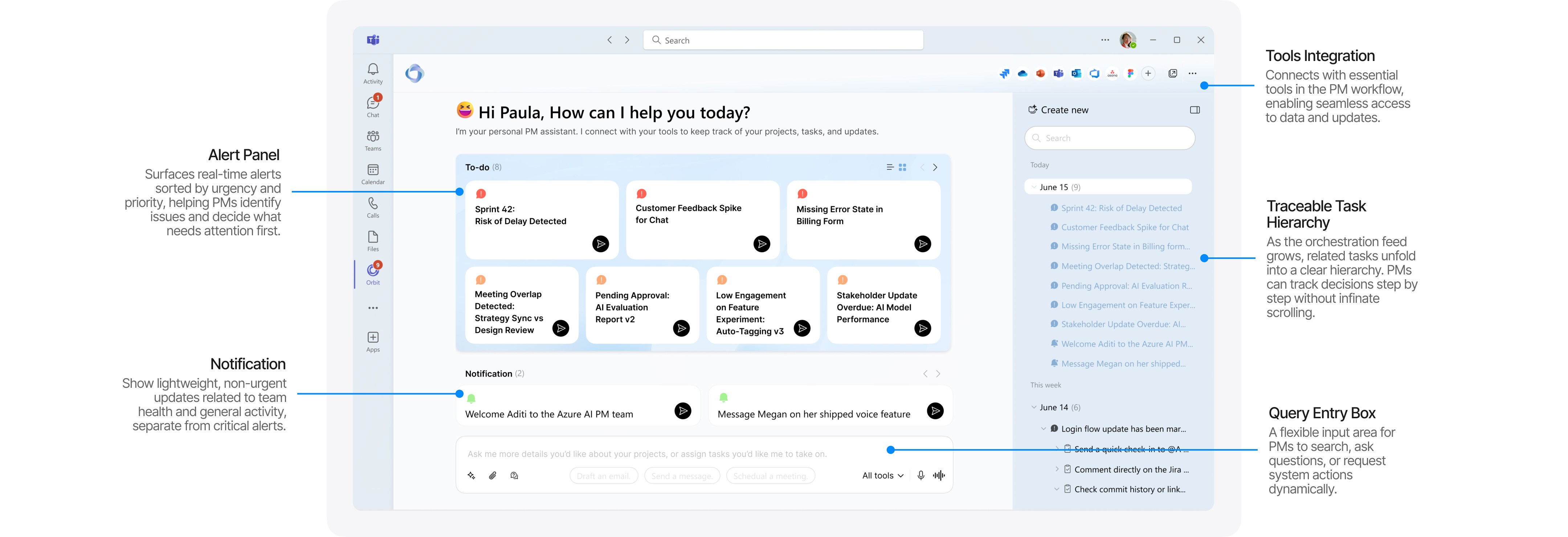
PMs often spend time switching between tools to figure out what needs attention. I brought the key workflow onto one page so PMs no longer need to switch tools. After several rounds of testing, I refined how alerts surface context without overwhelming the screen.
Problem: Fragmented signals made it difficult for PMs to prioritize and respond quickly.
Problem: Fragmented signals made it difficult for PMs to prioritize and respond quickly.
Problem: Fragmented signals made it difficult for PMs to prioritize and respond quickly.
Objective: Enable the system to surface urgent items early with the right context, so PMs can step in before issues escalate.
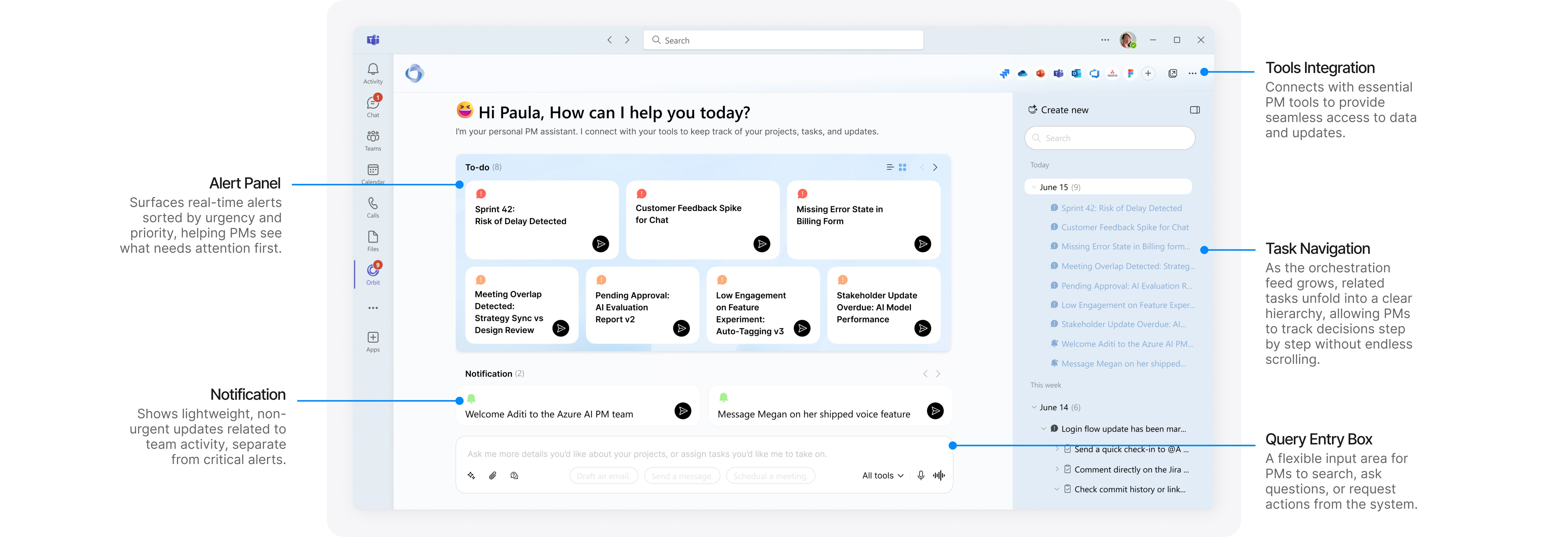
homepage Overview with annotation
Iteration
1
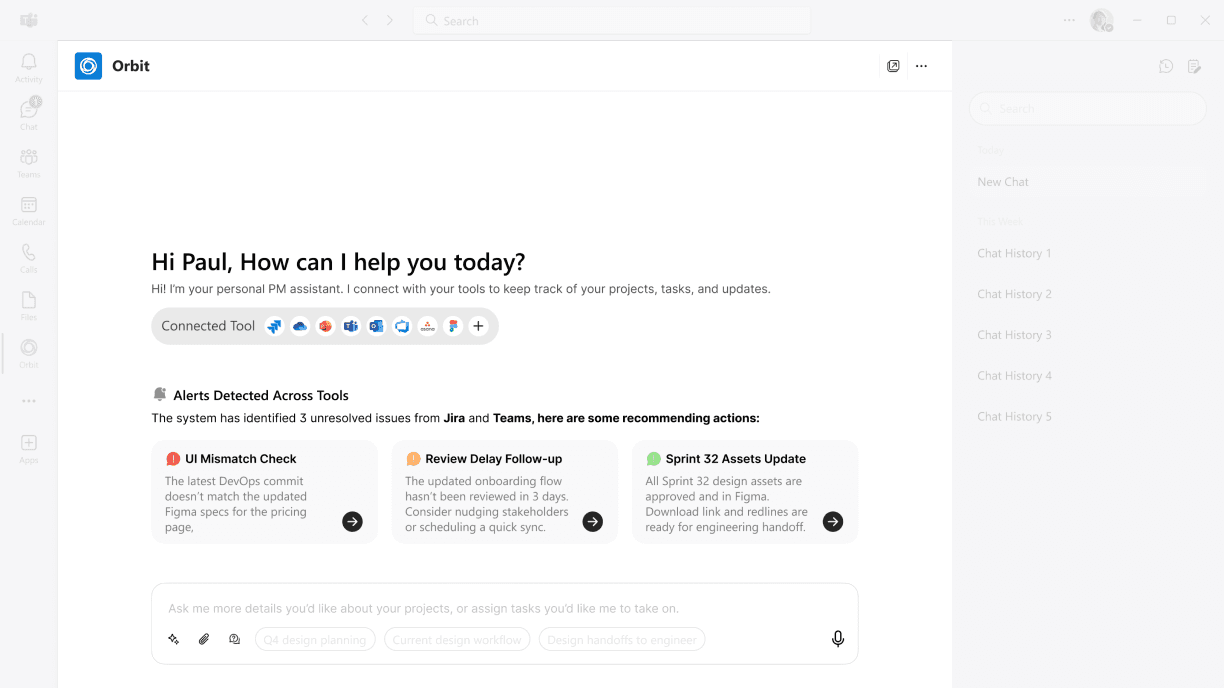
wireframe
I mapped out alerts, tools, and history in one place to understand the structure. While it captured the essentials, the page felt dense and hard to process.
“There’s too much detail. It takes effort to process.”
2
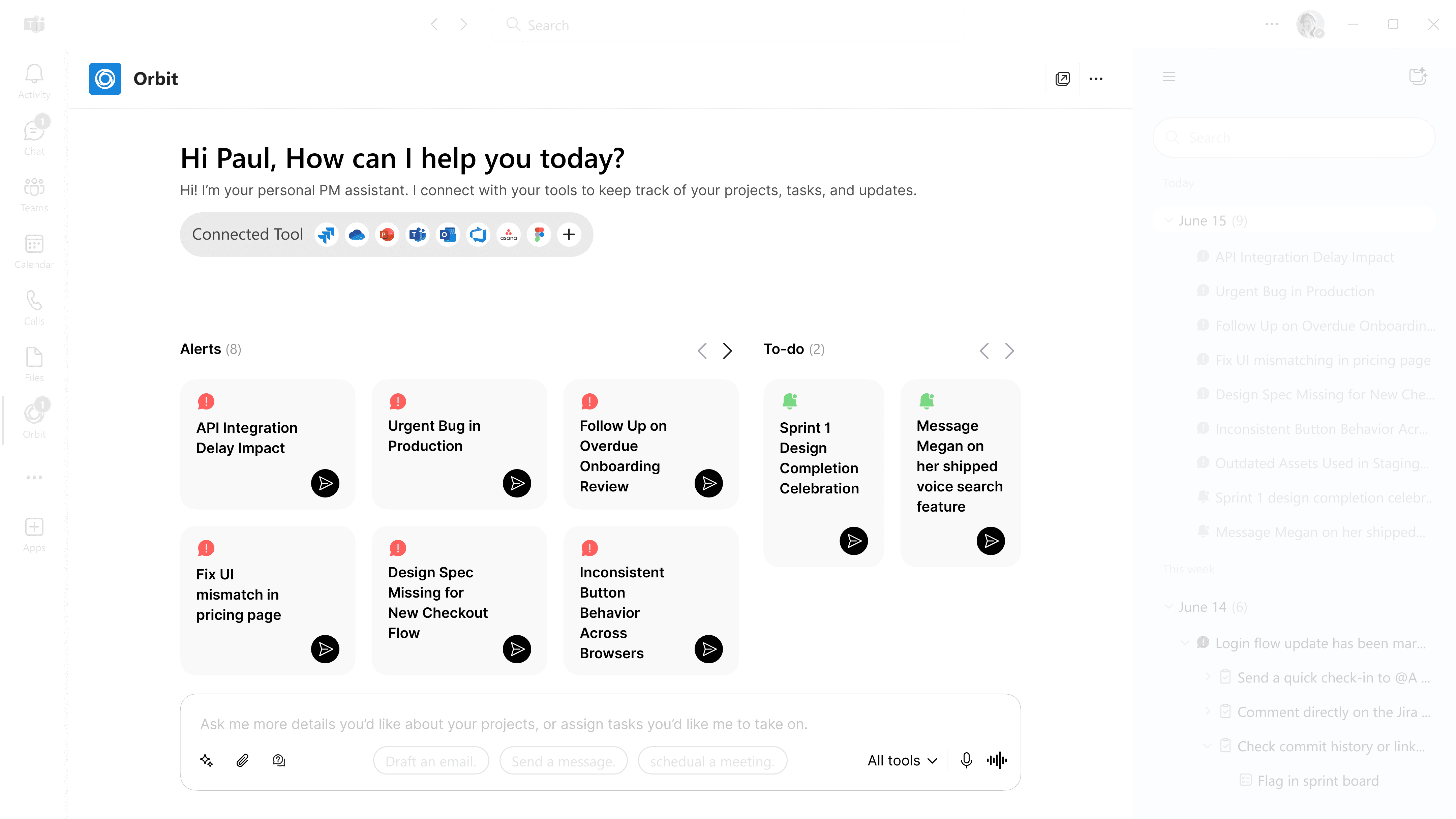
mid-fi Prototype
I explored 2 lighter layouts and tested ways to reveal context more gradually to avoid overwhelming the screen.
“Minimalist version is more aesthetic, but I like seeing everything.”
3
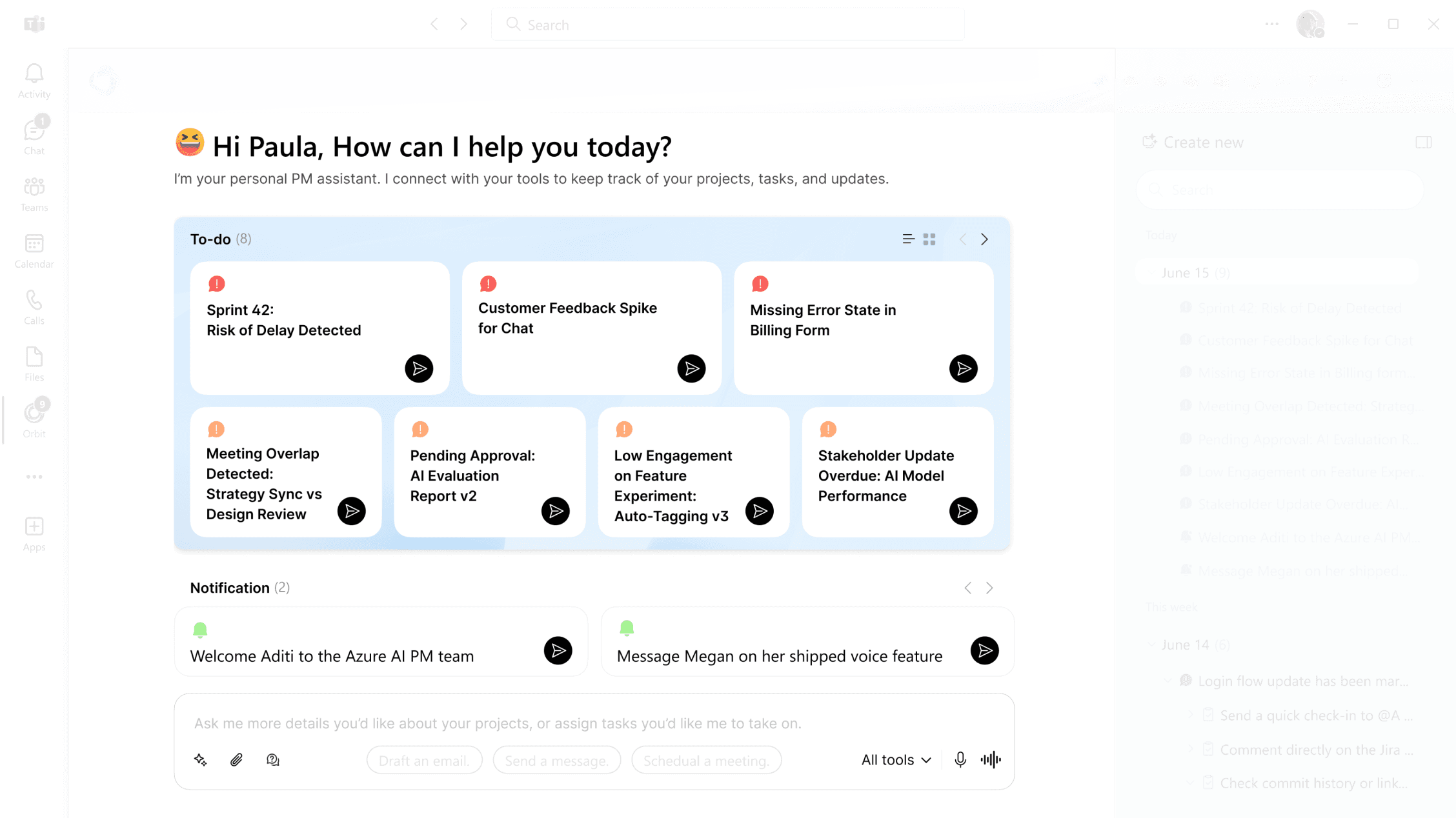
Final design
The final version brings alerts and tasks into one place, so PMs can act quickly without switching tabs. I also added simple entry points for expanding tools when more detail is needed.
“Good to keep positive events (like shoutouts) apart from urgent tasks.”
“It’s great that everything is summarized so I don’t need to track it myself.”
Design Details: Alert Panel & Tool Integration
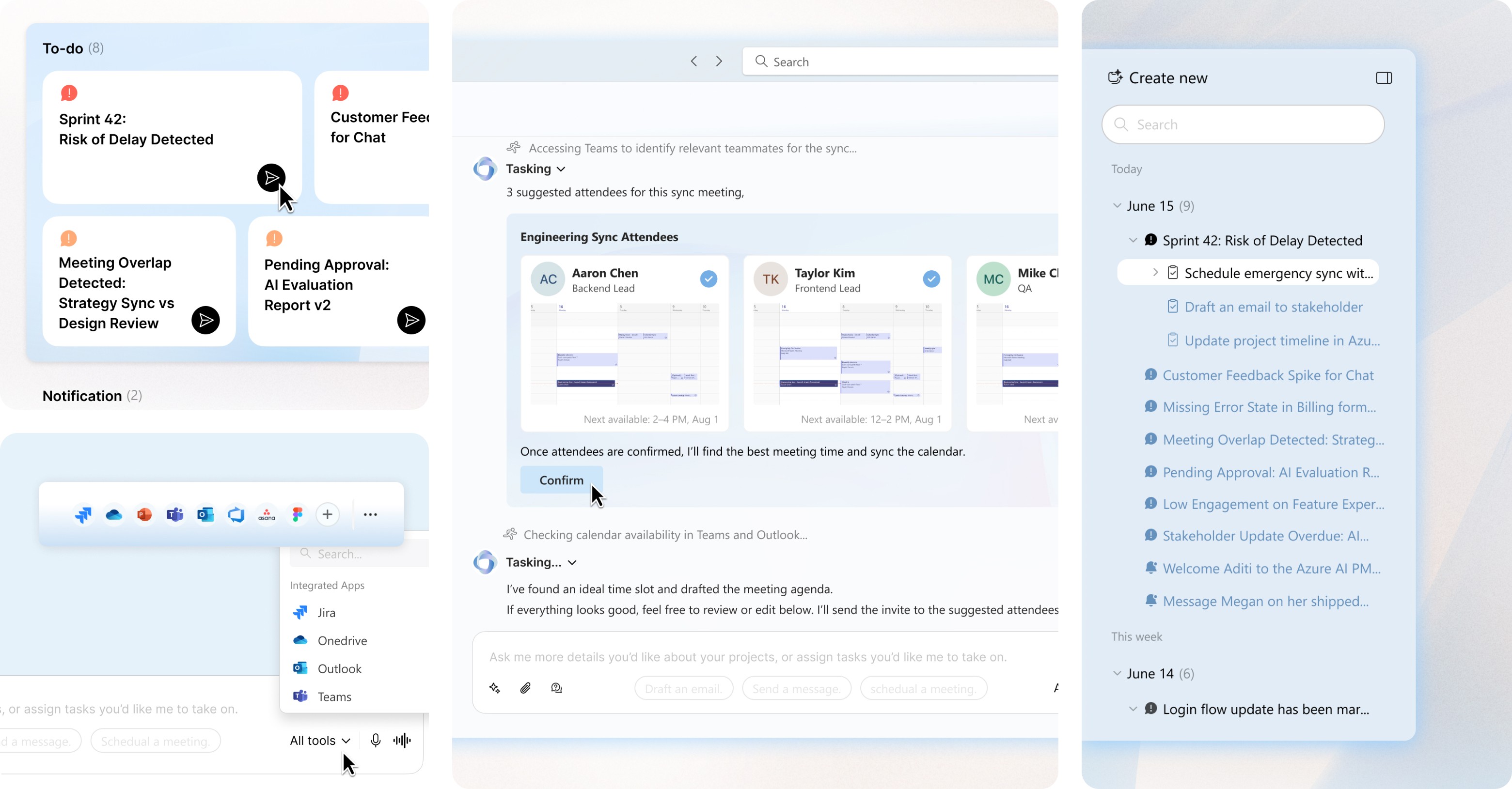
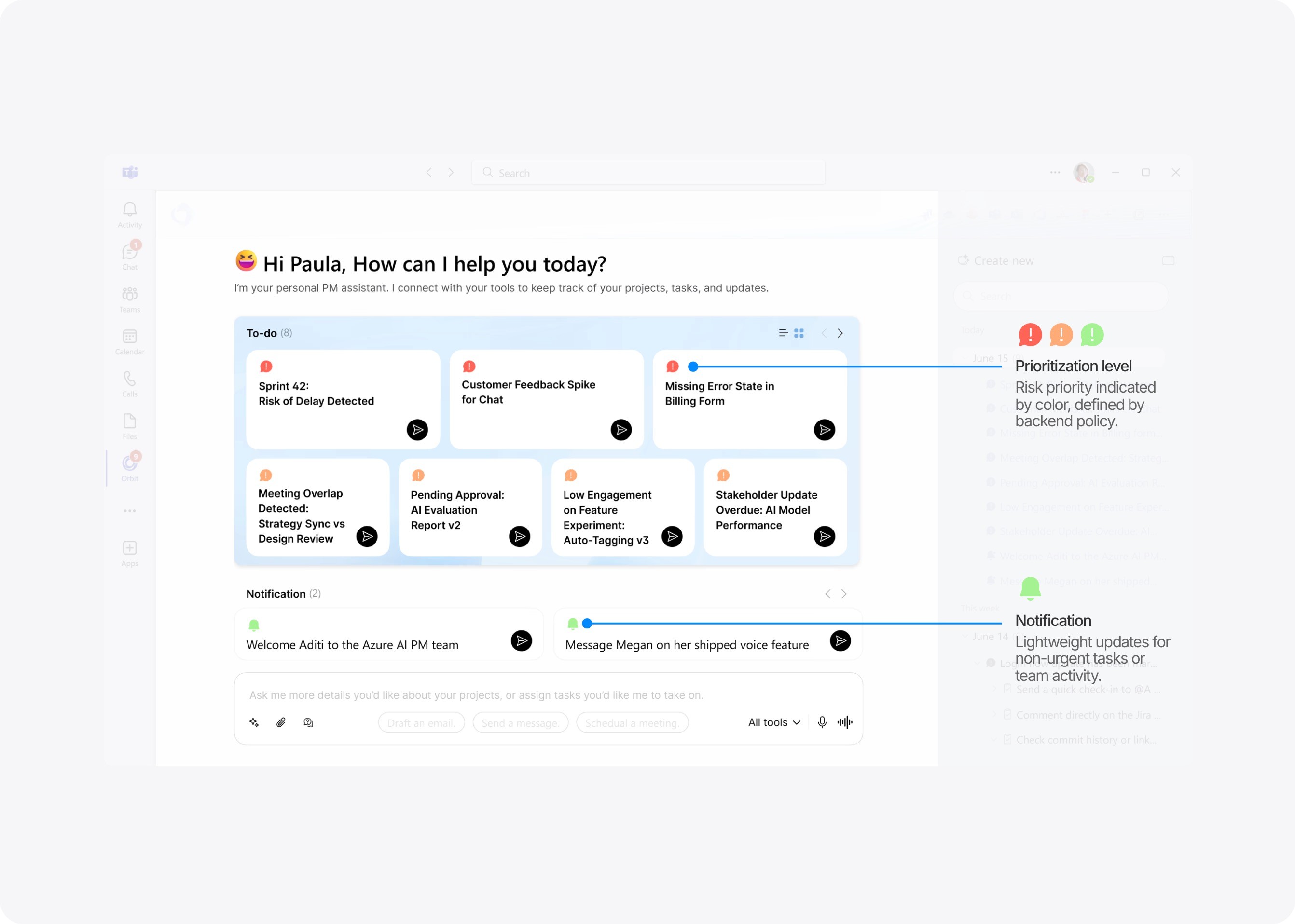
The alert panel becomes the starting point. Each card shows essential context—risk level, related tools, recent activity. Instead of manual checking across Jira or Teams, the agent pulls signals in the background and highlights early risks like delays or bottlenecks.
Notification
Lightweight updates for non-urgent tasks or team activity.
Prioritization level
Risk priority indicated by color, defined by backend policy.
Notification
Lightweight updates for non-urgent tasks or team activity.
Prioritization level
Risk priority indicated by color, defined by backend policy.
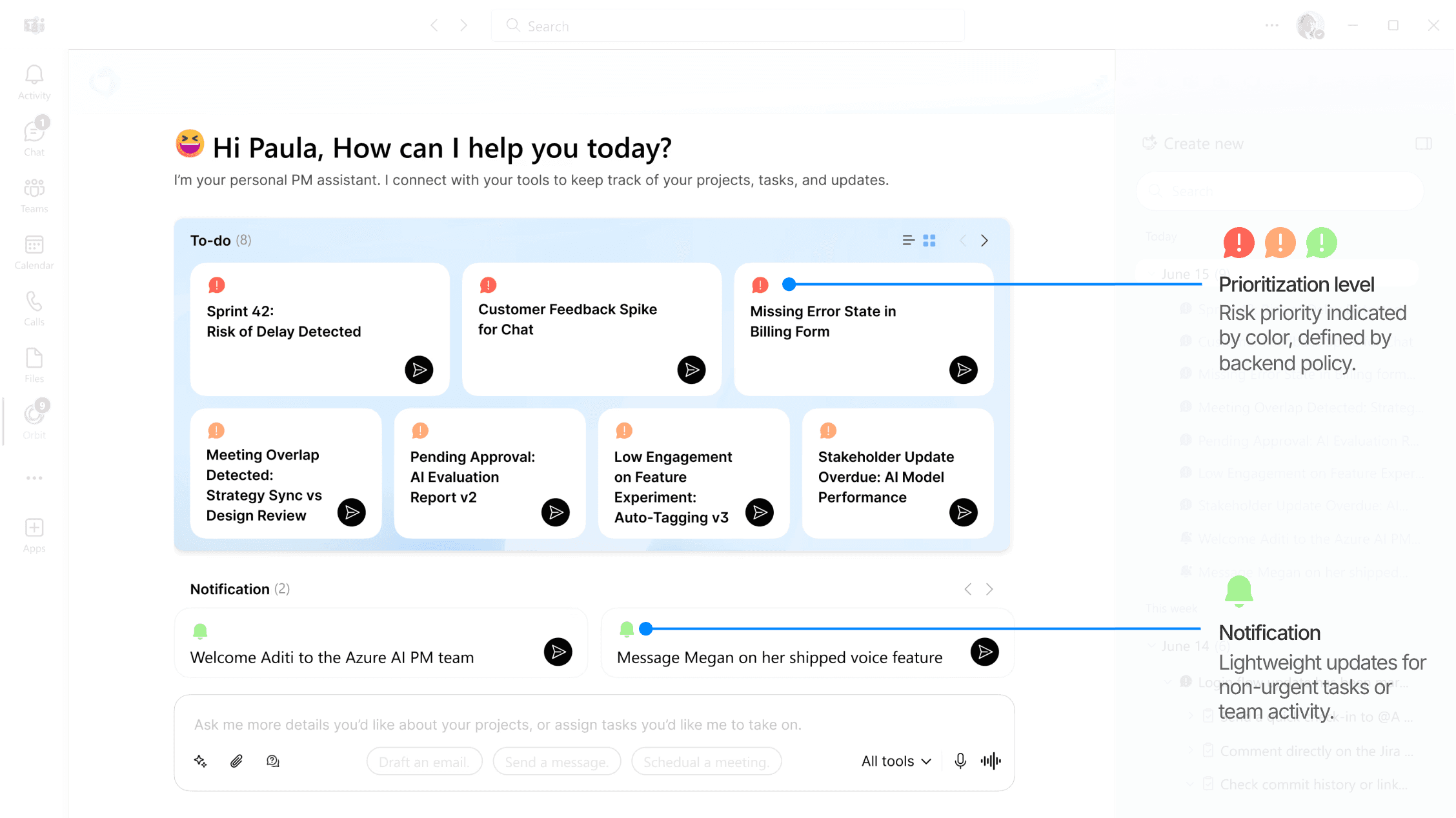
Hover to reveal context and click “send” to trigger the suggested next step
Choose which tools and data sources to include
Choose which tools and data sources to include
How it works : Priority model & alert policy
I built the policy to help the agent act more like a real teammate—one that understands a PM’s goals and calls out what’s worth paying attention to. It works through a hybrid scoring model that turns natural-language inputs into clear priorities, blending weighted scores with critical overrides.
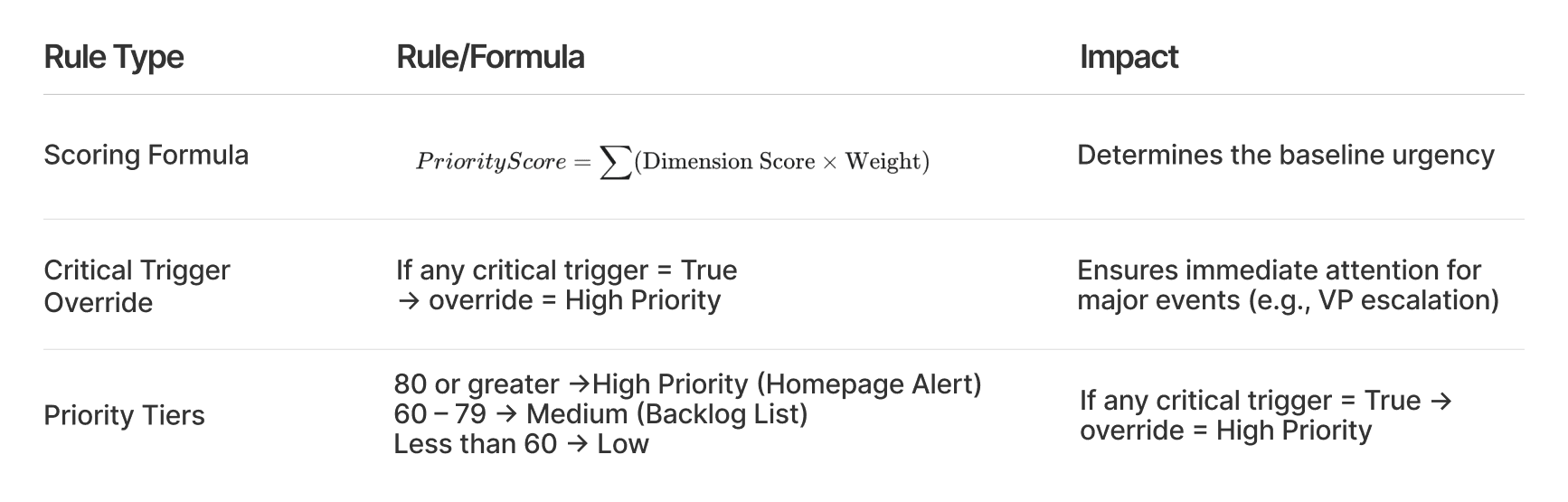
Click to explore the Scoring Strategy 🪄
Click to explore the Scoring Strategy 🪄
Click to explore the Scoring Strategy 🪄
module 2 · understanding
Alert Detail · Suggested Actions With Traceable History
When PMs click into a high-priority alert, the system reveals clear, context-aware next steps instead of starting from a blank input box. Each suggestion is grounded in the signals and tools involved, helping PMs close the loop with confidence.
Problem: PMs often need to translate adjustment plans into actions across teams and tools.
Problem: PMs often need to translate adjustment plans into actions across teams and tools.
Problem: PMs often need to translate adjustment plans into actions across teams and tools.
Objective: Provide trustworthy, actionable next steps with full transparency and traceability.
Iteration
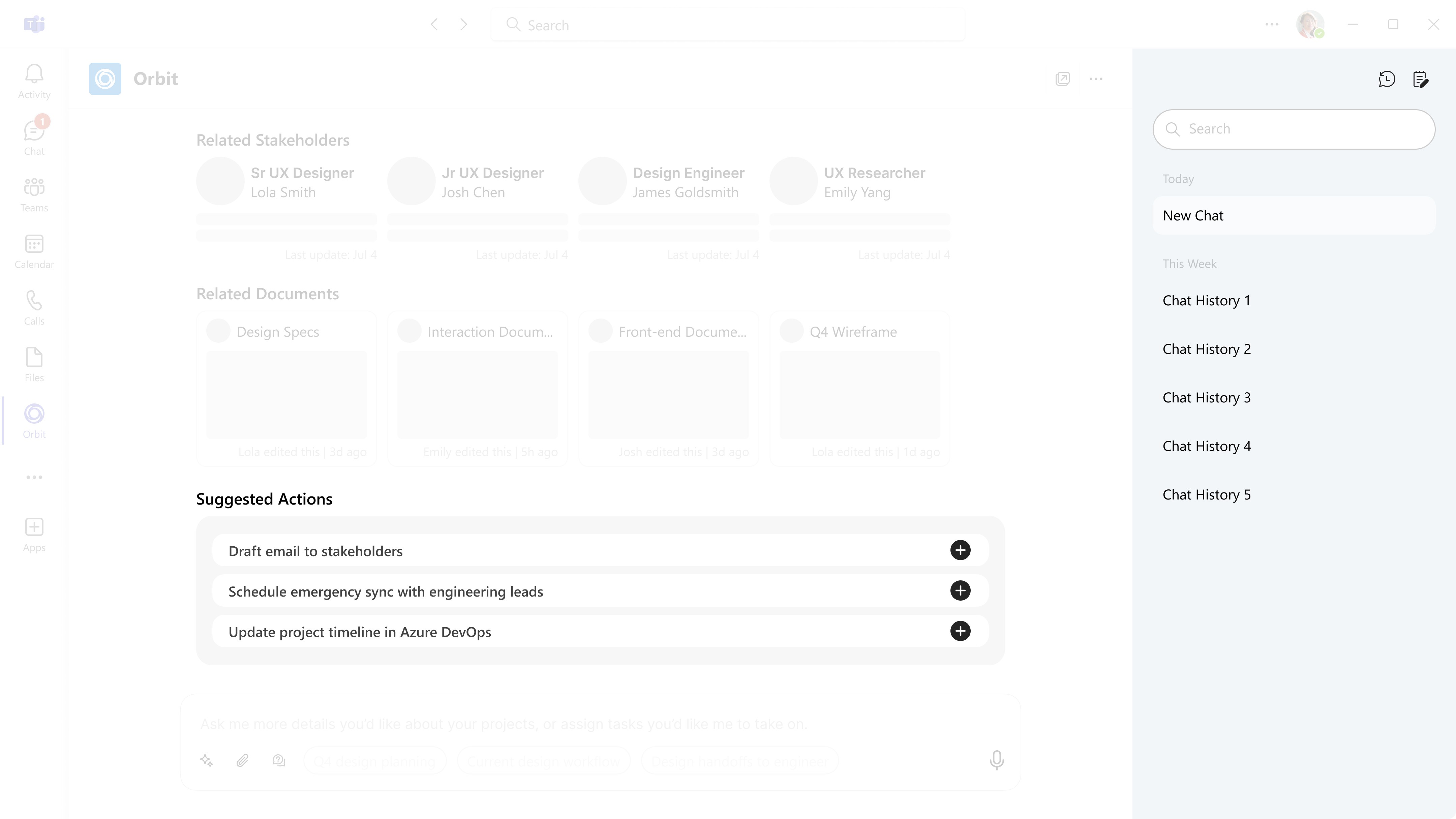
1
wireframe
I started by mapping the initial flow. While this version captured the core idea, the lack of contextual cues made it hard for PMs to act with confidence.
User prefer seeing more context before system generated task suggestions.
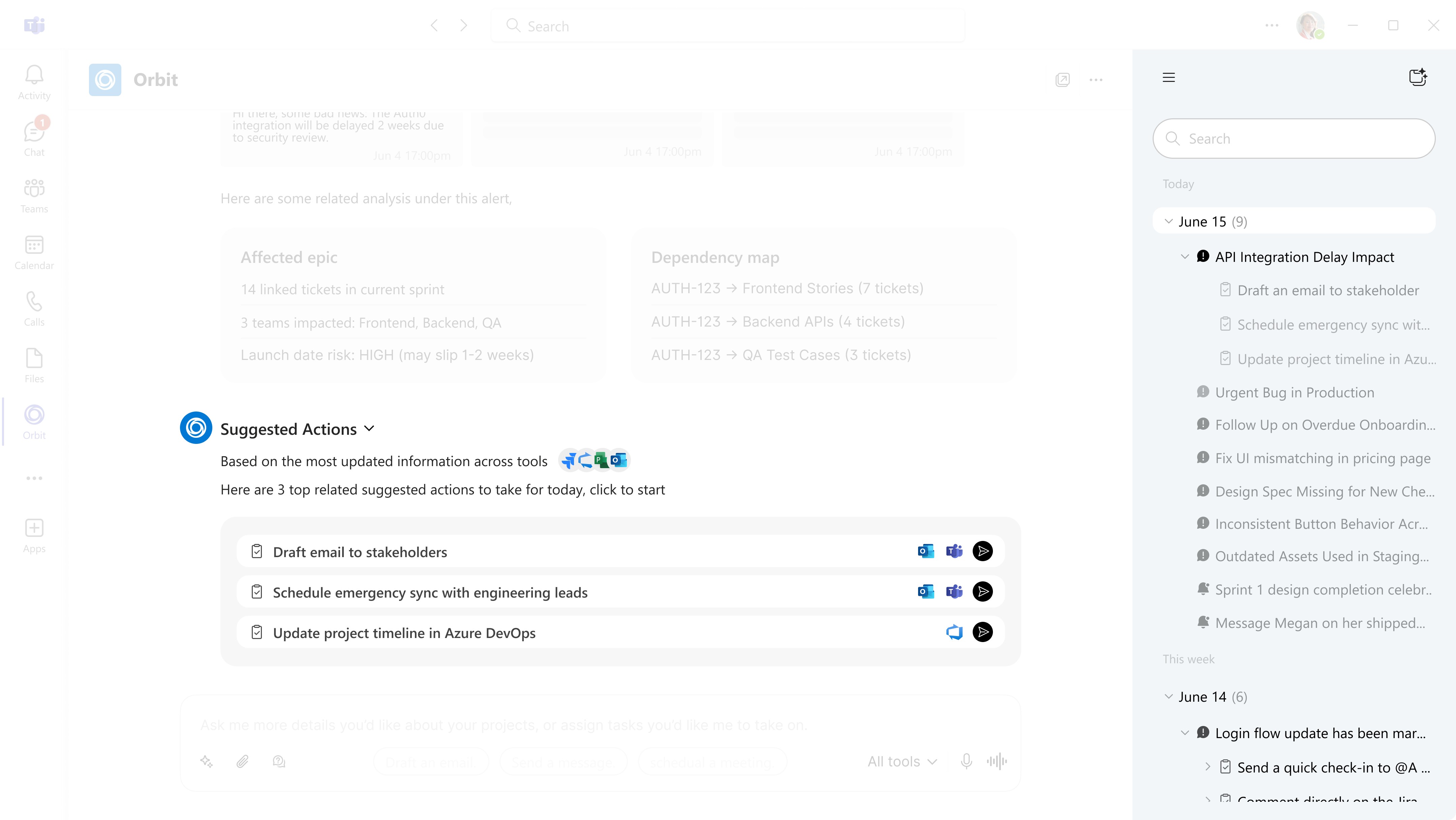
2
mid-fi Prototype
I added clearer context like tools and effort, and redesigned the sidebar into a structured trace view.
User prefers clicking suggested actions over typing queries
3
Final design
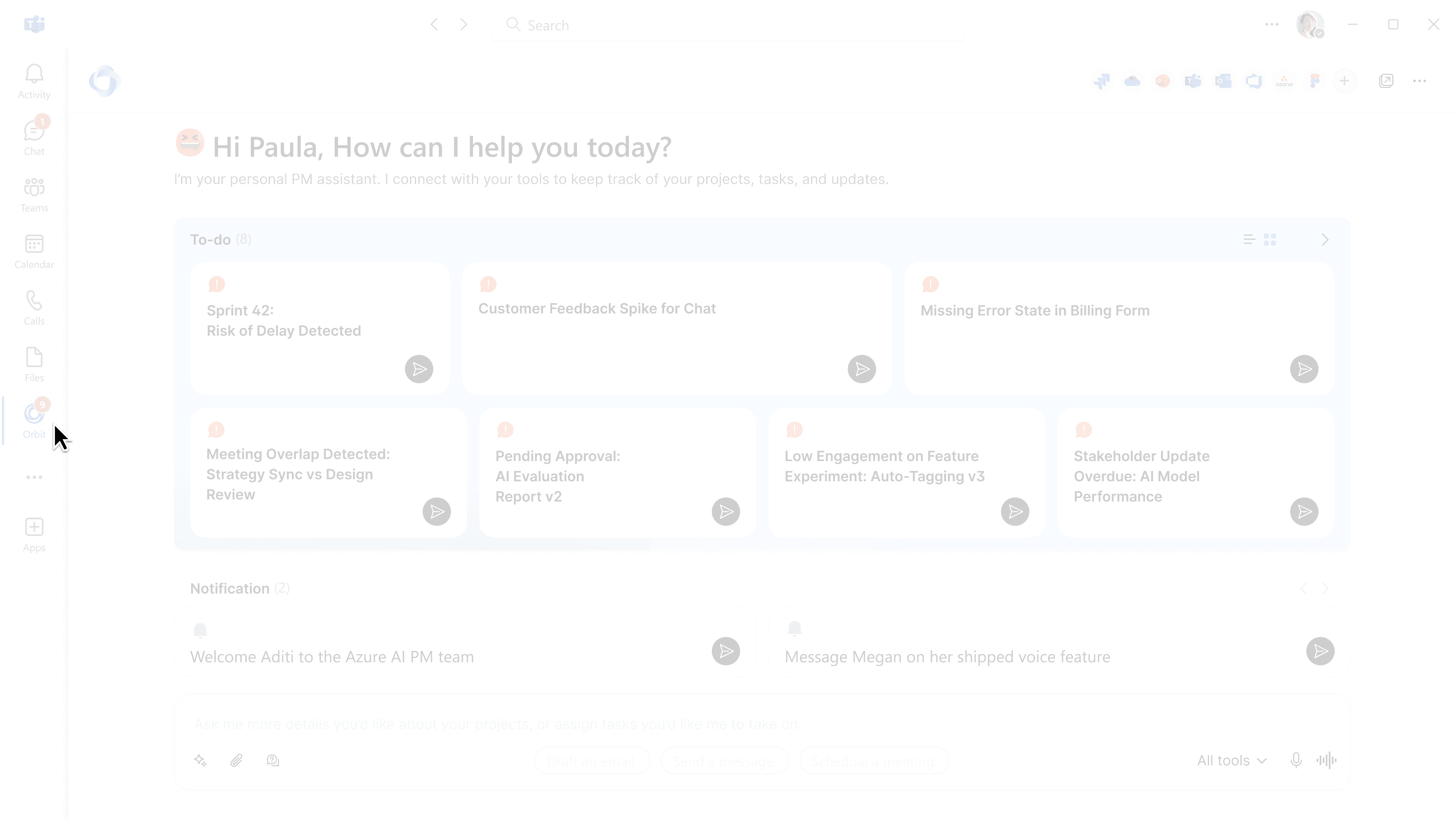
Each step appears in both the main view and the trace sidebar. Color cues show progress at a glance, with details available on click.
“I can get the highlights fast, but also go deeper if I want.” — P4
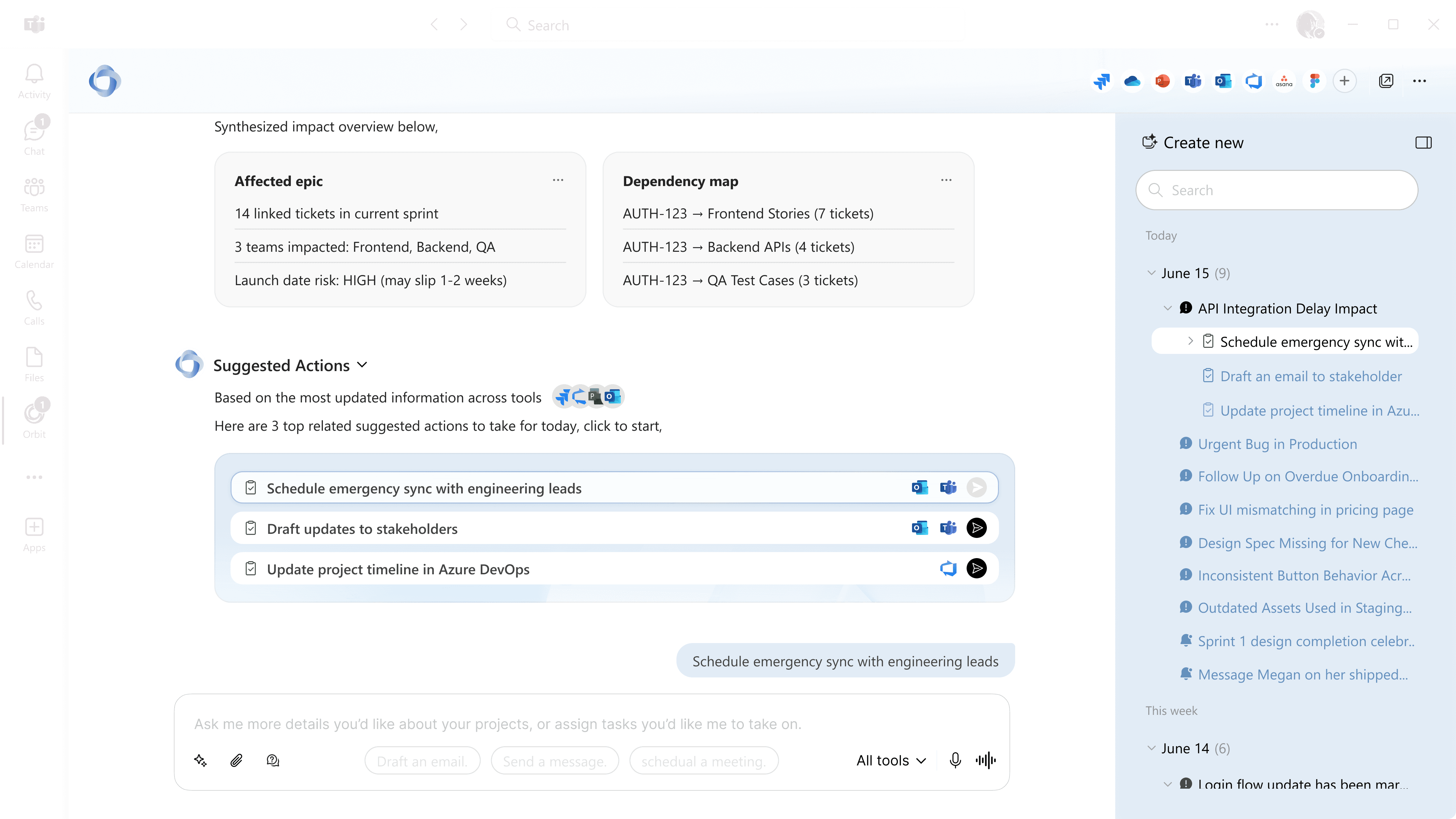
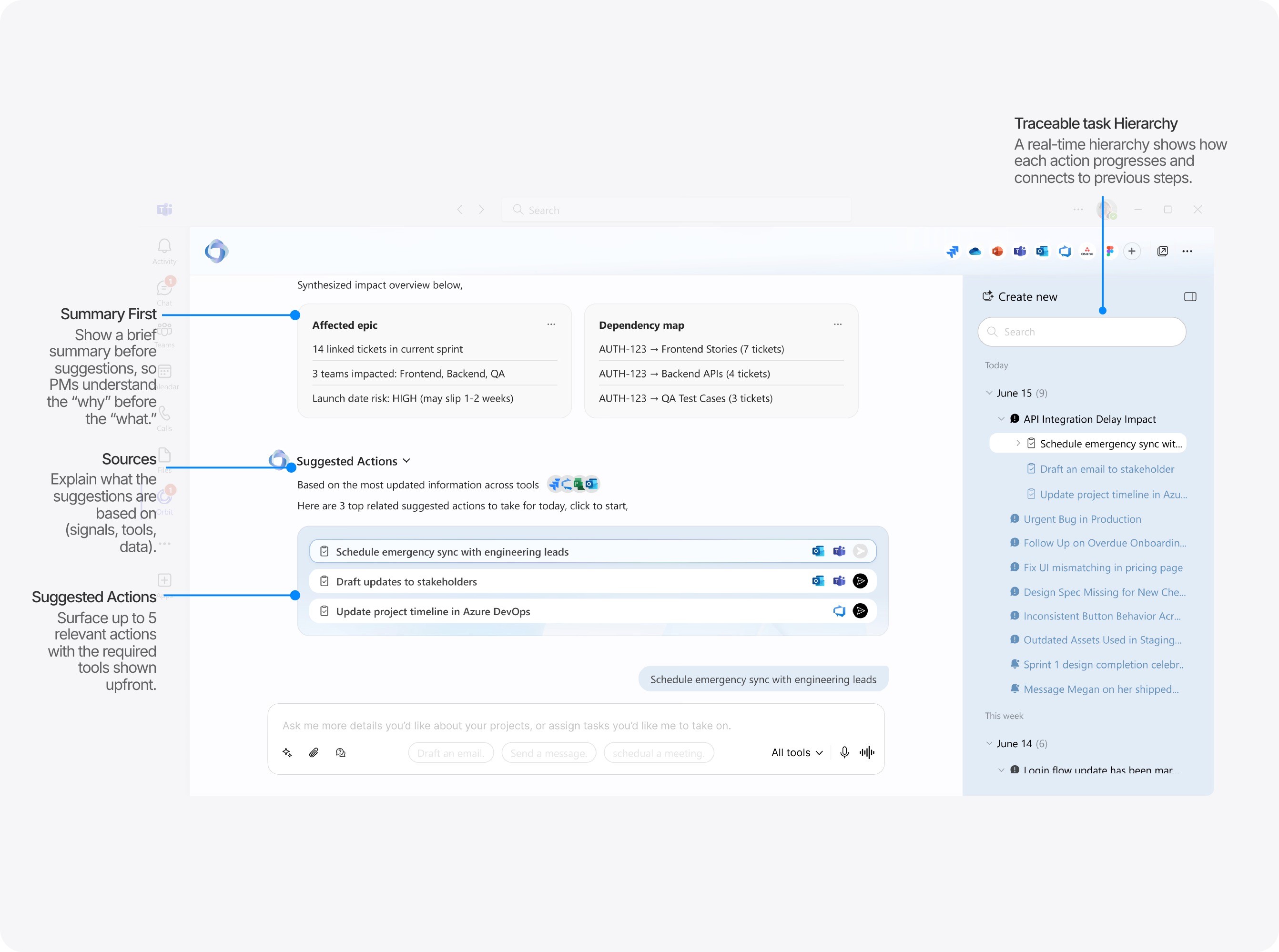
Design Details: Suggested Actions
Summary First
Show a brief summary before suggestions, so PMs understand the “why” before the “what.”
Sources
Explain what the suggestions are based on (signals, tools, data).
Suggested Actions
Surface up to 5 relevant actions with the required tools shown upfront.
Traceable task Hierarchy
A real-time hierarchy shows how each action progresses and connects to previous steps.
Suggested Action Details.
Follow-up actions appear once the main task are done, ensuring all related steps are fully addressed.
Follow-up actions appear once the main task are done, ensuring all related steps are fully addressed.
Closed
Not Started
In Progress
Closed
Not Started
In Progress
Closed
Not Started
In Progress
Closed
Not Started
In Progress
Prioritization level
Locate tasks instantly.
Prioritization level
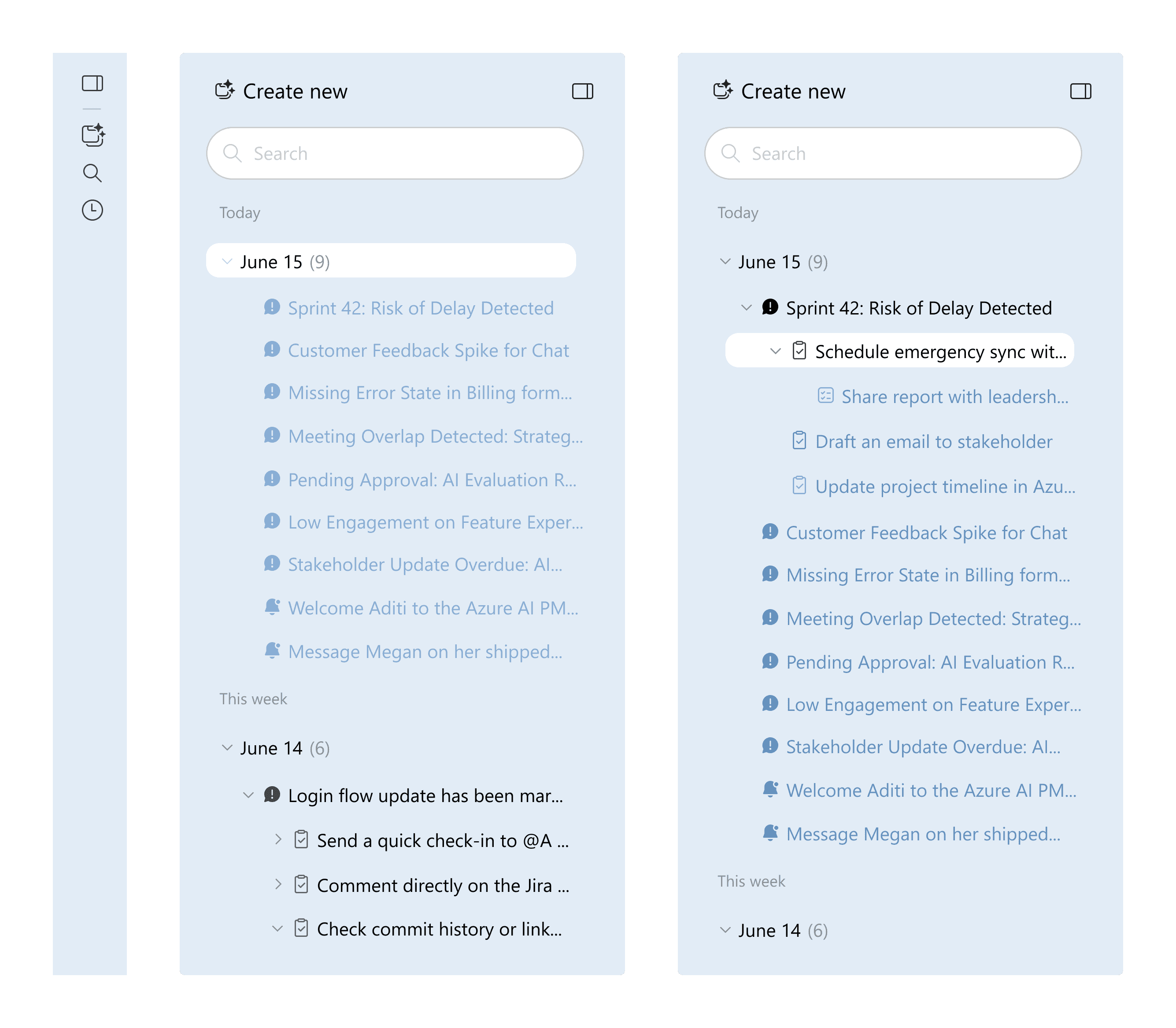
Three levels that show how the workflow unfolds.
alert
The root issue that triggers the workflow.
suggested actions
Recommended next steps with context.
Follow-up actions
Extra actions once main tasks are done.
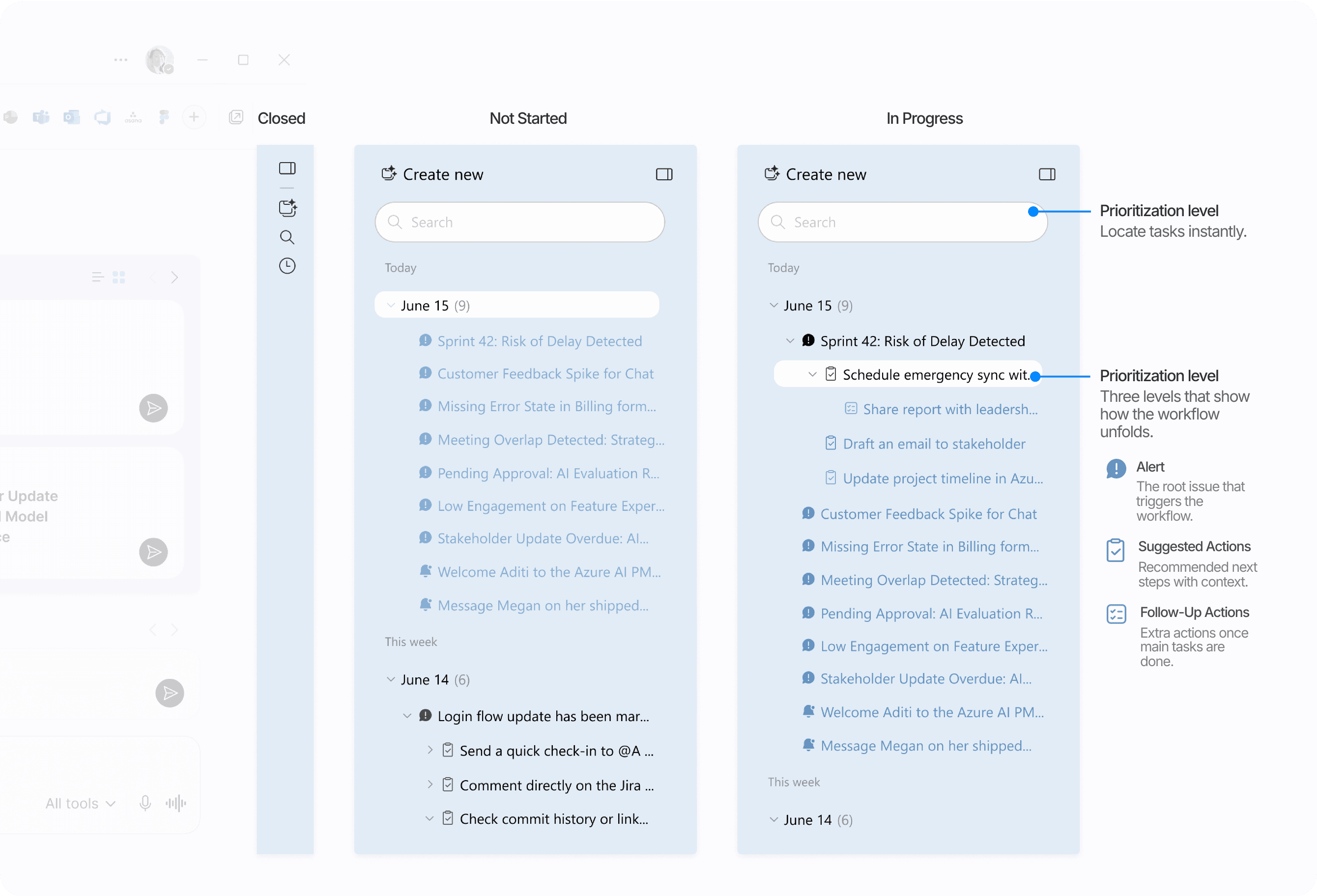
Design Details:
Task navigation
The trace view sidebar organizes the workflow into three levels: alert, suggested actions, and follow-up actions. A clear hierarchy helps PMs navigate steps and track progress at a glance.
1
Annotation
2
Real-Time Traceability
Clear task hierarchy helps PMs navigate steps without endless scrolling.
How I Built the Agent’s Reasoning Guardrails:
Prompt Engineering for Action Control
To help the agent interprete of ambiguous or incomplete input, I defined how it should understand context, extract the information it needs, and resolve uncertainty. These constraints prevent the agent from taking unsupported actions. When information is missing, it asks for clarification, focuses on what matters, and uses that understanding to suggest the next step.
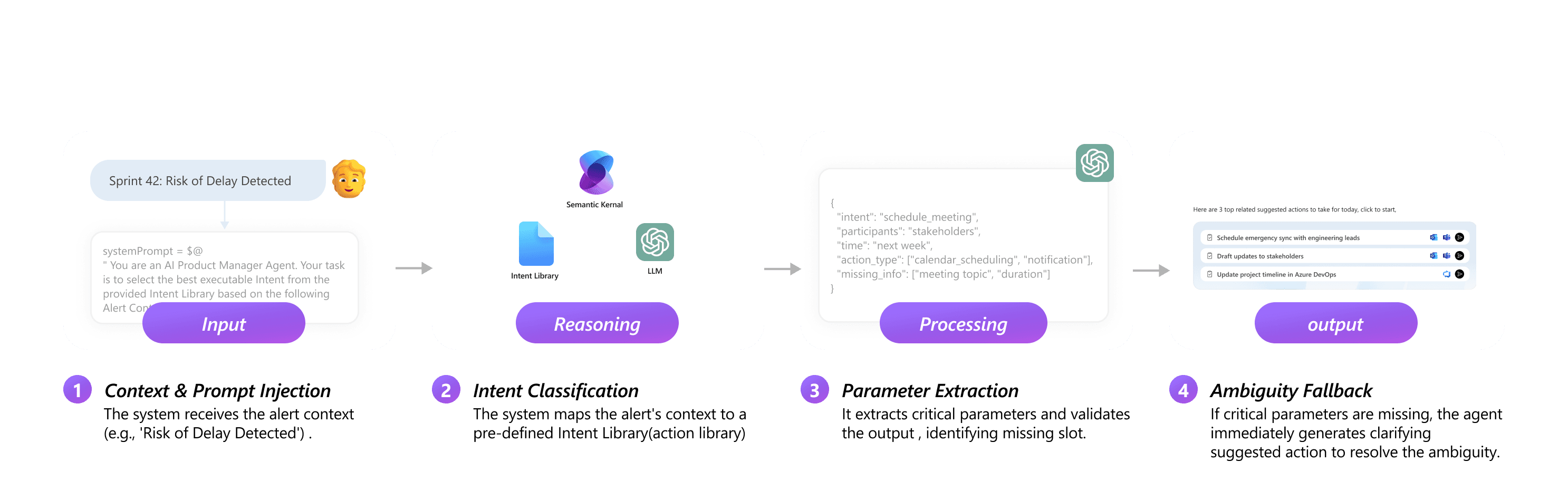
Click to explore the Intent Library 🪄
Click to explore the Intent Library 🪄
Click to explore the Intent Library 🪄
module 3 · orchestration
Orchestration Loop · Streamline Task Automation & Tool Coordination
PMs often know what needs to happen next, but following through means switching tools, repeating updates, and managing small details while keeping an eye on the bigger picture. After building suggested actions, I created the orchestration loop so the agent can take reliable actions for PMs, keep context aligned across tools and teams, and ease the manual work behind each step.
Problem: PMs lose time jumping between tools and tracking updates, which disrupts their flow and slows decisions.
Problem: PMs lose time jumping between tools and tracking updates, which disrupts their flow and slows decisions.
Objective: Enable the agent to handle routine tasks, keep context aligned across tools and teams, and reduce manual work.
Iteration
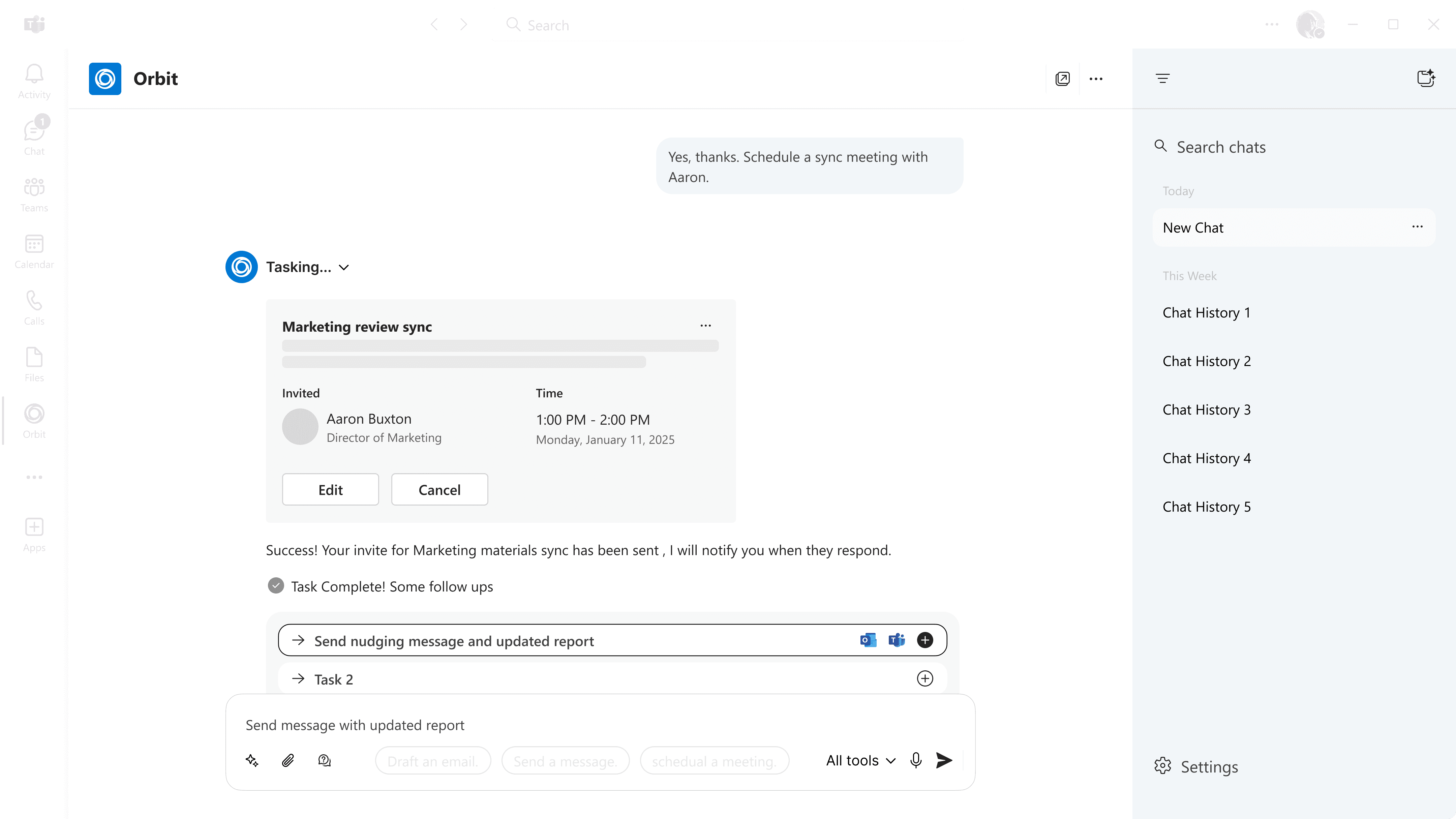
1
wireframe
The early chat-based flow tested basic meeting scheduling, but didn’t reflect real user habits.
"Would still check with team via Teams before finalizing" - P1
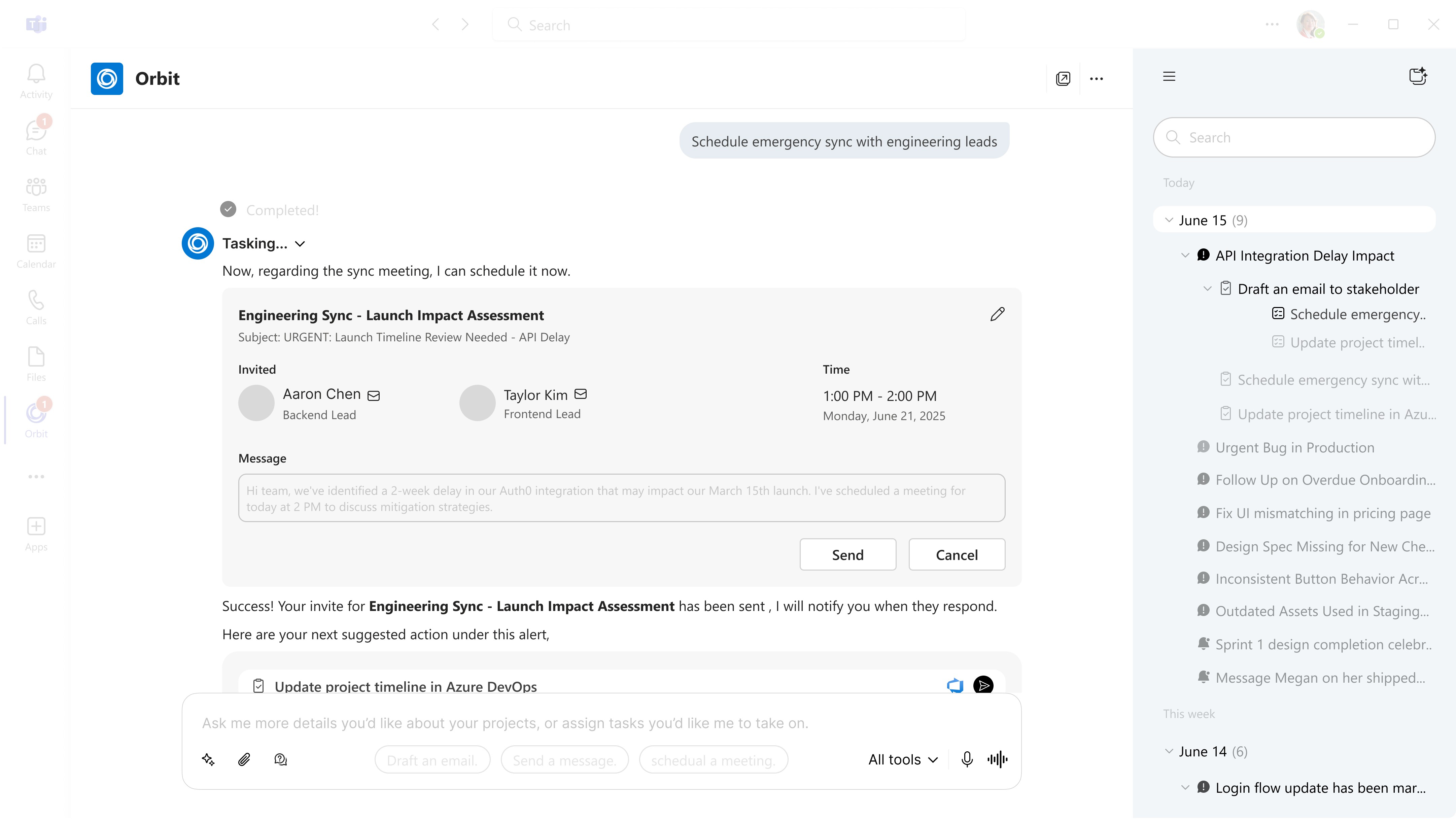
2
mid-fi Prototype
I added context such as tools, effort, and participant availability, and made the sidebar better reflect the task logic.
"I’d like seeing participant availability in their calendar." - P3
User prefer the invite to include an agenda and objective needed.
3
Final design
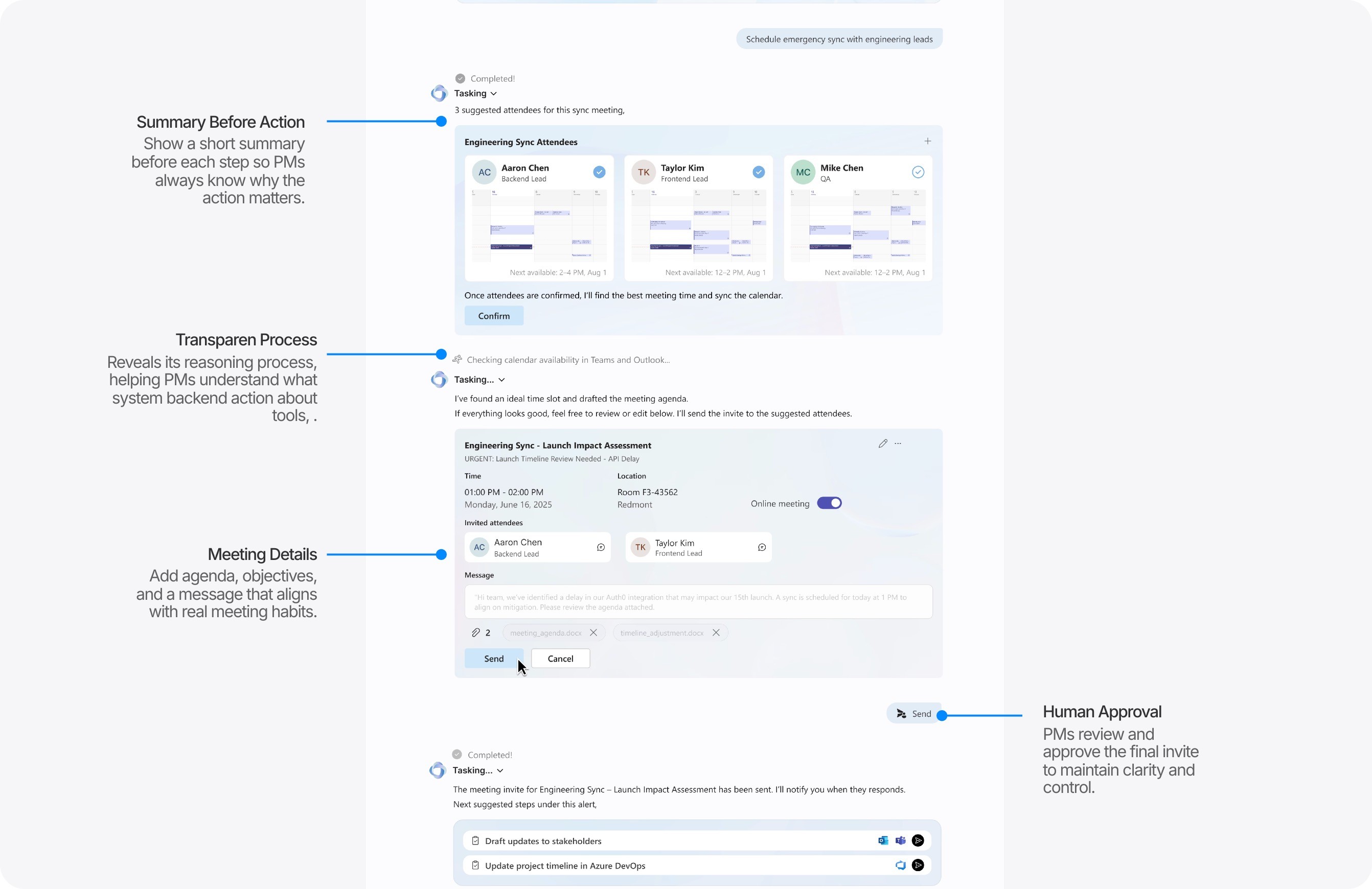
I introduced goal-oriented agendas and objectives. The invite now finds the best time slot, suggests participants, and adds a clear agenda and message before sending.
" It saves time because I don't have to manually check when everybody is free. "
Design Details:
conversational Orchestration for meeting schedualing
The chat panel remains the center of the orchestration loop. Here are a few common task types the system can execute for PMs:
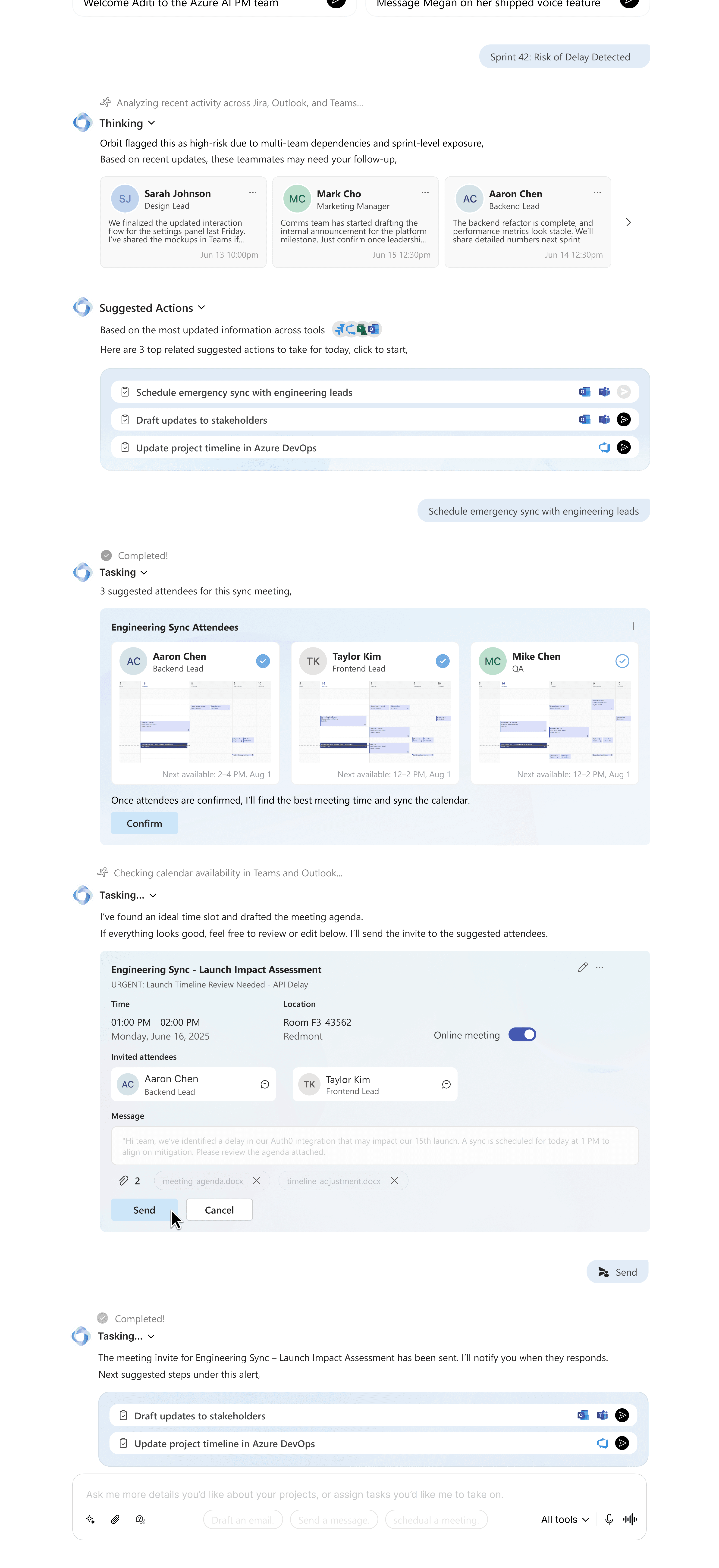
Human Approval
PMs review and approve the final invite to maintain clarity and control.
Summary Before Action
Show a short summary before each step so PMs always know why the action matters.
Transparen Process
Reveals its reasoning process, helping PMs understand what system backend action about tools.
Meeting Details
Add agenda, objectives, and a message that aligns with real meeting habits.
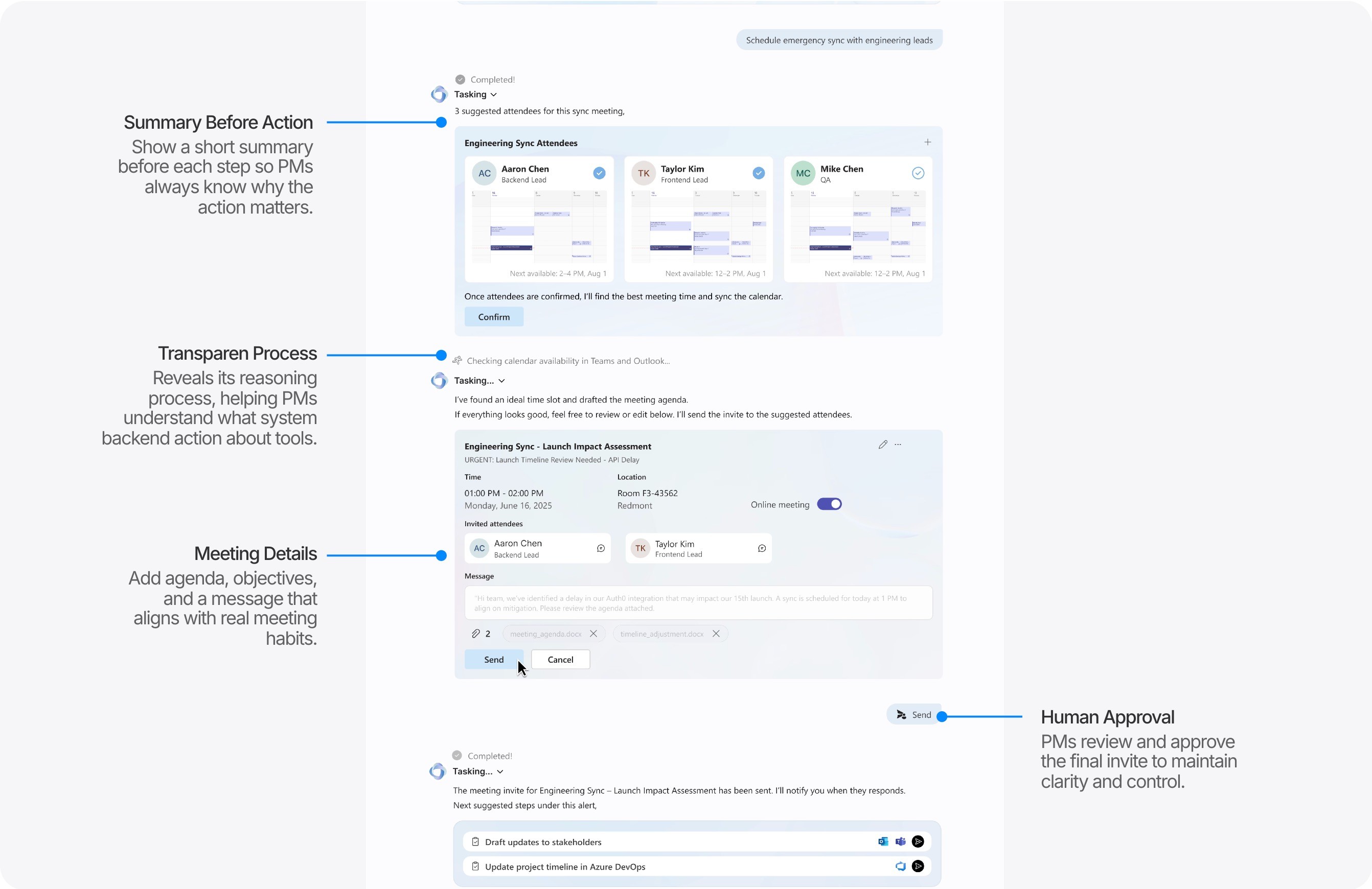
Human Approval
PMs review and approve the final invite to maintain clarity and control.
Summary Before Action
Show a short summary before each step so PMs always know why the action matters.
Transparen Process
Reveals its reasoning process, helping PMs understand what system backend action about tools.
Meeting Details
Add agenda, objectives, and a message that aligns with real meeting habits.
Only the necessary details are shown at each step.
Human Approval
PMs review and approve the final invite to maintain clarity and control.
Summary Before Action
Show a short summary before each step so PMs always know why the action matters.
Transparen Process
Reveals its reasoning process, helping PMs understand what system backend action about tools, .
Meeting Details
Add agenda, objectives, and a message that aligns with real meeting habits.
Human Approval
PMs review and approve the final invite to maintain clarity and control.
Summary Before Action
Show a short summary before each step so PMs always know why the action matters.
Transparen Process
Reveals its reasoning process, helping PMs understand what system backend action about tools, .
Meeting Details
Add agenda, objectives, and a message that aligns with real meeting habits.
Add or remove attendees with clear availability.
Additional Agent Capabilities
Additional Agent Capabilities
1
Automated
Email Drafting
The agent drafts emails based on the alert context and the people involved.
PMs can review, edit, and send with one click.
The agent drafts emails based on the alert context and the people involved. PMs can review, edit, and send with one click.
2
Personalized
Stakeholder Updates
The agent prepares updates for different audiences, adjusting tone and content automatically.
PMs can make edits before sending.
3
Generating Documents
The agent generates docs or specs from a theme or outline.
PMs can edit in parallel with the document open on the side.
Validation
& Metric
validation
Product Validation · Demonstrated Value in Real PM Workflows
What i Learned
💡 PMs trusted the system more when it revealed reasoning and kept them in control.
💡 Automation felt valuable only when context alignment across tools was correct.
💡 The orchestration loop reduced cognitive load by eliminating repetitive cross-tool steps.
💡 PMs trusted the system more when it revealed reasoning and kept them in control.
💡 Automation felt valuable only when context alignment across tools was correct.
💡 The orchestration loop reduced cognitive load by eliminating repetitive cross-tool steps.
💡 PMs trusted the system more when it revealed reasoning and kept them in control.
💡 Automation felt valuable only when context alignment across tools was correct.
💡 The orchestration loop reduced cognitive load by eliminating repetitive cross-tool steps.
Quantitative Impact
To ensure the agent works in real PM environments, we validated the product by :
Included 8+ experienced PMs across Microsoft and SMEs.
Tested core PM tasks flow: scheduling, drafting updates, stakeholder communication, document generation.
Measured task quality, cost, and consistency through interview and survey.
Adoption intent after contextual evaluation
100%
Average reduction in manual meeting scheduling effort
25%
Usability score compared with prompt-based workflows
4.5/5
Stakeholder Feedback
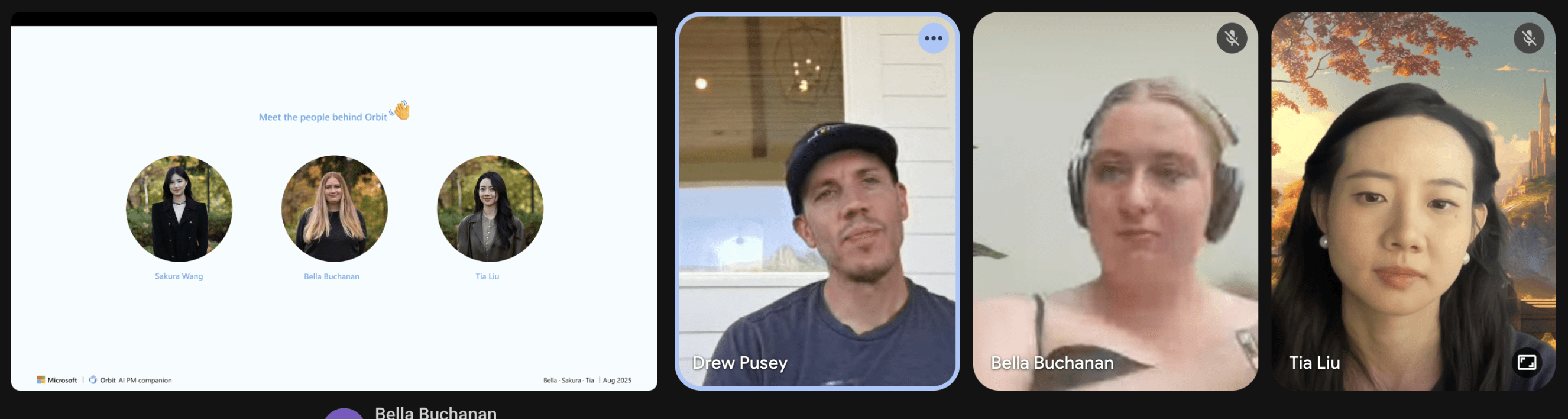
“It’s good that you’re not just designing AI for automation — you’re thinking about how it works with people.”
“It’s good that you’re not just designing AI for automation, you’re thinking about how it works with people.”
- Microsoft Principal PM
"It shows your awareness of the broader market and how this might expand.”
- Microsoft Lead Designer
- Microsoft Design Studio Head
Takeaways
& Reflections
Set Up Guardrails and Evaluation Early
Set Up Guardrails and Evaluation Early
Clarifying what the agent covers, how deep it goes, and what data it uses made everything more predictable. Setting these boundaries early kept the system steady and easier to work with.
Help PMs and Teams Reach Decisions Together
Help PMs and Teams Reach Decisions Together
PMs and their teams often struggled to move decisions forward. To take this further, I’d bring them into more co-design sessions so they can try things out and shape how the agent actually helps close decisions.
Design the Agent to Sound Like a Real Teammate
Design the Agent to Sound Like a Real Teammate
When the agent explained why, trust increased. I’d establish quality standards earlier and use more natural, conversational language from the start so the agent feels less like a tool and more like a real team member.
Make Privacy and Transparency Part of the Experience
Make Privacy and Transparency Part of the Experience
Privacy and transparency are core to the UX. Making data access explicit and revealing the agent’s steps helped the experience feel more trustworthy.
CHALLENGE
Redefining What a Trustworthy Human–AI Collaboration Looks Like in Enterprise Workflows.
Most AI assistants today focus on automation, but they don’t help teams make real progress together. In this project, I explored how AI could go beyond automation to become a reliable partner in decision-making, communication, and alignment across enterprise workflows.
a Role-Specific AI Agent for product managers
Trusted · Context-Aware · Embedded in the Enterprise Environment
overview
To address the growing complexity of product management, this solution tailored to PM workflows. It leverages Azure AI capabilities to connect tools, surface insights, and support decisions through transparent reasoning and human-in-the-loop validation. The design is guided by three principles.
Role-Specific Agent for PMs’ Intent
Not a generic AI assistant, but one designed around how PMs plan, align, and deliver work.
Transparent Reasoning for Trusted Collaboration
Every suggestion follows a clear logic. PMs can trace the “why” behind each action.
Embedded in Existing Flow and Context
Built into Microsoft 365, it works seamlessly across Teams and other tools to remove adoption barriers.
Bringing AI-powered clarity to PM workflows in Microsoft 365
Final design
Unlike tools that stop at dashboards or spec generation, I designed this companion to help product managers focus on strategy and decision-making with their teams. It predicts risks, automates recurring tasks, and aligns stakeholders through transparent reasoning—all within the familiar Microsoft 365 environment.
Proactive Alerts with Next-Step Suggestions
Turns scattered progress into clear, timely signals. Built on product principles and rule-based logic, it spots risks early and suggests actions before issues grow.
Streamlined Automation
Handles meeting prep, document drafts, and scheduling automatically.
Every action is transparent and reviewable, keeping PMs in control while reducing manual overhead.
Role-based alignment
Generates updates tailored to each role and tone, keeping everyone aligned without extra effort.
Demonstrating How Trusted AI Interactions Make Work Smarter and Faster
impact
I improved day-to-day efficiency for PMs and their teams by creating clearer workflows and building trust in AI-supported decisions.
Validated With 15+ Professionals
Ran user interviews and co-design sessions with Microsoft PMs to map real workflows and challenges.
Achieved 100% Adoption Intent in Concept & Usability Testing
“I could see myself using this soon.” – P3, PM from Microsoft
Improved Task Efficiency by 25%
Tested with Microsoft PMs and observed a 25% gain in recurring task speed, accelerating internal product delivery.
I also expanded the project’s reach by contributing to broader conversations on Human + AI collaboration across academic and industry groups.
Design Show Case
@ University of Washington
Shared project outcomes and research insights with the DUB community and industry mentors.
Evaluated With Internal Stakeholders From Microsoft
“It really shows your awareness of the market and how this could expand.”
Seattle Design Festival Showcase, 2025
Presented on the main stage at the festival’s technology breakthrough track.
Research
Understanding the Evolving Challenges
in PMs’ Daily Workflow
USER RESEARCH
To understand how product managers navigate their daily workflows, we conducted mixed-method research combining semi-structured interviews and mind-mapping sessions. This study explored how PMs manage the complexity of roadmap planning, task prioritization, and cross-team communication, revealing the real pain points behind their day-to-day work.
Study Objective
Identify key challenges in roadmap creation and feature prioritization.
Observe how PMs interact with current tools (Jira, Confluence, Slack, etc.) and where gaps emerge.
Learn how PMs access and synthesize insights to guide decisions.
Examine how PMs tailor communication for different stakeholders.
Discover opportunities for AI-assisted collaboration and decision support.
mind-mapping session (15min) + Contextual interview (45min)
We prompted participant to map out their Product Creations Flows including tools, and areas where challenges occur.
Through this, let them to walk us through Helped PMs Introspect More Deeply On Their Workflows.
We then proceeded with an interviewing focusing on the mind-map where we:
Why PMs Often Face Similar Challenges and Where the Opportunities Are
research Insight
Ideation
Shifting Focus From Automation to Collaboration
Problem reframing
Through research, I found that PMs’ main challenge isn’t about having too much to do — it lies in managing constant changes and keeping everyone aligned. Most tools focus on efficiency, automating tasks without understanding why PMs make decisions or how context shifts affect overall plans.
From Managing Tasks to Orchestrating Collaboration
Concept exploration
After reframing the problem, I mapped the current PM workflow to see where time and effort go. Then, I explored how AI could step in — not to replace PMs, but to handle repetitive coordination so they can focus on strategy and human context.
The ‘Magic Wand’ Moment ✨
A Super Assistant That Understands Your Intent, Acts Before You Do
During our exploration, a PM’s remark sparked a new direction: What if AI could think, observe, and act like three coordinated assistants? That question became the foundation of an agentic model — that interprets intent, connects signals, and acts proactively, with people still in control.
To see how this could work, I mapped a lightweight system that keeps humans in the loop with minimal effort. It functions like three synchronized agents that think, observe, and act, designed to fit within Microsoft’s existing ecosystem.
From Reactive Chatbots to Proactive Orchestration
🙋 How Design Went Beyond Copilots and Dashboards
IDEATION
After several iterations, we landed on the final prototype. Early versions focused on task execution, but without context or human involvement, everything felt mechanical, as if tasks appeared out of nowhere. Here’s how the design evolved through each iteration.
1 · Defining Core Requirements
The layout evolved from three key module
System Setup
Tool Integration (P0)
Orchestration Feed (Chat)
Alerts Panel: Alert → Context → Suggested Actions (P0)
Query Entry Box: Customized Action Feed (P1)
Track History
Side Navigation for Task History (P1)
Showing how the modules came together
Final sketch visualizing the orchestration flow
2 · Ideating Through Sketches
I visualized the orchestration flow through quick sketches.
Instead of a static query box, each alert opened into a growing thread of context, suggestions, and next steps, shifting the system’s role from responding to orchestrating.
3· Building an Agent-Led Workflow
Proactive → Contextual → Collaborative → Traceable
Design principles and guidelines
for building trustworthy agentic experiences
DESIGN PRINCIPLE
I created these principles to guide how I design agents that truly help people work better together. The goal is to make agent feel like a reliable collaborators - a systems that are sustainable, understandable, and centered on people at every step. These ideas shaped each design decision in the final MVP, defining how the agent thinks, communicates, and grows with its users inside real enterprise environments.
Prototyping
& iteration
Homepage · Proactive Alerts & Connected Tools
module 1 · request
PMs often spend time switching between tools to figure out what needs attention. I brought the key workflow onto one page so PMs no longer need to switch tools. After several rounds of testing, I refined how alerts surface context without overwhelming the screen.
Problem: Fragmented signals made it difficult for PMs to prioritize and respond quickly.
Objective: Enable the system to surface urgent items early with the right context, so PMs can step in before issues escalate.
homepage Overview with annotation
Iteration
1
wireframe
I mapped out alerts, tools, and history in one place to understand the structure. While it captured the essentials, the page felt dense and hard to process.
2
mid-fi Prototype
I explored 2 lighter layouts and tested ways to reveal context more gradually to avoid overwhelming the screen.
3
Final design
The final version brings alerts and tasks into one place, so PMs can act quickly without switching tabs. I also added simple entry points for expanding tools when more detail is needed.
Design Details: Alert Panel & Tool Integration
The alert panel becomes the starting point. Each card shows essential context—risk level, related tools, recent activity. Instead of manual checking across Jira or Teams, the agent pulls signals in the background and highlights early risks like delays or bottlenecks.
Hover to reveal context and click “send” to trigger the suggested next step
Choose which tools and data sources to include
How it works : Priority model & alert policy
I built the policy to help the agent act more like a real teammate—one that understands a PM’s goals and calls out what’s worth paying attention to. It works through a hybrid scoring model that turns natural-language inputs into clear priorities, blending weighted scores with critical overrides.
Alert Detail · Suggested Actions With Traceable History
module 2 · understanding
When PMs click into a high-priority alert, the system reveals clear, context-aware next steps instead of starting from a blank input box. Each suggestion is grounded in the signals and tools involved, helping PMs close the loop with confidence.
Problem: PMs often need to translate adjustment plans into actions across teams and tools.
Objective: Provide trustworthy, actionable next steps with full transparency and traceability.
Iteration
1
wireframe
I started by mapping the initial flow. While this version captured the core idea, the lack of contextual cues made it hard for PMs to act with confidence.
2
mid-fi Prototype
I added clearer context like tools and effort, and redesigned the sidebar into a structured trace view.
3
Final design
Each step appears in both the main view and the trace sidebar. Color cues show progress at a glance, with details available on click.
Design Details: Suggested Actions
Suggested Action Details.
Follow-up actions appear once the main task are done, ensuring all related steps are fully addressed.
Design Details:
Task navigation
The trace view sidebar organizes the workflow into three levels: alert, suggested actions, and follow-up actions. A clear hierarchy helps PMs navigate steps and track progress at a glance.
Sidebar Real-Time Trace
1
Clear task hierarchy helps PMs navigate steps without endless scrolling.
How I Built the Agent’s Reasoning Guardrails:
Prompt Engineering for Action Control
To help the agent interprete of ambiguous or incomplete input, I defined how it should understand context, extract the information it needs, and resolve uncertainty. These constraints prevent the agent from taking unsupported actions. When information is missing, it asks for clarification, focuses on what matters, and uses that understanding to suggest the next step.
Orchestration Loop ·
Streamline Task Automation & Tool Coordination
module 3 · orchestration
PMs often know what needs to happen next, but following through means switching tools, repeating updates, and managing small details while keeping an eye on the bigger picture. After building suggested actions, I created the orchestration loop so the agent can take reliable actions for PMs, keep context aligned across tools and teams, and ease the manual work behind each step.
Problem: PMs lose time jumping between tools and tracking updates, which disrupts their flow and slows decisions.
Objective: Enable the agent to handle routine tasks, keep context aligned across tools and teams, and reduce manual work.
Iteration
1
wireframe
The early chat-based flow tested basic meeting scheduling, but didn’t reflect real user habits.
2
mid-fi Prototype
I added context such as tools, effort, and participant availability, and made the sidebar better reflect the task logic.
3
Final design
I introduced goal-oriented agendas and objectives. The invite now finds the best time slot, suggests participants, and adds a clear agenda and message before sending.
Design Details: conversational Orchestration for meeting scheduling
Add or remove attendees with clear availability.
Only the necessary details are shown at each step.
Examples of Tasks the System Can Orchestrate
The chat panel remains the center of the orchestration loop. Here are a few common task types the system can execute for PMs:
Drafting Emails
1
The agent drafts emails based on the alert context and the people involved.
PMs can review, edit, and send with one click.
Sending Role-Based Updates
2
The agent prepares updates for different audiences, adjusting tone and content automatically. PMs can make edits before sending.
Generating Documents
3
The agent generates docs or specs from a theme or outline.
PMs can edit in parallel with the document open on the side.
Validation
& Metric
Product Validation ·
Demonstrated Value in Real PM Workflows
IDEATION
What i Learned
💡 PMs trusted the system more when it revealed reasoning and kept them in control.
💡 Automation felt valuable only when context alignment across tools was correct.
💡 The orchestration loop reduced cognitive load by eliminating repetitive cross-tool steps.
Quantitative Impact
To ensure the agent works in real PM environments, we validated the product by :
Included 8+ experienced PMs across Microsoft and SMEs.
Tested core PM tasks flow: scheduling, drafting updates, stakeholder communication, document generation.
Measured task quality, cost, and consistency through interview and survey.
Adoption intent after contextual evaluation
100%
Average reduction in manual meeting scheduling effort
25%
Usability score compared with prompt-based workflows
4.5/5
Takeaways
& Reflections
Set Up Guardrails and Evaluation Early
Clarifying what the agent covers, how deep it goes, and what data it uses made everything more predictable. Setting these boundaries early kept the system steady and easier to work with.
Help PMs and Teams Reach Decisions Together
PMs and their teams often struggled to move decisions forward. To take this further, I’d bring them into more co-design sessions so they can try things out and shape how the agent actually helps close decisions.
Design the Agent to Sound Like a Real Teammate
When the agent explained why, trust increased. I’d establish quality standards earlier and use more natural, conversational language from the start so the agent feels less like a tool and more like a real team member.
Make Privacy and Transparency Part of the Experience
Privacy and transparency are core to the UX. Making data access explicit and revealing the agent’s steps helped the experience feel more trustworthy.
Redefining PM Workflows with Microsoft Azure AI
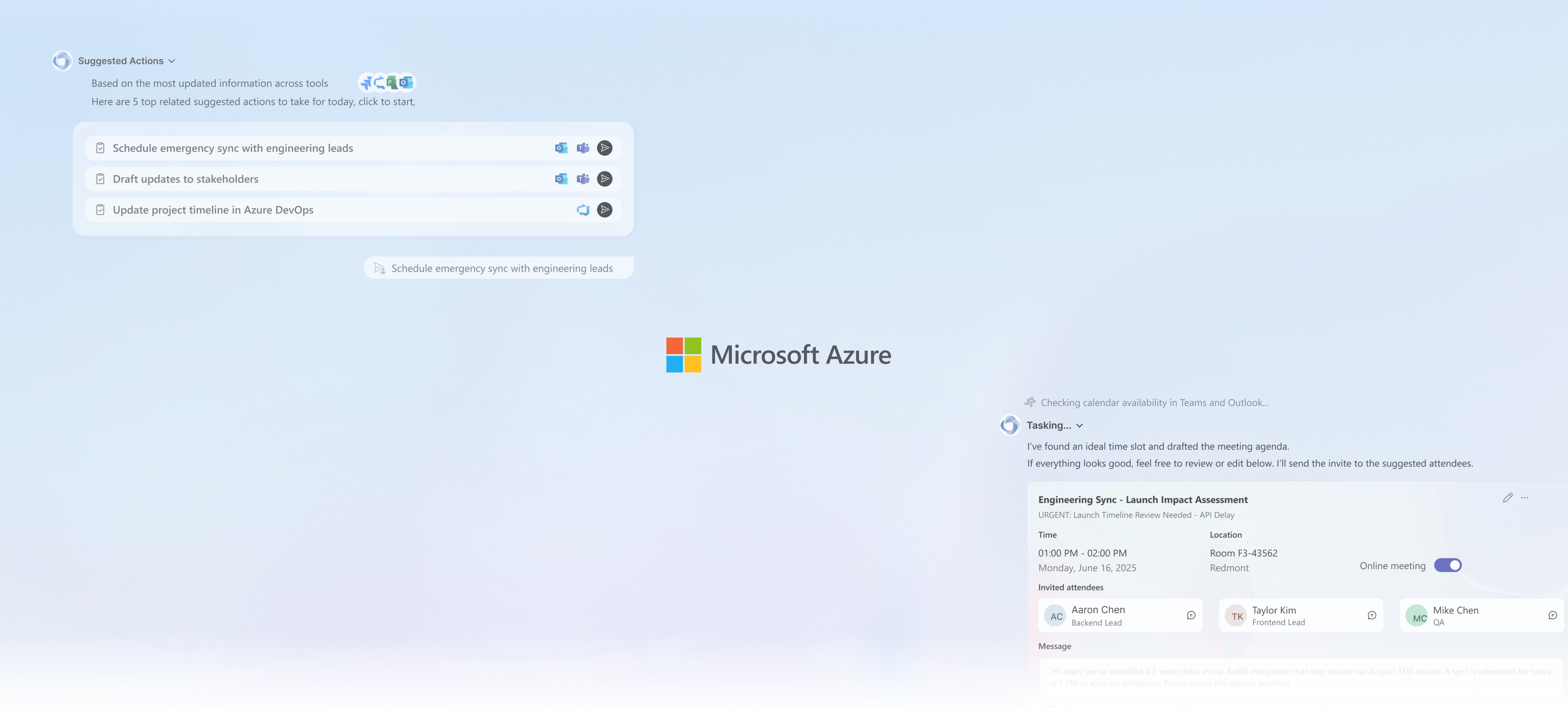
An AI-powered agent that helps Product Managers focus on high-level strategy by orchestrating workflows across tools and teams, in collaboration with Microsoft Azure AI.
overview
Today’s product managers spend significant time switching between tools, repeating updates for different audiences, and coordinating work across teams. These fragmented workflows often lead to delays and misalignment. To address this, I designed an AI-supported companion specific for PMs within the Microsoft 365 ecosystem. It connects information across tools, surfaces what needs attention, and prepares next steps in a clear and timely way, reducing manual effort while keeping PMs in control. Through generative research with PMs and multiple rounds of usability testing, the project explores a practical approach to human–AI collaboration that focuses on clarity, trust, and supporting everyday decision-making.
TIME
Jan. 2025 - Present
Type
Corporate Sponsor
Microsoft Azure AI
Team
1 Product Manager
2 Product Designer
1 Engineer
1 Principal PM, Microsoft Azure AI
1 Design Lead, Microsoft
mY Focus
Agent Design, Human–AI Interaction, Product Management, Enterprise UX, User Research & Experience Design, Product Strategy, System Thinking
mY Role
Transformed 4 key research findings into product through research, ideation and interviews with 15+ PMs.
Transformed 4 key research findings into product through research, ideation and interviews with 15+ PMs.
Defined the product roadmap based around workflow orchestration, cross-team visibility, and stakeholder alignment.
Defined the product roadmap based around workflow orchestration, cross-team visibility, and stakeholder alignment.
Design agentic system based on the 10 design principles we created to keep the system transparent and easy to understand.
Design agentic system based on the 10 design principles to keep the system transparent and easy to understand.
Validated the agent model through three rounds of testing, reaching 100% adoption intent and a 25% faster task-completion time.
Redefining PM Workflows with Microsoft Azure AI
An AI-powered agent that helps Product Managers focus on high-level strategy by orchestrating workflows across tools and teams, in collaboration with Microsoft Azure AI.
overview
Today’s product managers spend significant time switching between tools, repeating updates for different audiences, and coordinating work across teams. These fragmented workflows often lead to delays and misalignment. To address this, I designed an AI-supported companion specific for PMs within the Microsoft 365 ecosystem. It connects information across tools, surfaces what needs attention, and prepares next steps in a clear and timely way, reducing manual effort while keeping PMs in control. Through generative research with PMs and multiple rounds of usability testing, the project explores a practical approach to human–AI collaboration that focuses on clarity, trust, and supporting everyday decision-making.
TIME
Jan. 2025 - Present
Type
Corporate Sponsor
Microsoft Azure AI
Team
1 Product Manager
2 Product Designer
1 Engineer
1 Principal PM, Microsoft Azure AI
1 Design Lead, Microsoft
mY Focus
Agent Design, Human–AI Interaction, Product Management, Enterprise UX, User Research & Experience Design, Product Strategy, System Thinking
mY Role
Transformed 4 key research findings into product through research, ideation and interviews with 15+ PMs.
Defined the product roadmap based around workflow orchestration, cross-team visibility, and stakeholder alignment.
Design agentic system based on the 10 design principles we created to keep the system transparent and easy to understand.
Validated the agent model through three rounds of testing, reaching 100% adoption intent and a 25% faster task-completion time.